


Target WCAG 2.1 or 2.2 Level AA on every customer-facing page, starting with the pages people actually use to order and book. That means replacing PDF menus with real HTML text, making the reservation widget usable by keyboard, writing alt text for food photos, and checking that your color contrast doesn't fail on a phone screen in daylight. Do this now, not after a demand letter arrives.
Here's the short list to hand to whoever manages your site today:
- Convert every PDF menu to accessible HTML text
- Test the ordering flow using only a keyboard, no mouse
- Add alt text to dish photos and hero images
- Check contrast ratios on buttons, prices, and specials
- Run an automated scan this week, book a manual audit this month
Pro Tip: *Automated scanners like axe DevTools or WAVE catch maybe a quarter of real accessibility issues. Treat a clean scan as a starting point, not a finish line.*
Key Takeaways
Fixing menu PDFs, keyboard navigation, and form labels first eliminates the majority of both legal exposure and lost orders for a restaurant website.
| Point | Details |
|---|---|
| Target WCAG 2.1/2.2 AA | Apply this standard to every customer-facing page, starting with menu, ordering, and reservations. |
| Convert PDF menus first | Menu PDFs are the most common trigger in restaurant ADA complaints; replace with HTML text. |
| Scans alone aren't enough | Automated tools like axe and WAVE catch only a portion of issues; pair with manual and screen reader testing. |
| Vendors share responsibility | Request a VPAT from ordering and reservation vendors before renewing a contract. |
| Document everything | Keep audit reports, remediation dates, and a public accessibility statement for legal protection. |
| RESTOBOT builds it in | RESTOBOT launches restaurant sites with HTML menus and integrated ordering and reservations from day one. |
Table of Contents
- Why Restaurant Website Accessibility Starts With These Pages
- How To Audit A Restaurant Website Without Guessing
- The Fix-It-First Checklist For Restaurant Sites
- What You Owe When You Use Third-Party Ordering Or Booking Tools
- Proving You Fixed It: Documentation That Actually Helps
- Building Accessible Restaurant Sites With RESTOBOT
- Why User Testing Beats Assumptions Every Time
- Getting Your Staff To Actually Maintain An Accessible Site
- What Inaccessible Restaurant Websites Are Actually Risking
- Barriers That Show Up Again And Again On Restaurant Sites
- Fix The Big Three First, Then Build The Habit
- Get An Accessible Restaurant Site Live Without Hiring A Developer
- Sources
- FAQ
Why Restaurant Website Accessibility Starts With These Pages
Not every page on your site carries the same legal or financial risk. Four page types account for almost every complaint and most of the lost revenue when a customer with a disability gives up and orders somewhere else.
- Menu pages. A PDF menu is the single most common trigger in ADA web complaints against restaurants, because screen readers often can't parse it and it doesn't reflow on mobile. Convert it to HTML text as your first move.
- Online ordering and checkout. Keyboard traps in date pickers, unlabeled quantity fields, and cart totals that only update visually (with no announcement for screen reader users) all block a completed order.
- Reservation widgets. Third-party booking calendars are notorious for date and time pickers that only respond to a mouse. Test these specifically with keyboard-only navigation, since they're built by outside vendors and often ignored during your own QA.
- Locations, hours, and contact info. Never bury your address, phone number, or hours inside a map graphic or image. That information needs to exist as real, readable text somewhere on the page, including for gift card and catering pages that often get forgotten in an audit.
How To Audit A Restaurant Website Without Guessing
Start with automated tools. Axe DevTools, WAVE, and Lighthouse will flag missing alt text, low contrast, and broken heading structure in minutes, and they're free or nearly free. But automated scans only catch a portion of real issues, so treat the scan as a first pass, not a verdict.
The real work is manual testing:
- Unplug your mouse and navigate the entire ordering flow using only Tab, Enter, and arrow keys
- Run a screen reader walkthrough with NVDA on Windows or VoiceOver on Mac and iPhone
- Test the reservation flow on an actual phone, not just a desktop browser
- Check that every form field (name, phone, party size) has a visible, programmatically linked label
Scope the audit around your actual site structure: homepage template, menu page type, ordering flow, reservation flow, and any PDFs still in use (gift cards, catering menus, wine lists). A useful audit ends with a specific issue list mapped to WCAG success criteria, a priority ranking, and a named owner for each fix, whether that's your web developer, your POS vendor, or an outside accessibility consultant.
Pro Tip: *Ask whoever runs your audit to test the exact same reservation and checkout flow a customer would use on launch day. A clean homepage scan means nothing if the booking calendar still fails.*
The Fix-It-First Checklist For Restaurant Sites
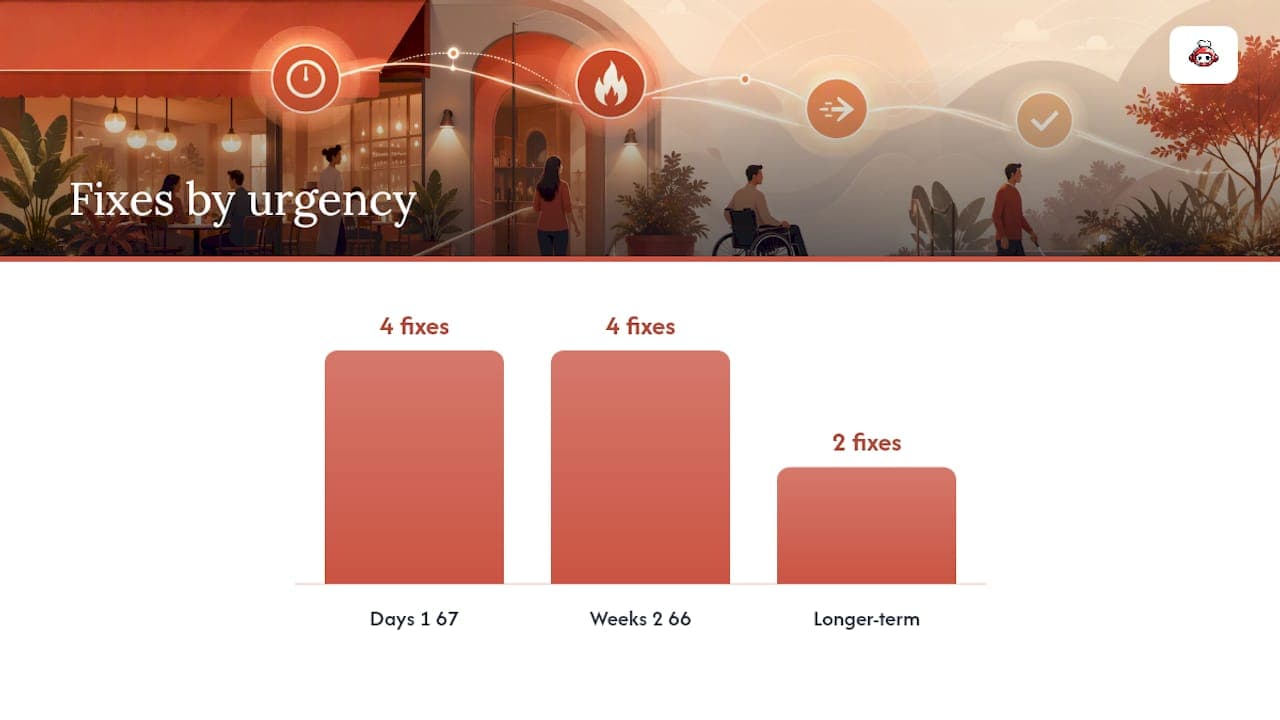
Not every accessibility issue deserves the same urgency. Some fixes take an afternoon and eliminate most of your legal exposure. Others take longer and matter less. Here's the order that actually reduces risk fastest.
Days 1 through 7:
- Replace PDF menus with HTML text, keeping a downloadable PDF only as a secondary option
- Add visible labels to every form field in ordering and reservations, not just placeholder text
- Put your address, phone number, and hours in real text on the contact and locations pages
- Add descriptive alt text to menu photos, hero banners, and any image carrying meaning
Weeks 2 through 6:
- Fix keyboard traps in the ordering flow, especially quantity selectors and payment fields
- Add visible focus indicators so keyboard users can see where they are on the page
- Correct color contrast on buttons, price text, and promotional banners
- Test and fix date and time pickers in your reservation widget for keyboard access
Longer-term:
- Tag any remaining PDFs (catering packets, wine lists) for accessibility as a secondary priority behind HTML conversion
- Add captions or text descriptions to any video content, like chef features or ambiance reels
Menu conversion alone addresses the most frequently cited issue in restaurant ADA complaints. This is why it sits at the top of every list here rather than buried in "longer-term."
Build editorial rules into your content workflow so new problems don't creep back in: every new dish photo gets alt text before it's published, every new page follows a logical heading order (one H1, then H2s in sequence, no skipping), and every page declares its language in the HTML so screen readers pronounce it correctly.
Pro Tip: *Put alt text writing in your menu update checklist, right next to price changes. If it's not part of the routine, it gets skipped the first busy week.*
What You Owe When You Use Third-Party Ordering Or Booking Tools
You're responsible for accessibility on your domain, even when the ordering widget or reservation calendar was built by someone else. Courts and regulators don't distinguish between "our code" and "embedded vendor code" when a customer can't complete an order.
Before you sign or renew with any ordering, reservation, or delivery vendor, ask directly:
- Do you have a current VPAT (Voluntary Product Accessibility Template) or conformance report for WCAG 2.1 AA?
- What's your remediation timeline when an accessibility bug is reported?
- Can we test the widget with a screen reader before launch, not after?
If a vendor can't answer, build a fallback: a visible phone number and email address next to the widget so a customer who hits a barrier has another way to order or book. Put accessibility commitments and a testing cadence into the contract itself, not just a verbal promise.
Proving You Fixed It: Documentation That Actually Helps
Fixing an issue and being able to prove you fixed it are two different things, and only one of them holds up if a demand letter shows up.
Have your auditor re-test every issue after remediation and produce a validation report that maps each fix back to the specific WCAG success criterion it resolves. Keep a running log of vendor correspondence, VPATs received, and remediation dates. That paper trail is what separates a restaurant that took accessibility seriously from one that ignored a warning.
Your public accessibility statement should name the standard you're targeting (WCAG 2.1 or 2.2 Level AA), describe your testing methods (automated plus manual), disclose any known exceptions honestly, and give a working contact method for someone who hits a barrier. Vague statements that promise perfection help no one, including you in a dispute, since they set an impossible bar you can't actually meet.
Building Accessible Restaurant Sites With RESTOBOT
RESTOBOT builds restaurant sites with a menu that lives in HTML from the start, not as a PDF bolted on afterward, so the highest-risk item on every remediation checklist is handled before you even launch. The website builder generates a live site automatically once your application is confirmed, using templates built around clear headings and visible labels rather than heavy animation that confuses screen readers and keyboard users alike.
To configure a RESTOBOT site for accessibility:
- Keep the HTML menu as your primary version; skip uploading a PDF as the only option
- Use the built-in reservation system instead of a separate embedded widget, so you control one accessible flow rather than auditing two
- Test the ordering and reservation flow with a keyboard before you announce the launch
- Pair the instant build with a one-time developer audit to catch anything template defaults don't cover
Intuitive, uncluttered navigation isn't a design preference. If a customer can't figure out where to click, they abandon the order, and that's true whether the barrier is confusing design or a genuine accessibility failure.
Why User Testing Beats Assumptions Every Time
An automated scan tells you a form field is missing a label. It won't tell you that a screen reader user gave up halfway through your checkout because the cart total update wasn't announced, or that someone using voice control couldn't find the "confirm reservation" button because it was labeled with an icon and no text. Testing ordering and reservation flows with actual screen readers and keyboard navigation uncovers exactly this kind of dynamic, real-time problem that a static scan simply can't see.
The most useful feedback comes from people who use assistive technology daily, not from a developer clicking through with a screen reader turned on for the first time. If you don't have the budget for formal usability research, start smaller: ask a local disability advocacy organization if they'll do a paid walkthrough of your ordering flow, or recruit a handful of testers through an accessibility consultant who already has that network.
Treat their feedback the way you'd treat a failed table turn: as a signal something in the process needs fixing, not as a one-off complaint to note and forget. Log every issue they surface with the same rigor as an automated scan finding, map it to the WCAG success criterion it violates, and assign it an owner and a deadline.
Restaurants that build this into a regular cadence, once or twice a year, tend to catch dynamic issues (focus management after a modal opens, cart updates, error messages that don't get announced) long before those issues turn into a complaint. Static audits alone miss this category almost entirely.
Getting Your Staff To Actually Maintain An Accessible Site
The best-built accessible website degrades fast if the person updating the menu doesn't know why alt text matters or skips a heading level because it "looked fine." Accessibility isn't a one-time project you finish and file away. It's a maintenance habit, and habits need training.
Whoever touches your website, whether that's a manager updating daily specials or a marketing hire adding a new promotional banner, needs a short, practical walkthrough covering three things: why alt text goes on every image before publishing, why headings need to follow a logical order (no skipping from H1 straight to H4 because it looks better visually), and why PDFs shouldn't quietly replace an HTML menu update.
This doesn't require a certification course. A 30 minute session covering your specific content management system, paired with a one-page checklist taped next to the desk where updates happen, prevents most of the backsliding that turns a compliant site back into a liability six months later.
Make accessibility part of onboarding for anyone new who'll touch the site, not an afterthought mentioned once and forgotten. And revisit the checklist whenever you add a new type of content, like a video menu walkthrough or an online gift card store, since new formats bring new accessibility questions your original training didn't cover.
What Inaccessible Restaurant Websites Are Actually Risking
The Department of Justice has made clear that businesses open to the public need accessible websites, and it points to WCAG as the technical benchmark for getting there. Restaurants, specifically, show up disproportionately in web accessibility complaints and lawsuits compared to other small business categories, largely because menu PDFs and ordering flows are such common, easily-flagged failures.
A typical case starts with a demand letter, not a courtroom. A visitor who couldn't complete an order or find your hours sends a letter through an attorney citing ADA Title III, and most restaurants settle rather than litigate, since the cost of a legal defense usually dwarfs the cost of fixing the site. That settlement often comes with a legally binding remediation timeline attached, meaning you end up doing the accessibility work anyway, just under a deadline and with legal fees on top.
The financial risk isn't hypothetical, but the more overlooked cost is the customer you lose quietly. Disability affects a significant share of the population, and every one of those potential customers who hits a barrier on your ordering page just orders from the restaurant down the street instead. No lawsuit, no letter, just a lost sale you never see reflected in any report.
Barriers That Show Up Again And Again On Restaurant Sites
Certain accessibility failures show up on restaurant websites far more often than on other types of small business sites, mostly because of how restaurants tend to build and update their pages.
PDF menus top the list, for reasons already covered, but a few others deserve specific attention. Reservation widgets embedded from third-party booking vendors frequently break keyboard navigation on the date picker, since many were designed for mouse and touch only. Food photography galleries often ship with zero alt text, meaning a screen reader just announces "image" repeatedly through an entire menu scroll. Specials and promotions added quickly by staff, often as an image with text baked in rather than real text, become invisible to anyone using a screen reader. And color choices meant to evoke a mood (dark backgrounds, low-contrast script fonts for a menu section title) frequently fail contrast requirements that a sighted customer with low vision or color blindness depends on.
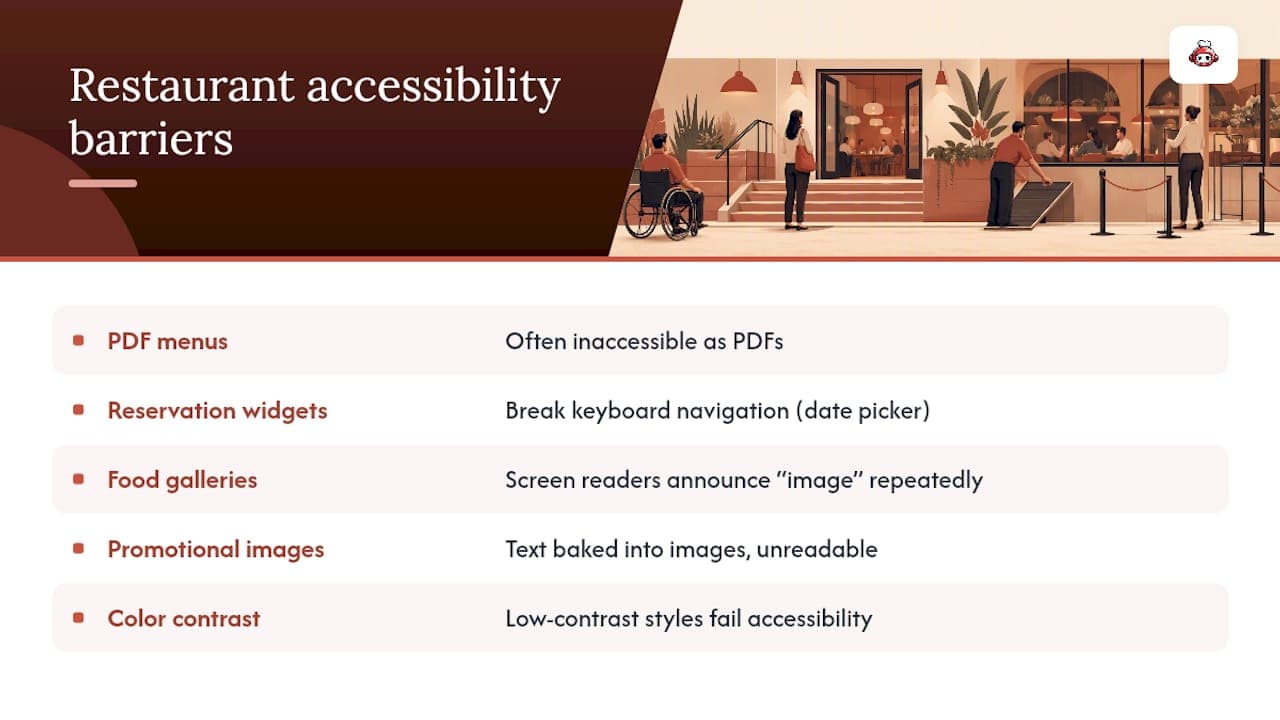
Each of these barriers traces back to the same root cause: content added fast, under pressure, without a repeatable process behind it. Fixing the underlying workflow prevents the barrier from reappearing every time someone updates the specials board.
Fix The Big Three First, Then Build The Habit
Most accessibility advice treats every WCAG success criterion as equally urgent, and that's where owners get stuck. It isn't equally urgent. If you fix nothing else this quarter, fix the menu PDF, the keyboard trap in your ordering flow, and the labels on your reservation form. Those three changes eliminate the majority of both your legal exposure and your lost orders, and none of them require a full site rebuild.
The conventional advice to "run a full WCAG audit" before doing anything is where most restaurants stall out. A comprehensive audit is valuable, but waiting for one before fixing an obvious PDF menu problem means months pass while risk sits exposed. Fix what you already know is broken, then audit for what you don't.
The other overlooked piece is vendor accountability. Restaurant owners spend real time auditing their own pages while giving embedded reservation and ordering widgets a free pass, even though those third-party tools are frequently the least accessible part of the site. Ask for a VPAT before you renew, not after a complaint arrives naming your booking vendor's calendar as the failure point.
Get An Accessible Restaurant Site Live Without Hiring A Developer
You've read the checklist: HTML menus, keyboard-friendly ordering, labeled forms, real contact text. Building all of that from scratch with a generic website builder or a freelance developer usually means weeks of back-and-forth and a bill for every revision. RESTOBOT skips that step entirely. Submit an application, get confirmed, and your site with a built-in HTML menu, ordering, and reservations goes live automatically, on the same day, with the accessibility-friendly structure already in place rather than something you bolt on later.
From there, pair the RESTOBOT website builder with a one-time manual audit to close any remaining gaps and get your accessibility statement written. If you're also managing customer data and repeat visits, the CRM and analytics dashboard gives you one place to track engagement without adding a second, potentially inaccessible tool to your stack. Start your application today and have a working, accessible foundation before your next menu update goes out.
Sources
FAQ
What Are The ADA Rules For Restaurant Websites?
The Department of Justice states that businesses open to the public, including restaurants, must make their websites accessible, and points to WCAG as the technical benchmark most businesses use to demonstrate compliance.
Is WCAG Legally Required?
WCAG itself isn't a law, but it's the technical standard regulators and courts point to when evaluating whether a website meets ADA accessibility obligations, so targeting WCAG 2.1 or 2.2 Level AA is the practical way to reduce legal risk.
Do Websites Legally Have To Be Accessible?
Businesses open to the public generally must ensure their websites are accessible under ADA Title III, and restaurants specifically face frequent complaints tied to PDF menus and inaccessible ordering flows.
What Is The 30/30/30 Rule For Restaurants?
That figure typically refers to food cost, labor cost, and overhead each targeting roughly 30% of revenue in restaurant financial planning, not a web accessibility standard; it isn't part of ADA or WCAG guidance.
Can RESTOBOT Help Make My Restaurant Site Accessible?
RESTOBOT builds restaurant sites with HTML menus and integrated ordering and reservations from launch, which addresses the two highest-risk areas restaurants face, though a manual audit is still recommended to confirm full WCAG conformance.