


Fix your Google Business Profile and turn your PDF menu into real HTML text — those two moves alone unlock most of the local visibility restaurants are missing. Everything else in restaurant website SEO is optimization around the edges. If your restaurant doesn't show up when someone searches "best tacos near me" or "[your neighborhood] Italian restaurant," the problem is almost always one of these two things, not some mysterious algorithm penalty.
Here's the quick-win checklist for this week:
- Claim and fully verify your Google Business Profile, then fill in every field, not just the required ones.
- Replace any PDF or image-based menu with a real HTML menu page Google can actually read.
- Check your title tags that follow a "Cuisine + Neighborhood/City" pattern instead of just your restaurant name.
- Open yourdomain.com/robots.txt and confirm there's no stray "Disallow: /" left over from a staging site.
- Request five to ten fresh Google reviews from regulars this week using a table card or receipt QR code.
- Confirm your name, address, and phone number match exactly across your website, GBP, and top directories.
Restaurant searches are overwhelmingly local and overwhelmingly mobile, which is part of why Statista's global data on mobile internet use matters more to a restaurant than almost any other business type: people search "near me" while they're already hungry and already near their phone. Google's own guidance confirms local rankings run on relevance, distance, and prominence, and that a complete, accurate Business Profile improves local ranking more reliably than almost anything else you could do to your website this month.
Expect early movement within two weeks on your Business Profile insights (more views, more direction requests), and expect the bigger jump in local pack rankings within 60 to 90 days once citations, on-page fixes, and reviews catch up.
Key Takeaways
A complete Google Business Profile paired with a readable HTML menu drives most of a restaurant's local search visibility, and consistent execution over 90 days compounds that advantage steadily.
| Point | Details |
|---|---|
| This week | Verify GBP, fix robots.txt, launch review QR codes on receipts and tables. |
| This month | Rebuild your menu as HTML, fix title tags, and implement core schema markup. |
| Next quarter | Publish local content, pursue two outreach links, and review your first rank data. |
| Top metrics to watch | GBP actions, local pack rank for priority terms, and review velocity. |
| Ongoing habit | Weekly GBP care and a consistent review response system drive lasting rank stability. |
| Platform support | RESTOBOT combines HTML menu publishing, review automation, and GBP-synced reservations in one zero-commission platform. |
Table of Contents
- Restaurant Website SEO for Menu, Location, and Reservation Pages
- Website Speed, Mobile Performance, and Crawlability
- Google Business Profile: The Restaurant Owner's Non-Negotiable Checklist
- Reviews and Reputation: Building Prominence That Compounds
- Schema Markup Restaurants Need for Google and AI Assistants
- Local Citations and NAP Consistency Across Directories
- Direct Ordering and Reservations: The SEO and Revenue Case
- Local Content and Link-Building That Actually Works for Restaurants
- Tracking Progress: KPIs, Tools, and Realistic Timelines
- The 90-Day Restaurant SEO Playbook, Week by Week
- Why Direct Ordering and Zero Commission Change Your SEO Math
- What Actually Slows Restaurant Owners Down (and What Doesn't Matter as Much)
- Getting the Playbook Live Without Adding to Your Workload
- Sources
Restaurant Website SEO for Menu, Location, and Reservation Pages
Restaurant website SEO lives or dies on four pages: your homepage, your menu, your location/contact page, and your reservations page. Get those four right and the rest of the site is secondary. Get them wrong and no amount of blogging will save you.
Every one of those four pages needs the same bones. An H1 that states what you are and where ("Wood-Fired Pizza in Riverside Heights," not just your restaurant's name). A tappable phone number formatted for mobile taps. An embedded Google Map, not just a text address. And schema markup pointing search engines to your hours, menu, and location data, which we'll cover in more detail later.
Your menu page is the highest-leverage fix on the site
Tableview's research on local SEO ROI keeps coming back to one point: a small number of pages move the needle, and the menu page is the biggest one most restaurants get wrong. If your menu is a PDF or a scanned image, Google can't read a word of it. That means no dish names ranking, no "gluten-free options near me" matches, and no chance of showing up in an AI assistant's restaurant recommendations, since AI tools increasingly pull from structured data and readable menus rather than from image files.

Build your menu as an actual HTML page with each dish as real text. Add short, honest descriptions, not just names ("Wild mushroom risotto, aged parmesan, truffle oil" beats "Risotto"). Tag allergens clearly, both for compliance and because "vegan options [city]" is a real search pattern. If you run separate lunch, dinner, and brunch menus, give each one its own URL rather than burying them all on one page.
Title tags and meta descriptions need the same specificity. Compare these two approaches:
Before: "Home — Marco's Restaurant" After: "Marco's — Authentic Neapolitan Pizza in Downtown Asheville"
Before: "Menu — Marco's" After: "Marco's Menu: Wood-Fired Pizza, Pasta & Wine in Downtown Asheville"
Keyword patterns for restaurants tend to follow two shapes: Dish + City ("best ramen in Tucson") and Occasion + City ("anniversary dinner Tucson"). Weave both patterns naturally into headers, menu descriptions, and location page copy instead of stuffing them into one paragraph.
Internal linking matters more here than most owners assume. Link your homepage to your menu, your menu to your reservations page, and your location page back to your homepage using descriptive anchor text like "view our downtown menu" instead of "click here." That interlinking reinforces to Google which pages represent your core local identity.
- Use one H1 per page, and make it describe the page's specific purpose, not just repeat your brand name.
- Give every major menu (lunch, dinner, catering) its own URL instead of stacking them under one page.
- Write meta descriptions under 160 characters that mention cuisine, neighborhood, and one differentiator.
- Add a dedicated FAQ block on your location page answering parking, dress code, and reservation questions.
Pro Tip: *Name your image files descriptively before uploading them, "grilled-salmon-dinner-asheville.jpg" instead of "IMG_4021.jpg," and add alt text describing the dish and setting. It costs nothing, takes thirty seconds per photo, and gives Google another signal tying your imagery to local search terms.*
Website Speed, Mobile Performance, and Crawlability
A restaurant site that takes six seconds to load on a phone is losing customers before they ever see the menu, and Google penalizes that slowness in rankings too. Technical SEO isn't glamorous, but it's the layer that determines whether any of your on-page work even gets indexed.
Google measures page experience through Core Web Vitals: Largest Contentful Paint (LCP), Interaction to Next Paint (INP), and Cumulative Layout Shift (CLS). For a restaurant site, the fixes that move these numbers most are usually the same three things: compress your images (a single uncompressed hero photo of your dining room can be the entire reason your homepage loads slowly), serve assets through a content delivery network, and strip out JavaScript plugins you installed once and forgot about.
Before any of that, though, check the plumbing. Three small files control whether Google can even find your pages: robots.txt, sitemap.xml, and your canonical tags. Muntin Digital's technical audit work flags one mistake constantly: a leftover "Disallow: /" in robots.txt from when a developer built the site on a staging URL and forgot to remove the block when it went live. That single line tells every search engine to ignore your entire website. It's invisible to a diner, but fatal for search visibility.
Checking for it takes thirty seconds. Type yourdomain.com/robots.txt into your browser. If you see "Disallow: /" sitting under "User-agent: *" with nothing scoped to a specific folder, your site is telling Google to skip it entirely, a problem Screaming Frog's robots.txt documentation walks through in more depth if you want to verify the fix yourself.
Here's where the key thresholds sit and what fixes them:
| Metric | Target | Most common fix |
|---|---|---|
| Largest Contentful Paint | Under 3 seconds | Compress hero images, use a CDN, lazy-load below-fold content |
| Interaction to Next Paint | Very low delay | Remove unused JavaScript, defer non-critical scripts |
| Cumulative Layout Shift | Low layout shift | Set explicit width and height on images, reserve ad/widget space |
| Mobile viewport | Present and correct | Add `<meta name="viewport" content="width=device-width, initial-scale=1">` |
| robots.txt | No blanket Disallow | Remove staging block, allow all except admin/cart paths |
Three free tools cover almost everything you need. Google's PageSpeed Insights shows your Core Web Vitals scores and flags specific fixes ranked by impact. Search Console tells you which pages are indexed, which are blocked, and whether Google has flagged mobile usability issues. Lighthouse, built into Chrome's developer tools, gives you a deeper technical audit if you want to hand something concrete to a developer.
- Confirm your sitemap.xml lists every live page and excludes anything you've removed.
- Check that canonical tags point to the correct version of each page, especially if you run both www and non-www URLs.
- Test your site on an actual phone, not just your desktop browser's mobile preview.
- Verify your reservation and ordering widgets don't block page rendering while they load.
Pro Tip: *Third-party reservation widgets and heavy analytics scripts are frequent speed killers because they load render-blocking JavaScript before your page even paints. Ask your reservation vendor if they offer an async loading option, and audit your analytics tags at least once a year, since most sites accumulate tracking scripts nobody remembers installing.*
Google Business Profile: The Restaurant Owner's Non-Negotiable Checklist
Google Business Profile for restaurants is the single highest-leverage local SEO asset you control, and it's also the one most owners half-finish and abandon. Claiming your listing takes ten minutes. Optimizing it properly takes an afternoon, and it's worth every one of those minutes.
Start with verification if you haven't done it, since an unverified listing barely factors into local rankings at all. Once verified, your name, address, and phone number need to match your website exactly, down to abbreviations ("St." versus "Street"). Choose your primary category with real precision: "Italian Restaurant" beats "Restaurant," and "Neapolitan Pizza Restaurant" beats "Italian Restaurant" if that's genuinely your specialty. Category precision on GBP frequently outperforms on-site keyword work for cuisine-specific searches, because Google leans on that field heavily when matching "near me" queries to specific cuisines.
Add secondary categories that genuinely apply (Bar, Caterer, Delivery Restaurant) but resist the urge to pile on categories that don't reflect what you actually serve. Fill in every attribute Google offers: outdoor seating, wheelchair accessibility, dine-in, takeout, delivery. Set complete hours including holiday hours, and update them proactively rather than reactively when you close early.
Photos matter more than most owners expect. Restaurants with active photo uploads consistently see higher click-through rates from the Map Pack, since food photos are often the deciding factor between two nearby options with similar ratings. Aim for at least one new photo a week: dishes, the dining room, the bar, staff at work. Use Google Posts for weekly specials, events, or seasonal menu changes, since those posts show up directly in your profile and give searchers a reason to click through now instead of later.
- Verify ownership and confirm your NAP data matches your website character for character.
- Choose the most specific primary category available, then add relevant secondary categories.
- Upload at least four new photos monthly and post weekly updates through Google Posts.
- Link your menu URL directly in the profile so it points to your HTML menu, not a PDF.
- Set complete hours, including holiday and special-event hours, and update them the moment they change.
Google's own local ranking factors break down into three buckets: relevance, distance, and prominence. Your category and description choices drive relevance. Distance is largely outside your control. Prominence, though, responds directly to your review count, review quality, citation consistency, and profile completeness, which is exactly why the GBP checklist above carries so much weight.
Pro Tip: *Keep one shared document (even a simple spreadsheet) listing your hours, holiday closures, and any temporary changes, then update your website, GBP, and any delivery platforms from that single source. Mismatched holiday hours across three platforms is one of the most common trust signals that quietly hurts both rankings and customer experience.*
Reviews and Reputation: Building Prominence That Compounds
Review recency and velocity often matter more to your local ranking than your raw star average. A restaurant with a 4.3 average and steady new reviews every week frequently outranks one sitting on a 4.8 average built entirely from reviews two years old, because Google reads consistent recent activity as a signal that the business is active and trustworthy right now.
Building a repeatable review system beats chasing one-off review pushes. Here's a workflow that works without eating into a manager's whole week:
- Print a small QR code on receipts or table tents that links directly to your Google review page.
- Train front-of-house staff to mention the QR code naturally at the end of a good interaction, not as a scripted pitch.
- Send a follow-up text or email 24 hours after a reservation or online order, asking for feedback with a direct review link.
- Respond to every new review, positive or negative, within 24 to 48 hours.
- Flag any review referencing a real operational issue (wait times, an order mistake) to management the same day, before responding publicly.
Response templates make step four faster without sounding robotic. For a positive review: thank the guest by name if given, reference something specific they mentioned, and invite them back. For a negative review: acknowledge the specific complaint, avoid defensiveness, offer a concrete next step (a direct phone number or email to resolve it), and keep the tone calm even when the review isn't fair. Managers who improvise these on the spot tend to either over-apologize or get defensive, so having two or three template drafts ready cuts that risk out entirely.
- Place QR codes on receipts, table tents, and takeout bags, not just the front counter.
- Automate the request timing where possible, since manual follow-up gets skipped during busy shifts.
- Track response time as a real metric, not an afterthought, and hold staff to the 24 to 48 hour window.
- Reserve time weekly to read every new review, not just skim the star rating.
A tool like RESTOBOT's automated Google review collection can handle the timing and delivery of review requests automatically after a guest orders or reserves, which removes the dependency on a manager remembering to send anything manually. For templates and a fuller walkthrough of building review volume, RESTOBOT's guide on generating consistent Google reviews covers the request cadence in more depth.
Pro Tip: *Watch your GBP insights for a jump in "requested directions" or "call" actions in the two weeks after you start a review push. A rise in review volume that isn't paired with more profile actions usually means the reviews are landing but your profile itself still needs work elsewhere, like photos or category precision.*
Schema Markup Restaurants Need for Google and AI Assistants
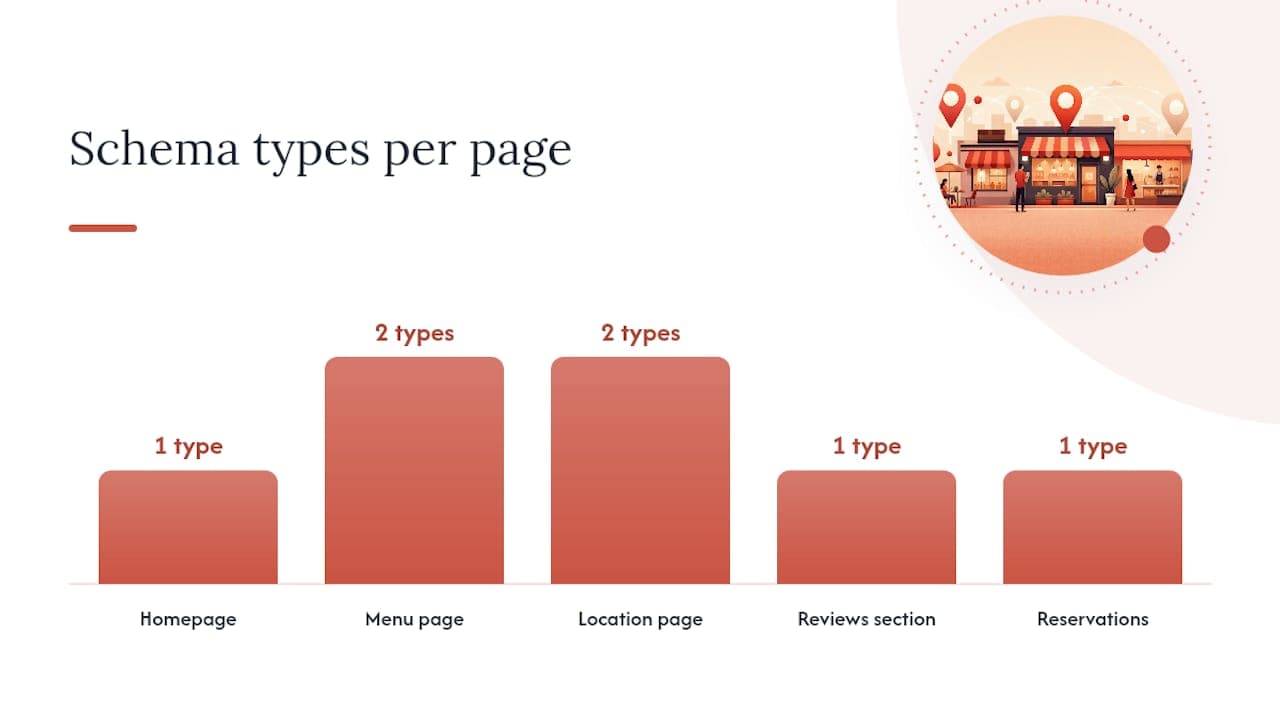
Structured data tells Google and AI assistants exactly what's on your page instead of making them guess from surrounding text, and most restaurant sites still skip it entirely. The minimum stack you need covers five schema types: Restaurant or LocalBusiness, Menu, MenuItem, AggregateRating, and FAQPage, with Reservation or OrderAction schema added wherever those actions exist on the page.
Your homepage should carry Restaurant/LocalBusiness schema with your name, address, phone, hours, cuisine type, and price range. Your menu page needs Menu and MenuItem markup listing each dish with its name, description, and price, since structured menu data remains a genuinely underused advantage precisely because so many competitors are still serving menus as flat PDFs with no markup at all. Your location page benefits from FAQPage schema answering common questions like parking availability or whether you take walk-ins. Reservation pages should carry Reservation schema, and order pages should carry OrderAction schema where your platform supports it.
Here's the checklist broken down by page:
| Page | Schema type | Key properties to include |
|---|---|---|
| Homepage | Restaurant/LocalBusiness | Name, address, phone, hours, cuisine, price range |
| Menu page | Menu, MenuItem | Dish name, description, price, allergen info |
| Location page | LocalBusiness, FAQPage | Address, map coordinates, common questions |
| Reviews section | AggregateRating | Rating value, review count (only for genuine site reviews) |
| Reservations | Reservation | Accepted party sizes, available times, booking URL |
One rule matters more than any other here: never mark up third-party reviews, the ones sitting on Google or TripAdvisor, as if they were on-site reviews using AggregateRating. That schema is meant only for reviews genuinely collected and displayed on your own website. Misusing it to reflect external review scores violates Google's structured data guidelines and risks a manual action against your site.
Test everything before you publish it. Google's Rich Results Test shows exactly how your markup will be interpreted and flags errors before they cost you anything. Search Console's Enhancements report tracks which structured data types Google has detected across your site over time and surfaces new errors as they appear. A typical validation workflow: write the JSON-LD, test it in the Rich Results Test, fix any flagged errors, publish, then check back in Search Console a week later to confirm Google picked it up cleanly.
- Add Restaurant/LocalBusiness schema to your homepage with complete hours and contact details.
- Mark up every dish on your menu page with MenuItem schema, not just a handful of highlights.
- Use AggregateRating only for reviews genuinely hosted on your own site.
- Validate every schema type in the Rich Results Test before publishing.
Local Citations and NAP Consistency Across Directories
Inconsistent business listings quietly undermine every other SEO effort you make, because Google cross-references your name, address, and phone number across the web to judge whether your business is legitimate and where it's actually located. When your address reads "123 Main St" on your website but "123 Main Street" on Yelp and an old address entirely on a directory you forgot existed, that mismatch dilutes the authority each citation should be building.
Fix them in priority order. Google Business Profile comes first, since it's the most visible and most weighted. After that, primary aggregators like data providers that feed dozens of smaller directories automatically. Then major consumer directories relevant to restaurants specifically, review platforms, delivery marketplaces, and local business directories. Finally, niche and local sources: your city's tourism board, local press mentions, chamber of commerce listings, and neighborhood association sites.
A quick audit doesn't require expensive software. Search your restaurant's name plus city in Google and manually check the first two pages of results for outdated addresses or old phone numbers. Search your exact address to catch listings that might not include your business name prominently. For a faster audit across dozens of directories at once, several citation-tracking tools can scan and flag inconsistencies automatically, which is worth it once your listing count grows beyond what you can check by hand in an afternoon.
- Search "[your restaurant name] [your city]" and audit the first two pages of results for NAP mismatches.
- Check every major review platform (Google, Yelp, TripAdvisor) for outdated hours or addresses.
- Verify delivery marketplace listings match your website's current hours and menu.
- Update your city's tourism or chamber of commerce listing if you have one.
- Set a recurring quarterly reminder to recheck all of the above, since listings drift over time even after you fix them.
The single item to verify first, above everything else on this list: your phone number. It's the field most likely to be wrong after a renovation, a new location, or a change in ownership, and it's the field that costs you a customer instantly when someone calls a disconnected number instead of finding you online.
Automated citation tools make sense once you're managing more than one location or you've discovered a dozen mismatches in your manual audit. For a single restaurant with a clean listing history, a quarterly manual check is usually enough to keep things tidy without paying for software you'll barely touch.
Direct Ordering and Reservations: The SEO and Revenue Case
Every order that goes through your own website instead of a third-party marketplace keeps your customer data, your margin, and your search visibility in your own hands. That's not just a revenue argument, it's an SEO one too: unique, well-built order and reservation pages give Google fresh content to index and give you full control over the page speed and schema markup that marketplace listing pages will never let you touch.
The revenue math is straightforward. Every order routed through a third-party delivery app gets a commission cut before you see a cent. Every order placed directly through your website or your own ordering channel keeps that margin with you, and it also puts the customer's contact information in your hands for future marketing instead of the marketplace's.
On the SEO side, order and reservation pages need the same technical care as your menu page. Give each one a unique URL rather than a generic "order now" popup that never gets its own indexable page. Add OrderAction or Reservation schema so Google and AI assistants can surface booking or ordering actions directly in search results. Prioritize page speed on these pages above almost anything else on your site, since a slow-loading checkout page is where hesitant customers abandon the process entirely. And if you run promotional tracking parameters in your URLs, set canonical tags pointing back to the clean version of the page so you're not creating duplicate content issues across a dozen URL variants.
Building this out well means checking a few boxes: payment processing that doesn't add friction, POS synchronization so orders flow straight into your kitchen system without manual re-entry, Reserve with Google setup so reservations can happen directly from a Google search result, and mobile checkout that doesn't require six taps to complete an order.
- Give your ordering and reservation pages unique, indexable URLs instead of hiding them behind a popup.
- Add Reservation or OrderAction schema so booking actions can surface directly in search.
- Sync your POS system so online orders land in your kitchen workflow without manual entry.
- Test your checkout flow on a phone specifically, since most restaurant orders happen there.
Pro Tip: *If you're weighing direct ordering against marketplace channels, don't treat it as either/or. Marketplaces bring discovery you can't easily replicate on your own, but every marketing dollar you spend driving someone to your own site instead of a marketplace listing compounds over time: you keep the data, avoid the commission, and build a page Google can actually rank.*
Local Content and Link-Building That Actually Works for Restaurants
Restaurant content doesn't need to be a blog you update daily. It needs a handful of pages and posts that genuinely serve local search intent and give other local sites a reason to link to you. Think neighborhood landing pages if you serve a wide delivery radius, seasonal specials announcements, dish spotlight posts, an accessibility information page, and a short FAQ addressing voice-search style questions like "does [restaurant] take reservations" or "is [restaurant] open on Sundays."
A realistic 90-day content cadence doesn't require a full-time content person. One neighborhood or seasonal landing page in month one. Two or three specials or event announcements per month after that. A dish-spotlight post every few weeks tied to whatever's actually changing on your menu. And one accessibility or practical-info page somewhere in the mix, since those pages quietly answer real search queries that competitors often ignore.
Link building for a restaurant looks nothing like link building for a software company, and that's a good thing, because it's far more achievable. Local press almost always wants a specific angle, not a generic pitch: a new seasonal menu, a chef's background story, a sustainability practice, or a community partnership. Neighborhood blogs and hyperlocal newsletters are often hungry for content and will link to a well-written guest post about your neighborhood's food scene. Local photographers who shoot at your restaurant will often link back to you from their portfolio if you ask. And ingredient suppliers or local farms you source from will sometimes list restaurant partners on their own sites, which is a citation and a link in one.
- Build one neighborhood or occasion-specific landing page per quarter if you serve a wide area.
- Publish a dish-spotlight post whenever you introduce a genuinely new item, not on a forced schedule.
- Reach out to one local food photographer or blogger per month rather than a mass outreach blast.
- Ask suppliers and partners if they list restaurant partners on their own site, and request a link if so.
- Identify two or three local press outlets or bloggers who've covered restaurants like yours before.
- Pitch a specific, timely angle (a new menu item, a local sourcing story) rather than "please write about us."
- Offer a photographer or blogger a complimentary meal in exchange for an honest write-up and a link, disclosed as such.
- Ask your produce or specialty suppliers whether they maintain a partner or client page, and request inclusion.
- Track which outreach actually converts to a link, and repeat the approach that worked, not the one that felt easiest.
Tracking Progress: KPIs, Tools, and Realistic Timelines
The metrics that actually predict whether your restaurant website SEO work is paying off aren't vanity numbers like total website visits. They're Google Business Profile views and actions (calls, direction requests, website clicks), your local pack ranking for two or three priority search terms, actual reservations or orders generated through your site, review velocity, and your Core Web Vitals scores.
Four tools cover nearly everything you need to track these, and none of them require a marketing budget beyond your time. Google Business Profile Insights, built directly into your profile dashboard, shows views, searches, and customer actions over time. Search Console shows organic clicks, impressions, and indexing status. PageSpeed Insights tracks your Core Web Vitals scores monthly so you catch regressions before they hurt rankings. And a local rank tracker like BrightLocal or Local Falcon shows exactly where you sit in the map pack for your priority search terms from different physical locations around your service area, which a simple personal search never accurately shows you.
Here's what to expect and when:
| Timeframe | What typically moves | What it signals |
|---|---|---|
| 2 to 4 weeks | GBP views, direction requests, review response engagement | Early signal your profile and review work are landing |
| 3 months | Local pack rankings for priority terms, organic click growth | Citation, on-page, and schema fixes are compounding |
| 6 to 12 months | Sustained top-three map pack rankings, steady organic order growth | Full playbook maturity and review velocity paying off |
A simple dashboard doesn't need to be complicated. A shared spreadsheet updated monthly with GBP views, review count, average rating, and your rank for two or three priority search terms gives an owner a clear before-and-after picture without any new software. A CRM and analytics dashboard built into your existing platform can pull order and reservation data automatically, which saves the manual entry step once you've got the basic spreadsheet habit established.
- Check GBP Insights weekly for the first month, then monthly once your baseline is established.
- Track your local pack position for two to three priority search terms, not dozens.
- Log review count and average rating monthly alongside your other metrics.
- Review Core Web Vitals scores quarterly, since site changes can quietly regress speed over time.
The 90-Day Restaurant SEO Playbook, Week by Week
A full local SEO overhaul feels overwhelming as one list, so break it into ownership: what the owner handles personally, what a manager can execute, and what needs a developer. Trying to do everything in week one guarantees burnout and half-finished tasks. Sequencing it by impact and effort gets the highest-value fixes done first.
Weeks 1 to 2 (Owner + Manager): Claim and fully verify Google Business Profile. Audit and fix NAP consistency across your website and top five directories. Check robots.txt for a staging block. Launch review request QR codes on receipts and table tents.
Weeks 3 to 4 (Manager + Developer): Rebuild your menu as an HTML page if it's currently a PDF. Rewrite title tags and meta descriptions using the Cuisine + City pattern. Add mobile viewport meta tags if missing. Run PageSpeed Insights and fix the top two flagged issues.
Weeks 5 to 6 (Developer): Implement Restaurant/LocalBusiness and MenuItem schema. Add FAQPage schema to your location page. Validate everything in the Rich Results Test and fix flagged errors.
Weeks 7 to 8 (Manager): Launch a consistent weekly Google Posts cadence. Establish the 24 to 48 hour review response habit across staff. Publish your first neighborhood or seasonal landing page.
Weeks 9 to 10 (Owner + Developer): Set up or optimize direct ordering and reservation pages with unique URLs and schema. Configure Reserve with Google if not already live. Sync POS integration if applicable.
Weeks 11 to 12 (Manager): Pitch two local outreach opportunities (press, blogger, or supplier link). Review your first 60 days of GBP Insights and rank tracking data. Adjust based on what's actually moving.
| Week range | Primary owner | Key tasks | Expected early signal |
|---|---|---|---|
| 1 to 2 | Owner + Manager | GBP verification, NAP audit, robots.txt check | GBP views begin rising |
| 3 to 4 | Manager + Developer | HTML menu, title tags, mobile fixes | Faster load times, cleaner indexing |
| 5 to 6 | Developer | Schema implementation and validation | Rich results eligibility confirmed |
| 7 to 8 | Manager | Google Posts, review habit, first landing page | Review velocity increases |
| 9 to 10 | Owner + Developer | Ordering/reservation pages, Reserve with Google | Direct order or booking volume starts |
| 11 to 12 | Manager | Outreach, data review, adjustments | First local pack rank movement |
- Assign one person as the accountable owner for the whole 90 days, even if tasks get delegated.
- Front-load the free, fast fixes (GBP, robots.txt, NAP) before the developer-heavy schema work.
- Review progress every two weeks against the GBP Insights and rank tracker data, not gut feel.
- Defer anything requiring a full site rebuild until after the quick wins are live and measured.
Why Direct Ordering and Zero Commission Change Your SEO Math
Direct ordering isn't just a revenue lever, it's an SEO lever too, because every order and reservation you route through your own site strengthens the pages Google is trying to rank. A marketplace listing page is someone else's asset. Your own ordering page, built with real schema and real speed optimization, is yours to improve indefinitely.
The operational case is straightforward. Higher margin per order, since a platform with a zero-commission model means the full ticket price stays with the restaurant instead of a percentage going to a third party on every transaction. Full ownership of customer data, since a direct order captures a phone number or email you can use for a future win-back campaign, something a marketplace order almost never gives you. And a cleaner, faster checkout experience you actually control, rather than a marketplace's generic template competing for attention with every other restaurant on the platform.
An integrated platform supports the exact playbook covered above rather than replacing it. A restaurant website builder that publishes menus as real HTML instead of a PDF solves the single biggest on-page gap most restaurant sites have. Automated review collection keeps velocity steady without a manager remembering to send requests manually. CRM and analytics tools turn order and reservation data into the same KPI tracking discussed earlier, without a separate spreadsheet habit. Digital loyalty cards give returning guests a reason to keep ordering direct instead of defaulting to a marketplace app out of habit.
Getting started means configuring a few things first: your Business Profile connection so hours and menu links stay synced automatically, your menu as structured HTML content rather than an upload, and your review collection workflow so it triggers right after an order or reservation instead of relying on staff to remember.
- Zero commission means full ticket revenue stays with the restaurant on every direct order.
- Direct orders capture customer contact data that marketplace orders typically withhold.
- HTML menu publishing solves the most common on-page SEO gap in one step.
- Automated review requests keep velocity steady without adding manager workload.
What Actually Slows Restaurant Owners Down (and What Doesn't Matter as Much)
Most restaurant owners don't fail at SEO because they don't understand it. They fail because they're running a kitchen, managing staff, and handling a hundred other things, and SEO tasks get pushed to "next week" indefinitely. The real constraint isn't knowledge, it's time and the fact that half the tasks above sound like they need a developer even when they don't.
Here's the useful distinction: GBP optimization, review requests, and photo uploads are things an owner or a front-of-house manager can genuinely do without technical skill, often in under an hour a week once the habit is set. Schema markup, robots.txt fixes, and Core Web Vitals work benefit from a developer's eye, even a freelance one hired for a single afternoon, because a small mistake in JSON-LD can create more problems than it solves.
Where a lot of owners go wrong is trying to hand a developer a vague instruction like "fix our SEO." Scope it instead: "Add Restaurant and MenuItem schema to the homepage and menu page, validate in the Rich Results Test, and send me a screenshot of the passing result." That's a ticket a developer can execute in an afternoon instead of a project that drags for months because nobody defined what "done" looks like.
A realistic weekly cadence for an owner or manager once the 90-day playbook is underway: fifteen minutes checking GBP Insights and responding to new reviews, fifteen minutes confirming hours are accurate across platforms, and thirty minutes on whatever content or outreach task is next on the calendar. That's under an hour a week, and it's enough to keep the whole system from quietly decaying, which is what happens to most restaurant websites within six months of a one-time redesign.
Getting the Playbook Live Without Adding to Your Workload
Everything in this playbook, the HTML menu, the schema, the review automation, the GBP syncing, adds up to a lot of separate tools if you're piecing it together one vendor at a time. RESTOBOT is built to run that entire stack from one dashboard instead of stitching together a website host, a review tool, an ordering system, and a POS integration separately.
The restaurant website builder publishes your menu as real HTML by default, with embedded reservation functionality, so you're not fighting a PDF menu from day one. Automated review requests keep your velocity steady without a manager remembering to send anything. Reservation management syncs with Reserve with Google, and POS integration keeps orders flowing straight into your kitchen without manual re-entry. Digital loyalty cards built for Apple and Google Wallet give returning guests a reason to order direct instead of defaulting to a marketplace app. And since RESTOBOT runs on a zero-commission model, every direct order keeps its full margin with the restaurant, not a third party.
Deployment typically takes about a day, not months, and pricing details are listed transparently with no hidden setup fees. Once you're live, run your new pages through the Rich Results Test and confirm your Google Business Profile sync is pulling hours and menu links correctly, the same validation step covered earlier in this playbook. If you want to see the full feature set in context, RESTOBOT's main platform overview walks through exactly how the website, ordering, and review pieces fit together for a restaurant running the 90-day plan above.
Sources
Google's own documentation on improving local ranking remains the single most authoritative reference for how Business Profile completeness affects the map pack, and it's worth rereading whenever Google updates its local search features. For a deeper technical walkthrough of robots.txt auditing specifically, Muntin Digital's restaurant technical SEO checklist and Screaming Frog's robots.txt tester tutorial both cover the exact staging-block issue in more detail than a single checklist item can capture.
For the broader strategic framing behind local, on-page, and authority pillars, DoorDash's restaurant SEO guide and Tableview's local SEO guide both hold up well as reference points, and RestaurantLaunchpad's ranking guide offers useful detail on realistic timelines. Whatever schema or GBP changes you make from this playbook, validate them in Google's Rich Results Test and check Search Console a week later to confirm the changes were picked up cleanly before assuming the job is done.
Recommended
- Reserve with Google for restaurants: how to set it up in 1 day | RESTOBOT | RESTOBOT
- How to get 100 Google reviews per month for your restaurant — automatically | RESTOBOT | RESTOBOT
- Automatic Google Reviews for Restaurants | RESTOBOT | RESTOBOT
- RESTOBOT Blog — guides for restaurants | RESTOBOT | RESTOBOT