


The fastest, safest path to accepting online payments at your restaurant is outsourcing card capture to a PCI-validated provider and running orders through an integrated, commission-free platform instead of a marketplace. This cuts reconciliation headaches, shrinks your compliance burden, and stops a third party from skimming every order. One option built around exactly this model pairs hosted payments with zero-commission ordering.
***
TL;DR:
>
- Outsourcing payment capture to a PCI-validated provider significantly reduces your compliance scope and security risks, often down to the simplest self-assessment tier. - Selecting the payment setup should be based on your restaurant’s service model, order volume, and tipping preferences, not on flashy features or marketing claims. - Using an integrated, commission-free platform simplifies reconciliation, accelerates deployment, and allows quick implementation of features like QR pay-at-table and staff tip collection. - You should verify your provider’s PCI validation, support for tokenization, and payout timing before committing to ensure secure and timely transactions. - Building a foundation with hosted checkout and QR pay-at-table, along with chargeback evidence tracking, is best before expanding to advanced loyalty and analytics features.
***
Table of Contents
- What counts as online payments for a restaurant
- How to choose the right payment setup for your restaurant
- Reducing PCI scope and locking down the controls that matter
- Chargebacks and refunds: what to track and how fast to respond
- From decision to live payments: a step-by-step rollout
- Why an integrated, commission-free platform changes the math
- Getting started with RESTOBOT
- What actually matters once you flip the switch
- Sources
- FAQ
What counts as online payments for a restaurant
"Online payments" covers more than a checkout button on your website. Each channel carries its own trade-offs in speed, chargeback exposure, and customer friction.
- Hosted checkout: the customer is redirected to a payment provider's page, which keeps card data off your servers and simplifies your compliance load.
- Embedded checkout with tokenization: payment fields live on your own page but the actual card data is tokenized and never touches your systems directly.
- Digital wallets like Apple Pay and Google Wallet: fast, low-friction, and increasingly the default for mobile diners.
- QR pay-at-table: the guest scans a code, views the bill, and pays without waiting for a server, which speeds table turns and simplifies tip capture.
- Virtual terminals and payment links: useful for phone orders, deposits, or private events where there is no live checkout session.
- Bank transfers and regional wallets: relevant depending on where you operate, and some providers can surface local methods automatically inside a hosted checkout.
- Cryptocurrency: supported by a small but growing number of restaurant platforms for customers who prefer it.
Marketplace ordering changes this picture. When a diner orders through a third-party marketplace app, the marketplace often controls the checkout, holds the funds temporarily, and applies its own commission before paying you out, which limits your visibility into the transaction and adds a layer of reconciliation you do not control.
How to choose the right payment setup for your restaurant
The right setup depends on your service model, not on which provider has the flashiest marketing. Start with five questions: How fast do you need table-side payment? Who should receive tips, the house or the individual worker? Do you need unified reporting across locations? What is your order volume? And how much do you want to avoid marketplace commissions?
From there, a few setups tend to fit most restaurants:
- Full-service dining: QR pay-at-table paired with an integrated ordering system lets guests settle the bill without flagging down a server, while tips route directly to staff or the house.
- Quick-service restaurants: a simple hosted checkout paired with your existing POS handles high volume without adding hardware complexity.
- Multi-location groups: a platform with centralized reporting across sites saves hours of manual reconciliation each week.
- Takeout and delivery outside marketplaces: direct ordering combined with a courier integration lets the delivery fee pass through to the customer instead of eating into your margin.
Before signing with any provider, ask: Are you PCI validated, and at what level? Do you support P2PE or tokenization? What does your refund and authorization flow look like? Do you send webhook events for chargebacks? When do payouts actually land, and what are the contract terms if I want to leave?
Pro Tip: *Ask a prospective payment provider to walk you through a live refund on a test transaction before you sign anything. It reveals more about their process than any sales deck.*
Reducing PCI scope and locking down the controls that matter
The PCI Security Standards Council's small merchant guide recommends outsourcing payment capture to a validated third party specifically because it narrows your compliance scope, often down to the simplest self-assessment tier, SAQ A. Practically, that means less paperwork, fewer systems to audit, and a smaller attack surface for your business to defend.
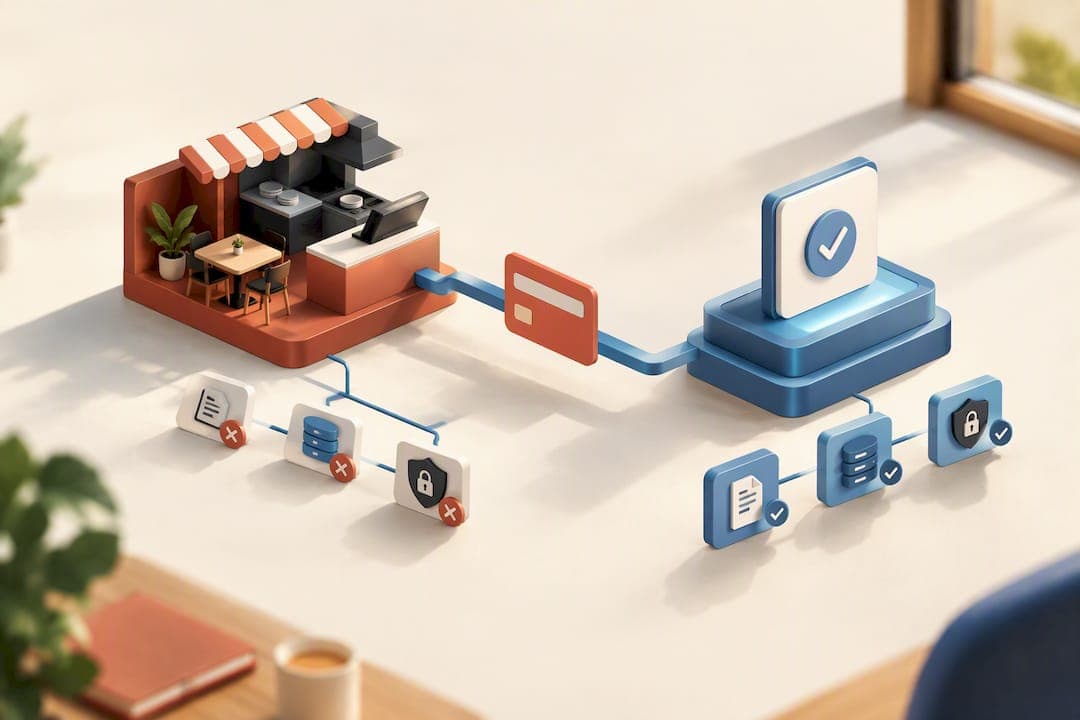
That said, outsourcing does not remove your responsibility entirely. As Cloudflare's explainer on PCI DSS points out, you still have to confirm your provider is itself properly validated. A vendor that cannot answer that question directly is a red flag.
A PCI-validated provider handling your capture and processing is the single biggest lever for cutting both your security risk and your compliance workload, according to the PCI Council's guidance.
The must-have technical controls, per that same guidance, are:
- Hosted payment pages or tokenization so raw card numbers never sit on your servers.
- P2PE (point-to-point encryption) on any physical terminal, plus EMV chip support and SRED-certified hardware.
- TLS encryption on every payment-related connection.
- Network segmentation that keeps payment systems isolated from general business systems like email or guest Wi-Fi.
Before you commit to a vendor, ask for their PCI listing, confirm whether their terminals are P2PE-validated, and get specifics on how they tokenize card data. One easy rule worth enforcing with staff: never use a payment terminal or tablet for general web browsing, since that alone can widen your PCI exposure.
Chargebacks and refunds: what to track and how fast to respond
Chargebacks move through defined stages, and the clock starts the moment a dispute is filed. According to Worldpay's dispute management documentation, the typical path runs through retrieval, first chargeback, representment, and, if unresolved, arbitration. Some evidence windows can be very short, which does not leave room to scramble for records after the fact.
Worldpay also notes that chargeback fraud is climbing in hospitality and food delivery specifically, and that letting disputes pile up can raise your processing fees or put your account at risk of suspension.
Build your evidence habit before you need it:
- Save digital receipts tied to each order ID.
- Log delivery confirmations and driver timestamps for off-premise orders.
- Keep customer communication records, including any complaint or resolution notes.
- Timestamp every order at each stage, from placement to fulfillment.
To operationalize this:
- Set up webhook alerts so a new chargeback notification reaches you the moment it is filed, not days later.
- Route those alerts into a dashboard your team checks daily.
- Run a mock representment at least once so your team knows the submission process before a real deadline is ticking.
From decision to live payments: a step-by-step rollout
Moving from "we should fix our payments" to actually taking transactions online does not need to take months. Break it into three phases.
Pre-launch
- Pick your architecture: hosted checkout, embedded tokenized checkout, or a combination with QR pay-at-table.
- Confirm PCI validation and payout timing with your provider in writing.
- Map how tips will route, whether to the house or directly to individual staff.
- Assign who owns setup, who owns staff training, and who owns ongoing dispute monitoring.
Integration
- Connect your hosted checkout or embed the payment widget on your ordering page.
- Link it to your POS so orders and payments reconcile automatically.
- Set up kitchen ticket routing and digital or printed receipts.
- Add courier integrations or simple payment links for delivery orders outside a marketplace.
- Turn on loyalty and tipping features if your platform supports them.
Testing and launch
- Run sandbox transactions before going live, including a full order-to-payment cycle.
- Simulate a refund and a chargeback so staff see the workflow, not just the theory.
- Train front-of-house and kitchen staff on the new flow, especially anything that changes how tips are handled.
- Monitor closely for the first 30 days and revisit any friction points, like slow checkout pages or confusing QR instructions, before they become habits.
Pro Tip: *Run your 30-day review on a specific day, not "sometime next month." A calendar reminder is the difference between a real review and one that never happens.*
Why an integrated, commission-free platform changes the math
An integrated platform that skips per-order fees changes that math immediately, and one platform's design leans into that model directly.
Relevant features for the payment picture:
- Website and ordering setup can be created automatically once an application is confirmed, often live the same day.
- A zero-commission model on orders, with revenue retained by the restaurant rather than a marketplace cut.
- QR-based tipping profiles let individual staff collect tips directly, with no platform commission taken.
- Digital loyalty cards integrated into popular mobile wallets like Apple Wallet and Google Wallet.
- Courier integrations where the delivery fee is paid by the customer rather than deducted from the restaurant's revenue.
Because ordering, payment, and loyalty sit on one platform instead of stitched-together tools, reconciliation work is reduced and deployment can happen quickly rather than as a multi-week project.
Getting started with RESTOBOT
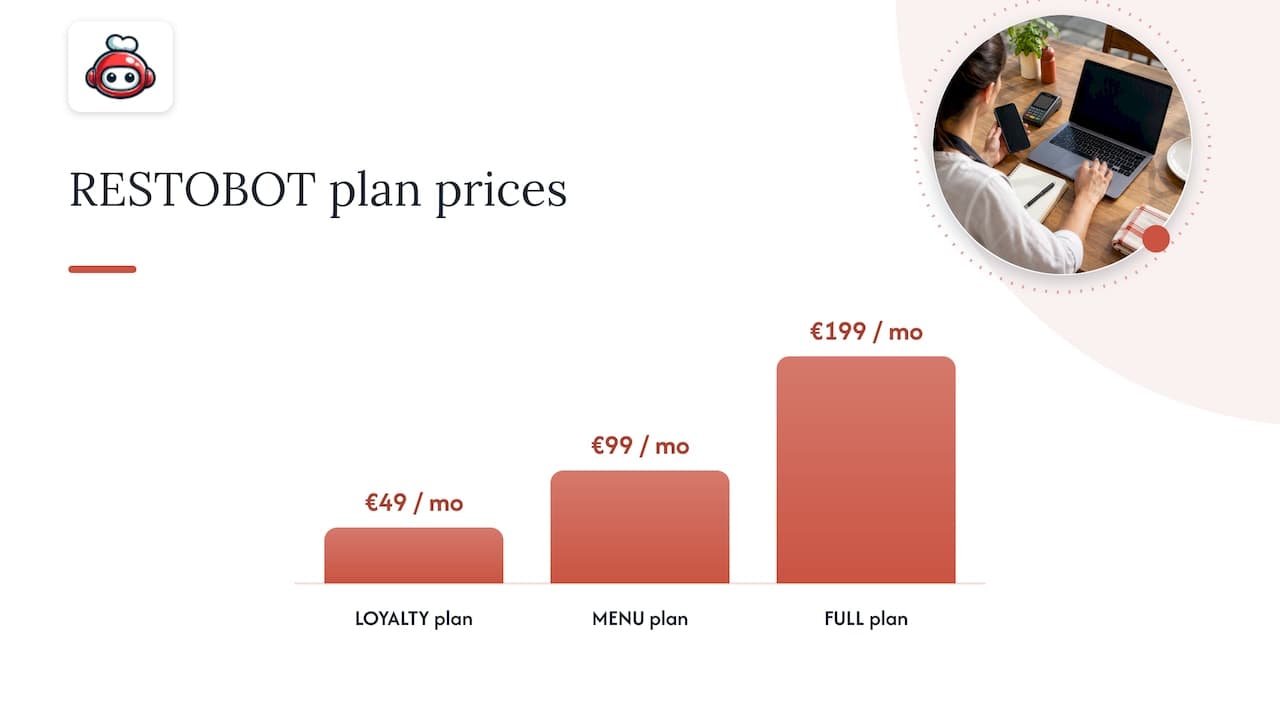
If you are ready to move off marketplace commissions and get a compliant payment setup running fast, RESTOBOT gives you the ordering, payment, and loyalty pieces in one place instead of three separate vendor contracts. Setup runs on the LOYALTY, MENU, or FULL plans, starting at €49 per month for LOYALTY, €99 per month for MENU, and €199 per month for FULL, with no per-order commission on top. Staff can also start collecting tips through their own QR tipping profile independent of which plan the restaurant chooses, or even if the restaurant has not signed up at all. Check the pricing page for plan details and get your ordering and payment flow live within a day.
What actually matters once you flip the switch
Most restaurants overbuild their first payment setup, chasing features before they have the basics stable. Start with hosted checkout plus QR pay-at-table, get it running cleanly, and hold off on extras until that foundation feels boring. Track your dispute rate from week one and automate your evidence capture immediately, since retrofitting that habit after a wave of chargebacks is far harder than building it in from day one. Everything else, loyalty perks, deeper analytics, multi-location dashboards, can wait until payments themselves are no longer something you think about daily.
*— ADMIN*
Sources
FAQ
What app can I use to pay at restaurants?
Digital wallets like Apple Pay and Google Wallet work at most restaurants that accept contactless payments, and many restaurants also offer QR pay-at-table or hosted checkout links through their own ordering platform. Some platforms, including RESTOBOT, build wallet support and QR payment directly into the restaurant's own ordering flow rather than requiring a separate app.
What restaurants allow you to order online and pay with cash?
Cash-on-delivery or cash-on-pickup availability depends entirely on the individual restaurant's policy and the platform it uses, since some online ordering systems support a cash option alongside card and wallet payments while others require payment upfront. Check the specific restaurant's ordering page or call ahead to confirm.
What is the 30/30/30 rule for restaurants?
This is not a recognized industry standard covered by payment or restaurant operations guidance, and definitions of it vary widely depending on the source. Rather than rely on an unverified rule, focus on documented practices like reducing PCI scope and tracking chargeback deadlines, which carry clear guidance from payment security authorities.
Is there an app that allows me to get paid to try food?
This describes a different category of consumer app focused on paid food reviews or sampling programs, which is unrelated to restaurant payment processing. It falls outside the scope of setting up online payments for a restaurant business.
How long does it take to set up online payments for a restaurant?
With an outsourced, PCI-validated provider and an integrated ordering platform, the technical setup can happen within a day of your application being confirmed, though your own testing and staff training should still follow before a full launch. Some platforms are built around this kind of same-day deployment for the ordering and payment layer.