

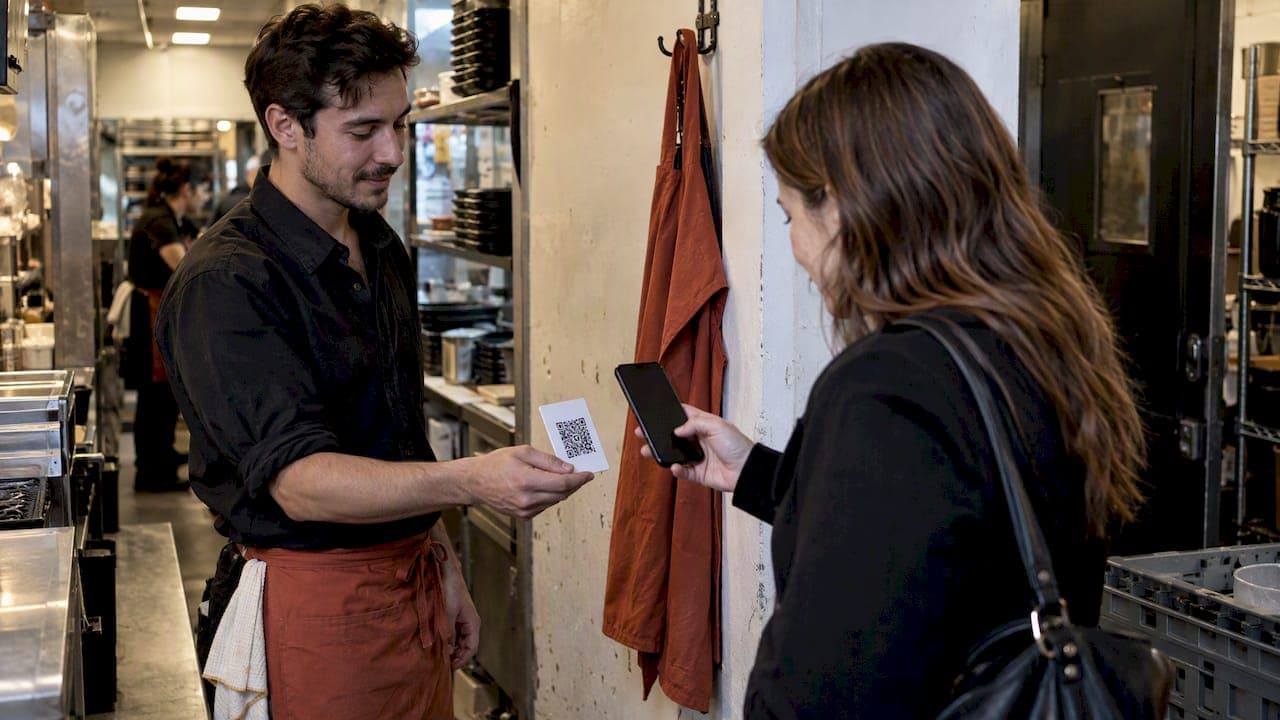
Digital tipping is when a guest sends a gratuity electronically rather than in cash, through an app, a QR code, or a checkout screen, and the money either lands in your account directly or passes through your employer first. Which path it takes decides who reports it to tax authorities. Verify every payout, keep a running log, and ask your manager for a written tipping policy before your next shift.
***
TL;DR:
>
- Digital tips routed directly to a worker's personal account are faster and simpler to verify than those passing through employer systems. - QR code tipping that bypasses the employer reduces reporting complexity but increases vulnerability to scams like quishing. - Recording and reconciling tips weekly, including screenshots and paystubs, helps prevent discrepancies and ensures accurate tax reporting. - Adoption of digital tipping varies by region and venue type, with cash-heavy or quick-service settings showing slower integration. - Employers and workers should understand the specific flow and fees of each tipping platform to ensure timely payout and compliance.
***
Table of Contents
- What digital tipping is and common delivery methods
- How servers receive tips: payouts, pools, and instant-pay options
- Tax, reporting, and recordkeeping basics for servers
- Security risks and practical fraud checks servers should use
- Practical setup checklist for servers: accounts, verification, and habits
- Impact of digital tipping on server income stability and variability
- Best practices for servers to encourage digital tipping etiquette
- Comparison of digital tipping adoption across different regions or types of service establishments
- What servers should actually expect from digital tipping tools
- RESTOBOT's take on commission-free tipping profiles for servers
- How RESTOBOT's Online tips feature works
- FAQ
- Sources
What digital tipping is and common delivery methods
Digital gratuities move through a handful of common channels, and each one changes who touches your money before you do.
- In-app or checkout tipping: the guest adds a tip during card or mobile payment at the point of sale, and the amount routes through the restaurant's payment processor before distribution.
- QR code peer-to-peer tipping: the guest scans a code tied to your personal profile and sends money straight to your account, often bypassing the employer entirely.
- Employer-distributed digital tips: tips collected through the house system get pooled or assigned by the business, then paid out through payroll or a separate app.
- Third-party tipping apps: standalone services let guests search for or scan a worker's profile and tip them directly, independent of any restaurant's point-of-sale setup.
The technical flow is usually guest, then payment processor, then recipient, but the number of stops in between determines your reporting burden. Direct-to-worker QR and app tips tend to make the worker responsible for tracking and reporting; employer-collected tips usually shift at least part of that responsibility onto payroll. A QR-code tipping setup that sends money straight to a server's own profile is a clear example of the direct model.
How servers receive tips: payouts, pools, and instant-pay options
Getting paid out depends entirely on which model your venue uses, and the steps differ enough that it's worth knowing all three before your first digital tip arrives.
- Direct peer-to-peer payouts: once a guest sends a tip to your personal profile, funds typically settle to your linked bank account within one to a few business days, after you've verified your identity on the platform.
- Employer-collected tip pools: tips gathered through the house system are usually combined and redistributed on a set payroll schedule, sometimes with a short hold period before your share appears in your paycheck or a connected app.
- Instant-pay services: some payroll and tipping tools let you cash out earned tips before the regular pay cycle, often for a small transfer fee paid by the worker rather than the employer.
- Practical access steps: link your bank account or debit card, complete identity verification with a photo ID, and check your payout history regularly to confirm every shift's tips actually arrived.
Pooled systems add a layer most direct-pay models skip: a distribution formula decided by management. Confirming your share means comparing your logged hours or sales against what hits your account, and flagging any gap right away. A breakdown of tip pooling versus direct tips is worth reading if your venue mixes both systems, since the rules for timing and verification differ between them.
Tax, reporting, and recordkeeping basics for servers
Electronic tips are treated as cash tips for reporting purposes in the United States, and they count as taxable income you're expected to report to your employer, according to IRS tip recordkeeping guidance. Employers and employees carry different obligations under that guidance, including recordkeeping and, in many cases, withholding.
A service charge is not the same thing as a tip. A mandatory fee added by the house counts as employer revenue and gets paid out as wages, not as a voluntary gratuity, a distinction confirmed in Gov. That guidance also shows that a tip sent through a third-party app directly to a worker is usually treated like a cash tip, putting the reporting responsibility on the worker rather than the employer.
Keep your own paper trail regardless of which model your venue uses:
- Screenshot or export tip summaries from any app you use.
- Save paystubs and compare them against your own daily log.
- Record shift-by-shift totals in a notebook or spreadsheet.
- Report discrepancies to payroll the same week they happen, not months later.
Average tip rates across food and beverage channels sit around 15%, based on Square's 2025 restaurant industry data, a benchmark worth knowing if you want to sanity-check whether your digital tips are landing close to what similar venues report.
Security risks and practical fraud checks servers should use
QR codes make tipping convenient, but they also open a door for a scam known as quishing, where someone places a fraudulent sticker over a legitimate code and redirects guests to a fake payment page, as described in guidance on quishing from Trend Micro. A guest who scans the wrong code might think they tipped you when the money actually went somewhere else entirely.
On the platform side, tokenization and hosted payment pages keep raw card numbers away from a restaurant's own systems, which lowers the venue's exposure under PCI payment-security standards and protects the guest's payment details.
- Glance at QR table tents and signage before each shift to confirm nothing looks pasted over or replaced.
- Confirm your tipping profile shows the verification badge or confirmation your platform provides.
- Avoid posting your personal tipping link in public places where it could be copied or swapped.
Pro Tip: *Ask your manager to switch to dynamic QR codes, so a compromised code can be disabled remotely, and keep a quick signage check on the daily opening checklist.*
A table ordering QR setup playbook covers the same signage habits from the manager's side, which is useful context if you want to make the case for better controls at your venue.
Practical setup checklist for servers: accounts, verification, and habits
Setting up a digital tipping profile takes a handful of steps, and doing them right the first time saves headaches later.
- Gather your government-issued ID, bank routing and account numbers, and a clear verification photo before you start the signup.
- Save a copy of every confirmation email or screen, since you may need proof of account ownership if a payout gets disputed.
- Choose a payout method: a standard bank transfer is usually free but slower, an in-app wallet keeps funds available instantly for spending, and instant-pay options get cash to you fastest for a small fee.
- Reconcile your tip log against your paystub every week, and flag any mismatch to payroll right away rather than letting it build up.
- Keep a short, natural script ready for mentioning your tipping option, such as noting your QR code is on the receipt, without pressuring the guest.
| Payout option | Speed | Typical cost |
|---|---|---|
| Bank transfer | 1-3 business days | Usually free |
| In-app wallet | Instant | Usually free |
| Instant-pay transfer | Minutes | Small fee, often paid by worker |
Daily habits matter as much as the initial setup. Save every tip receipt, note your shift totals before you clock out, and compare that log against whatever shows up in your bank account or wallet by the end of the week. If a payout looks short, raise it with payroll immediately while the shift is still fresh in everyone's memory, including the manager's.
Impact of digital tipping on server income stability and variability
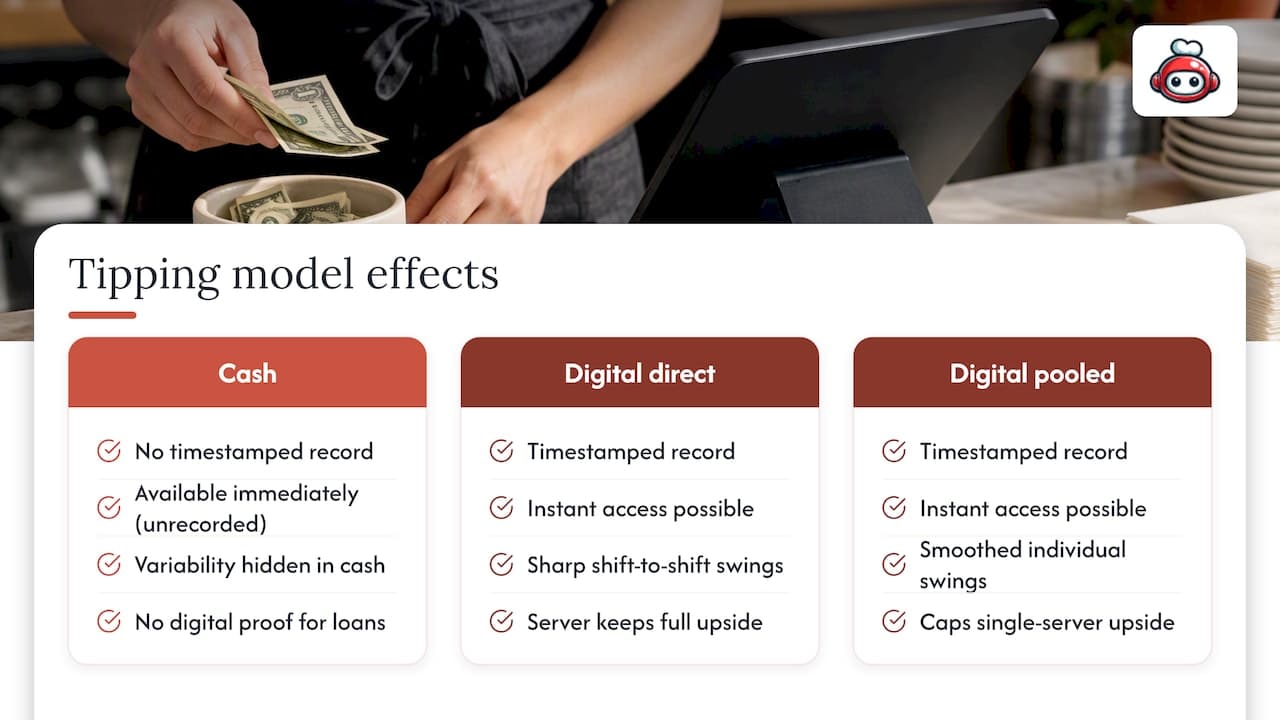
Digital tipping changes the shape of your income more than the amount of it. Cash tips disappear the moment a shift ends, while digital tips create a timestamped record that smooths out the guesswork at tax time and makes a slow week easier to document if you ever need to show proof of earnings for a loan or lease application.
Instant-pay tools add a different kind of stability: instead of waiting for a biweekly paycheck, some workers can access earned tips within minutes of a shift ending, which matters when rent or a bill is due before the next scheduled payday, a shift in frontline worker pay access covered by Forbes reporting on instant pay.
That said, digital tipping doesn't eliminate variability, it just makes it visible. A slow Tuesday still pays less than a packed Saturday, and a venue that pools tips across a larger staff smooths out individual swings but also caps how much a single standout server keeps. Workers on direct-to-worker tipping profiles tend to feel income swings more sharply shift to shift, since nothing buffers a quiet night, but they also keep the full upside of a great one. Knowing which model your venue uses helps you plan a budget around the right kind of variability instead of being surprised by it.
Best practices for servers to encourage digital tipping etiquette
The way you present a tipping option shapes whether a guest tips at all, and whether they feel nudged or genuinely invited to do so.
- Mention your tipping option naturally, after the meal is settled, rather than before or during service.
- Let the payment screen or printed QR code do the asking instead of verbally pushing a specific amount.
- Thank every guest the same way regardless of whether they tipped, so the gesture never reads as performance.
- Keep your public profile simple and accurate, with a clear name and role so regulars can find you again.
Industry guidance on the timing of the tip ask recommends presenting tipping choices after service wraps up, which avoids making guests feel watched while they decide. Giving guests room to adjust the amount privately, rather than announcing a suggested percentage out loud, tends to preserve goodwill better than a hard sell ever does.
Tipping norms also shift by country, so a server working in or near international tourist traffic benefits from knowing that what counts as generous in one place may be standard or even unusual in another, a point covered in practical terms in a guide to tipping customs in Portugal.
Comparison of digital tipping adoption across different regions or types of service establishments
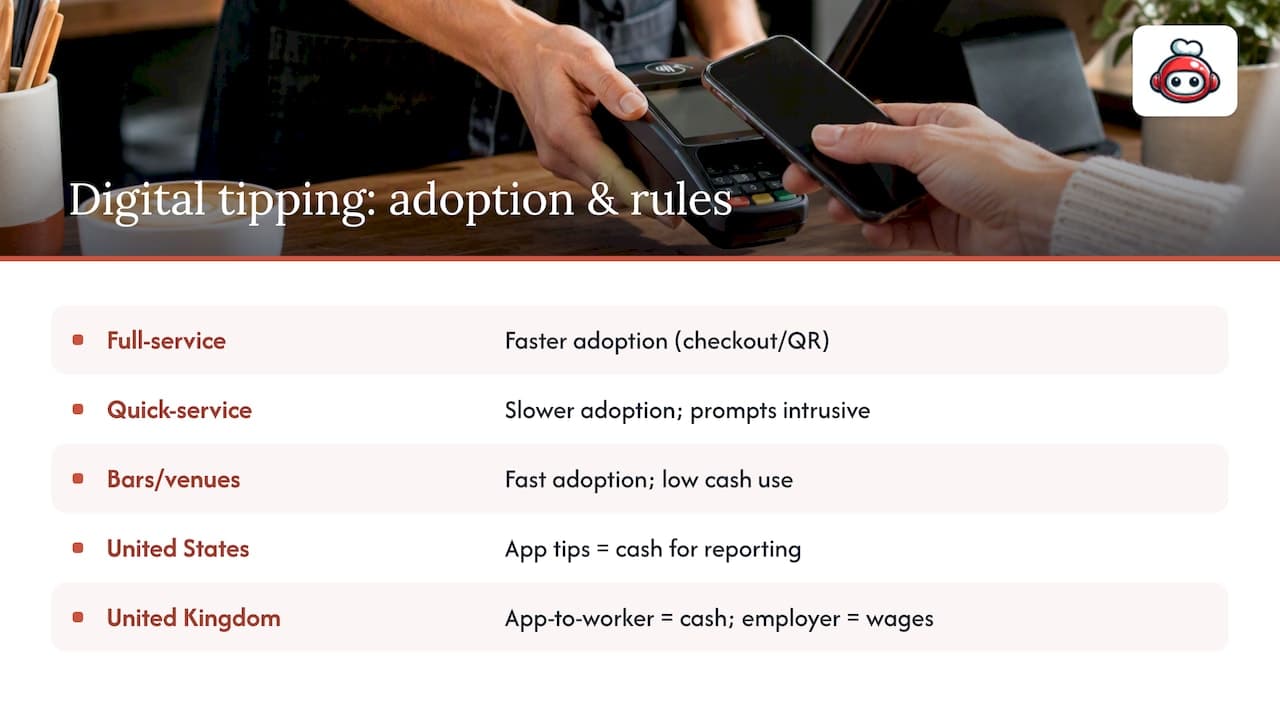
Adoption looks different depending on where you work and what kind of venue employs you. Full-service restaurants with table service have leaned into checkout and QR tipping faster than quick-service counters, where the tip prompt often feels more intrusive to a guest grabbing a coffee on the way to work. Bars and venues with high card-payment volume tend to see digital tips become the default quickly, simply because fewer guests carry cash at all.
Regional rules also shape adoption. In the United States, the IRS treats electronic tips as cash tips for reporting purposes, which keeps the server largely responsible for tracking and reporting income regardless of which app delivered it. In the United Kingdom, GOV.UK's guidance draws a sharper line: a tip sent through a third-party app straight to a worker is treated like a cash tip, while a tip collected by the employer through its own system is treated as wages and distributed under separate tronc rules. A server moving between countries, or working for an international chain, needs to check which category applies locally rather than assuming the same rule follows them across a border.
Hospitality guides written for travelers reflect this patchwork too. A guide to digital reservations and guest-facing hospitality features notes that digital conveniences, tipping included, are adopted unevenly depending on local payment habits and guest expectations, which is worth remembering before assuming every venue you work at will handle tips the same way.
What servers should actually expect from digital tipping tools
A tipping tool that routes funds through an employer's system before they reach you is fundamentally different from one that sends money to your own account the moment a guest taps confirm, even if both show up as "digital tipping" in a search result.
The gap worth watching is between convenience and control. Plenty of tools market themselves as making tipping easier for guests, but the server-facing question, how fast you get paid, whether fees come out of your tip, and whose name is on the compliance paperwork, gets far less attention than it deserves. A server who understands that distinction can ask better questions before adopting a new tipping tool, instead of assuming every QR code on a table works the same way behind the scenes.
*— ADMIN*
RESTOBOT's take on commission-free tipping profiles for servers
We built our tips feature around a simple idea: a server's tip should reach the server, not pass through a chain of intermediaries first. Our platform lets any hospitality worker, waiter, bartender, or anyone else working a shift, create a personal profile tied to a QR code, independent of whether their restaurant uses RESTOBOT at all.
Guests who scan the code can rate the worker, leave a comment, and send a tip straight to that worker's own account. We take 0% commission on these tips; the only deduction comes from the standard Stripe processing fee that applies to any Stripe transaction, not something we set.
How RESTOBOT's Online tips feature works
Setting up a personal tipping profile takes a few minutes, and nothing about it depends on your employer's plan or contract status with us.
- Create a personal profile and QR code tied to your own name, not your venue's.
- Guests scan, rate, comment, and send a tip that goes straight to your account.
- We apply 0% platform commission; only the standard Stripe processing fee applies.
If you want to see how the feature works in detail, our Online tips page walks through setup, and restaurant owners curious about our broader platform, including the LOYALTY, MENU, and FULL plans, can compare features there before signing up.
This article is general information, not a substitute for advice from a qualified financial advisor. Consult a qualified financial professional about your own circumstances before acting on anything here.
FAQ
What is the best app for tipping waiters?
There isn't one universal "best" app, since the right choice depends on whether you want a tip to go straight to a worker or through the restaurant's own system. Direct-to-worker QR profiles tend to get money to servers fastest, while employer-run systems add a payroll step in between.
What is digital tipping?
Digital tipping is a gratuity sent electronically through a checkout screen, a QR code, or a tipping app, instead of handed over as cash. Depending on the method, the money either reaches the worker directly or passes through the employer's payroll system first, which affects how it gets reported for taxes under IRS guidance.
What is the best electronic tipping app?
The strongest option for a server is usually one that sends funds directly to a personal account without taking a cut, since every dollar routed through extra intermediaries adds delay or fees. Look for a platform that offers direct payouts, clear verification steps, and transparent fee disclosure before choosing one.
How do I tip electronically?
A guest typically taps a tip amount on a card reader or checkout screen, scans a QR code linked to a worker's profile, or opens a tipping app to send money directly. The payment processor moves funds to the recipient's linked bank account or wallet, often within a few business days.