


Set up Wolt Drive integration by running a three-phase flow: check availability with a promise or fee endpoint, create the delivery, then track it through webhooks and a generated tracking URL. Most restaurant and POS integrations should use venueful endpoints, since venues are preconfigured on Wolt's side. Your next move is simple: request staging credentials from your Wolt contact and validate the full flow before anyone issues you production keys.
***
TL;DR:
>
- Most developers mistakenly choose the wrong endpoints for their mode, increasing errors and complicating the integration process. - Venueful mode reduces payload and error risks for high-volume restaurants by using preconfigured venue data, while venueless mode suits low-volume or temporary pickup points. - Webhook handling must be event-driven with idempotent processing to avoid missed status updates and customer notification failures. - Starting directly in production skips crucial staging validation, risking rate-limit issues and unreliable webhook responses during live operation. - A comprehensive integration includes testing all delivery scenarios, handling rate limits gracefully, and planning credential management for a smooth launch.
***
Table of Contents
- What Wolt Drive Does and Who Should Integrate It
- The Wolt Delivery API Integration Process, Step by Step
- Venueful vs Venueless: Which Endpoint Mode Fits Your Setup
- Onboarding, Authentication, and Environments: SSIO vs WIO
- Implementation Checklist and Pitfalls to Avoid
- How RESTOBOT Ties Wolt Drive Into Your Restaurant's Full Stack
- Sources
- FAQ
What Wolt Drive Does and Who Should Integrate It
Wolt Drive is a last-mile courier network that businesses plug into for ASAP or scheduled deliveries, without hiring or managing their own drivers. A restaurant, grocer, or retailer sends a delivery request through the Wolt Drive API, and Wolt handles courier assignment, routing, and customer notification.
Three groups typically build this integration:
- POS systems that want to route completed orders straight to a courier without staff touching a third app
- E-commerce checkouts that need live delivery pricing and ETAs at the point of sale
- Middleware platforms orchestrating delivery across multiple courier networks at once
The payoff for merchants is speed and reduced overhead: no delivery staff to manage, a tracking link generated automatically for every order, and courier logistics handled entirely off your plate. Integration partners like POS and kitchen display system connectors also offer two-way plug-and-play links for merchants who would rather skip custom development altogether.
The Wolt Delivery API Integration Process, Step by Step
The Wolt delivery API integration process breaks into three distinct phases, and skipping the order or shortcutting any one of them is where most integrations break down.
- Check availability and price. Call
/shipment-promisesif you're on venueful mode, or/delivery-feefor venueless requests. The response returns an estimated time of arrival and a delivery price, which you should show the customer before they confirm the order. - Create the delivery. Once the customer commits, call
/deliveries(venueful) or/delivery-order(venueless). The payload needs pickup and dropoff details, order value, and a timing flag: ASAP deliveries get dispatched immediately, while scheduled ones carry a specific dropoff window. - Track and manage the live order. Wolt pushes status changes through webhooks rather than making you poll for updates. Expect transitions like courier assigned, picked up, courier en route, and delivered, alongside a tracking URL you can hand to the customer directly or embed in an SMS.
One detail catches almost every developer off guard the first time: Wolt Drive is genuinely event-driven, not request-response for status. If your system architecture assumes you'll poll an endpoint for "is it delivered yet," you'll build the wrong thing. Webhooks are the mechanism, full stop, and your listener needs to be ready for that from day one.
Quick fact: the entire flow rests on four core endpoints working together, /shipment-promises, /delivery-fee, /deliveries, and /delivery-order, and picking the wrong pair for your mode is the single most common early mistake.
Venueful vs Venueless: Which Endpoint Mode Fits Your Setup
Venueful mode assumes your pickup location is already registered as a venue inside Wolt's system, so most of your requests carry fewer fields and less room for error. Venueful integration is recommended for most restaurants because the venue's address, hours, and contact details are already on file. You call /shipment-promises and /deliveries, and Wolt fills in the gaps from its own records.
Venueless mode exists for a narrower case: a one-time pickup point, a pop-up, or a very low-volume location that doesn't justify formal venue setup. Here you pass full pickup and dropoff details on every single request through /delivery-fee and /delivery-order, which means more payload to manage and more surface area for mistakes.
- Venueful: fewer fields per request, preconfigured venue data, lower error rate at scale
- Venueless: full address details required every time, better suited to dynamic or rare pickup locations
- Venueful integration reduces payload size and error surface area in high-throughput POS setups specifically
If you're building for a chain, a franchise group, or any restaurant expecting regular order volume, venueful is the practical default. Venueless makes sense for a food truck doing three orders a week from a different corner each time.
Pro Tip: *If you're not sure which mode fits your business model, talk to your Wolt contact before writing a line of code. Switching modes after launch means rebuilding your payload structure and retesting the entire flow.*
Onboarding, Authentication, and Environments: SSIO vs WIO
Every Wolt Drive integration starts in staging, not production. That's not a suggestion; production merchant tokens are issued only after your integration passes validation in the staging environment, so budget real testing time before you expect live keys.
Onboarding itself splits into two paths:
- SSIO (self-service integration onboarding): you activate and manage venues through your own interface, giving you control over rollout timing
- WIO (Wolt-led integration onboarding): Wolt onboards venues on your behalf, which fits merchants who'd rather not build venue activation tooling at all
- Authentication generally runs on a merchant token or basic auth for core requests, though some endpoints use OAuth or JWT patterns
- Most flows issue one token per merchant, so plan your credential storage and rotation logic around a single active key rather than per-venue tokens
Request staging credentials early. The gap between "my code compiles" and "my code survives a real courier delay" only shows up once you're testing against Wolt's staging environment with a real test venue ID.
Implementation Checklist and Pitfalls to Avoid
Run through this list before you write your first production request:
- Confirm you have staging credentials and a valid test venue ID.
- Build a webhook listener endpoint with retry and backoff logic, not a bare receiver that fails silently on a dropped connection.
- Handle HTTP 429 rate-limit responses gracefully instead of hammering the endpoint again immediately.
- Write error handling for malformed addresses, missing fields, and unexpected response keys.
- Configure tracking URL delivery and, if relevant, SMS notification content for venueful orders.
- Test both ASAP and scheduled delivery flows, not just the happy path.
- Simulate courier delays and small-order surcharge scenarios before launch, not after your first angry customer call.
The most common pitfall is starting integration work directly against production, skipping staging validation entirely because "the docs look simple enough." A close second is brittle webhook handling: a listener that can't survive a duplicate event or a network retry will eventually miss a delivered status and leave a customer staring at a stale tracking page. Insiders in the developer community consistently point to idempotent webhook handlers with de-duplication logic as the fix, since Wolt's own retries can otherwise trigger the same event twice on your end.
For venueless setups specifically, inconsistent address formatting across requests is a silent killer. Wolt's delivery-fee endpoint will sometimes "best guess" an ambiguous address rather than reject it outright, which means a sloppy address string can quietly route a courier to the wrong building instead of throwing an error you'd actually notice.
Pro Tip: *Treat rate limits as a design constraint, not an edge case. If your system batches order creation during lunch rush, build in request throttling now rather than discovering the 429 responses in production on your busiest Friday night.*
How RESTOBOT Ties Wolt Drive Into Your Restaurant's Full Stack
Raw API documentation tells you how to call an endpoint. It doesn't tell you what happens to that delivery request after your website takes the order, or how status updates actually reach your kitchen staff. That's the gap a platform like RESTOBOT is built to close.
RESTOBOT generates a restaurant's website and embedded ordering menu automatically once an application is confirmed, and orders placed through that site or the Telegram ordering bot sync directly into a management dashboard. From there, a delivery request can be created and passed toward a courier network like Wolt Drive without a staff member manually re-entering an address into a separate app. Webhook status updates flow back into that same dashboard, so "courier picked up" and "delivered" show up where the restaurant is already watching, in real time.
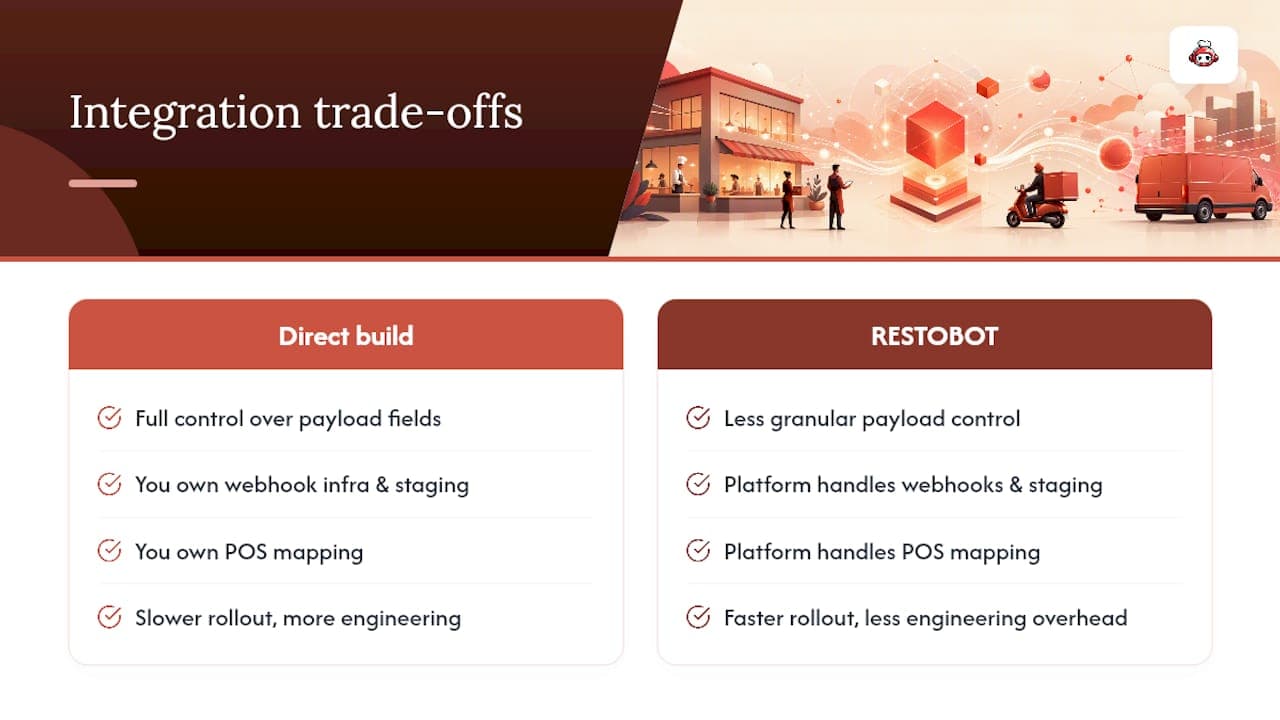
RESTOBOT charges zero commission on orders regardless of how the delivery gets fulfilled, whether that's self-managed delivery or a courier service handling the last mile. For a restaurant weighing platform versus bespoke build: a direct integration gives you full control over every field in the payload, but it also means owning webhook infrastructure, staging validation, and POS mapping yourself. A platform route trades some of that granular control for faster rollout and less engineering overhead, which matters most for restaurants without a dedicated developer on staff.
*— ADMIN*
FAQ
Does Wolt Operate in the United States?
Wolt's delivery network is not available in the United States. It operates across a substantial footprint of European, Nordic, and select international markets, so US-based businesses looking for on-demand courier integration need to evaluate delivery providers active in their own country.
Was Wolt Acquired by DoorDash?
Wolt continues to operate under the Wolt brand in its existing markets rather than being folded into another service footprint.
How Do You Integrate the Google Drive API?
Google Drive API integration is a separate product from Wolt Drive and involves Google Cloud project setup, OAuth credentials, and Drive-specific endpoints for file storage and sharing. It has no technical overlap with restaurant delivery logistics or the Wolt Drive endpoints covered in this guide.
Which Countries Is Wolt Available In?
Wolt operates across dozens of countries, concentrated primarily in Europe along with several markets in the Middle East and Asia. Coverage varies by city, so check availability directly with your Wolt contact before building a venue-specific integration.
Should I Choose Venueful or Venueless Mode for My Restaurant?
Venueful mode is the practical default for restaurants and POS integrations because venues are preconfigured, which cuts payload size and reduces error surface area. Venueless mode only makes sense for one-off pickup points or very low-volume locations that don't justify formal venue setup.