

To embed an online menu, you build the menu once in a hosted tool, copy the code it generates, and paste that code into the page of your website where the menu should appear. Dishes, photos and prices then live in the menu tool, and your site simply displays them. The work is mostly in preparing good content and testing on a phone, not in the code.
This guide covers both routes: pasting a widget into a site you already have, and using a platform where the menu is part of the website from the start.
TL;DR
- Embedding means pasting a snippet of generated code into one page or template. No custom development is normally needed.
- The big gain is separation: staff edit dishes and prices in the menu tool, and the website updates without a developer or a new PDF.
- Put the menu in your main navigation and homepage button, not buried in a footer link. Keep a direct link and a QR code as a fallback.
- Test on mobile first. That is where most guests will open it.
- If you would rather not stitch tools together, RESTOBOT includes an embedded menu in its website builder, with no commission on orders.
Table of Contents
- What "embedding" a menu actually means
- Prepare the content before you touch any code
- Step by step: embedding a menu widget
- Where to put the menu so guests actually see it
- Menu only, or menu plus ordering?
- Our perspective
- Where RESTOBOT fits
- Common mistakes when embedding a menu
- A quick pre-launch checklist
- FAQ
- Sources
What "embedding" a menu actually means
There are three common ways to put a menu online, and they behave very differently.
| Method | How it works | Weak point |
|---|---|---|
| PDF or flipbook upload | A file is linked or displayed on a page | Every price change means re-exporting and re-uploading |
| Plain link to a hosted menu | A button sends guests to another page | Easy to miss, and guests leave your site |
| Embedded menu (widget, iframe or script) | The menu appears inside your own page | Needs a one-off paste and a mobile check |
A menu-only PDF or ePaper can be linked or embedded, but it does not give you live ordering, reservations or availability controls. That matters the moment a dish sells out or a supplier changes your costs.
An embedded menu avoids that. The widget approach works because it separates content maintenance from website maintenance: staff change dishes, photos or prices in the menu service, and the embed location on the site stays the same.
Prepare the content before you touch any code
Most embedding projects stall because the menu is not ready, not because the code is hard. Collect these first:
- Categories in the order guests think. Starters, mains, sides, desserts, drinks. Keep the list short. Seven or eight categories scan better than fifteen.
- Item names and short descriptions. One line on the main ingredients and how it is cooked. Avoid poetry.
- Prices, final and consistent. Use the same format throughout, for example £12.50 on every line rather than a mix of £12.5 and 12.50.
- Photos for the dishes that sell. You do not need every item photographed. Start with your top sellers and signature plates. Our guide to shooting a restaurant menu in one afternoon shows how to do it without a studio.
- Dietary and allergen information. Tag vegetarian, vegan and gluten-free dishes clearly. In Great Britain, the Food Standards Agency says a restaurant or café must provide allergen information, either on the menu or through a prompt explaining how to get it. Check the FSA page for what applies to your venue.
If you want to go further on what to show and where, our piece on online menu optimisation for owners covers layout and pricing presentation.
Category design and item photos
Two details change how a menu reads on a small screen.
Categories. Use clear, collapsible or tabbed sections so a guest can jump to desserts without scrolling past thirty mains. Name them plainly. "Sunday Roasts" beats a clever brand name nobody recognises.
Photos. Use one consistent ratio, usually square or 4:3, so the grid looks tidy. Keep files compressed so the page loads quickly on mobile data. A menu with ten good photos beats one with forty uneven ones.
Step by step: embedding a menu widget
The documented workflow is the same across most tools: customise the widget, copy the generated code, and insert it. In practice:
- Create the menu. Add categories, dishes, prices, photos and dietary labels in your menu tool.
- Adjust the look. Pick the layout, number of columns and colours so it matches your site. Column and width controls help adapt the widget to shorter or longer menus.
- Copy the generated code. It is usually a short script tag or an iframe.
- Open the right page on your website. Create a "Menu" page if you do not have one.
- Paste the code into an HTML or embed block. Do not paste it into a plain text block, which will show the code as text.
- Publish and test on a phone. Then test on a desktop and a tablet.
The widget tools list compatibility with WordPress, Wix, Squarespace, Webflow, Shopify, Joomla and plain HTML, so the route is similar whichever builder you use. If your site was built by an agency, ask them for the embed block or template location. A web design studio such as Hook Digital in Oxford can advise on technical options for common website platforms if you need hands-on help.
The failure point nobody mentions
The code itself rarely fails. What goes wrong is placement: pasted into the wrong template, hidden behind a tab that does not load it, or squeezed into a narrow column so the menu looks cramped. Test the result on mobile, where most restaurant visitors are likely to open it. Scroll the whole menu, open a dish, switch categories, and tap every button with your thumb.
If the layout looks cramped on a phone, the problem is often the page, not the widget. Display considerations across devices are a design question as much as a technical one, as agency work such as this restaurant website build illustrates.
Where to put the menu so guests actually see it
An embedded menu that nobody finds is a wasted menu. A digital-menu provider recommends direct embedding because an ordinary text or button link can be less noticeable. Apply that lesson:
- Main navigation. "Menu" should be one of the first items, not under "More".
- Homepage button. One clear call to action above the fold on mobile.
- A dedicated URL. Give the menu its own page, for example yoursite.co.uk/menu, so it can be shared and indexed.
- A fallback. Keep a direct link and a table QR code. Our online menu QR code guide walks through the setup.
- Google. If your menu does not appear on your Google profile, see how to fix partner feed blocks and publish your menu on Google.
For wider structure, restaurant website best practices explains how to get orders in one tap, and if you want to make the page easy to find in search, the guidance on SEO for restaurants is a useful starting point.
Menu only, or menu plus ordering?
A display-only menu answers the question "what do you serve?". It does not take money. Before choosing a tool, decide what you want the embed to do.
Display only. Cheapest and simplest. Good for a pub or café that takes orders at the counter.
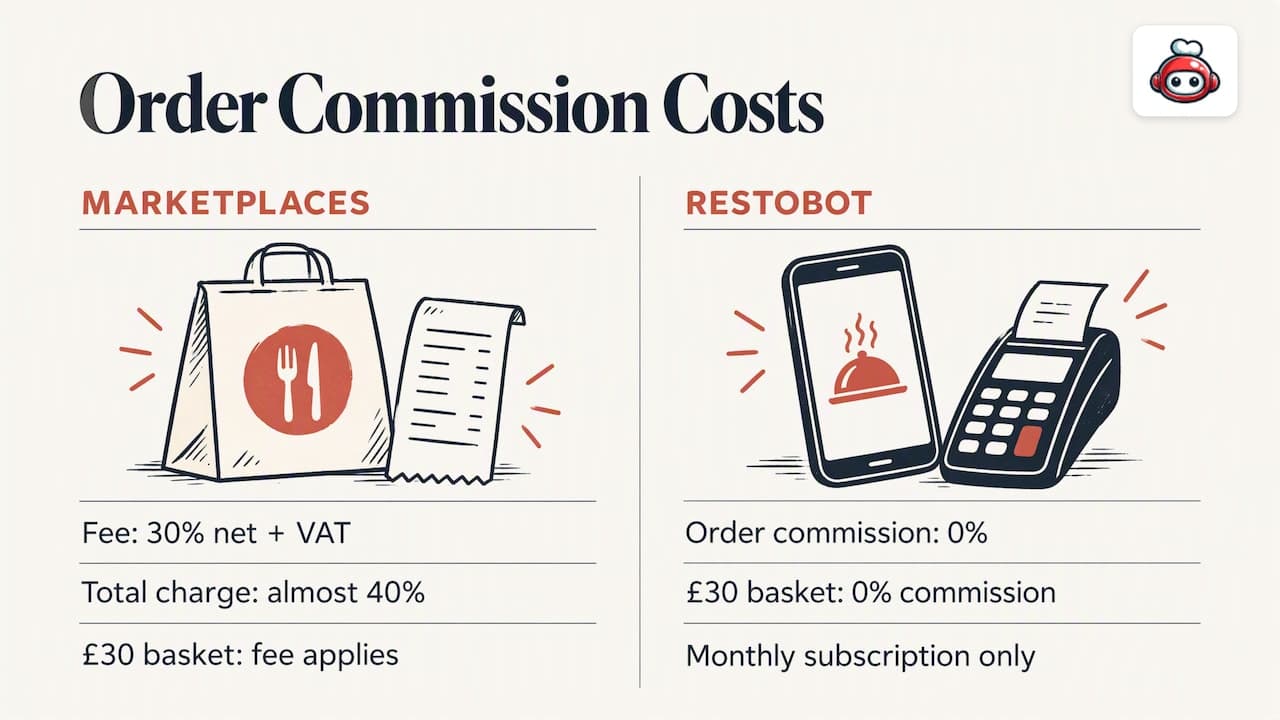
Display plus ordering. Guests choose, pay and you receive the order. This is where fees matter. Marketplaces such as Uber Eats, Glovo, Bolt Food, Wolt, Just Eat and Pyszne charge 30% of the net order value plus VAT, almost 40% in total. On a £30 basket, that is a large slice of a thin margin. Ordering through your own site avoids it, and with RESTOBOT the commission on orders is 0%. You pay a monthly subscription only.
Display plus reservations. A menu next to a booking button is useful for restaurants where guests check dishes before choosing a table.
When the menu, ordering and booking all sit on one site, the guest never has to leave to finish the job. If you are weighing costs, our breakdown of real restaurant website budgets gives realistic numbers, and building a restaurant website fast sets out a launch plan.
Our perspective
We see the same pattern with restaurant owners. They start with a PDF because it is quick, then spend years re-exporting it whenever a price moves. The real cost is not the hour spent uploading. It is the weeks when the website shows last season's menu and guests arrive expecting a dish you no longer serve.
So our view is simple: the menu should be a living thing in one place, and everything else should read from it. That is why the website builder at RESTOBOT has the menu and reservations embedded from the start, rather than leaving you to glue separate widgets together. Orders can come from the website and from a Telegram bot, and we do not take a commission on them.
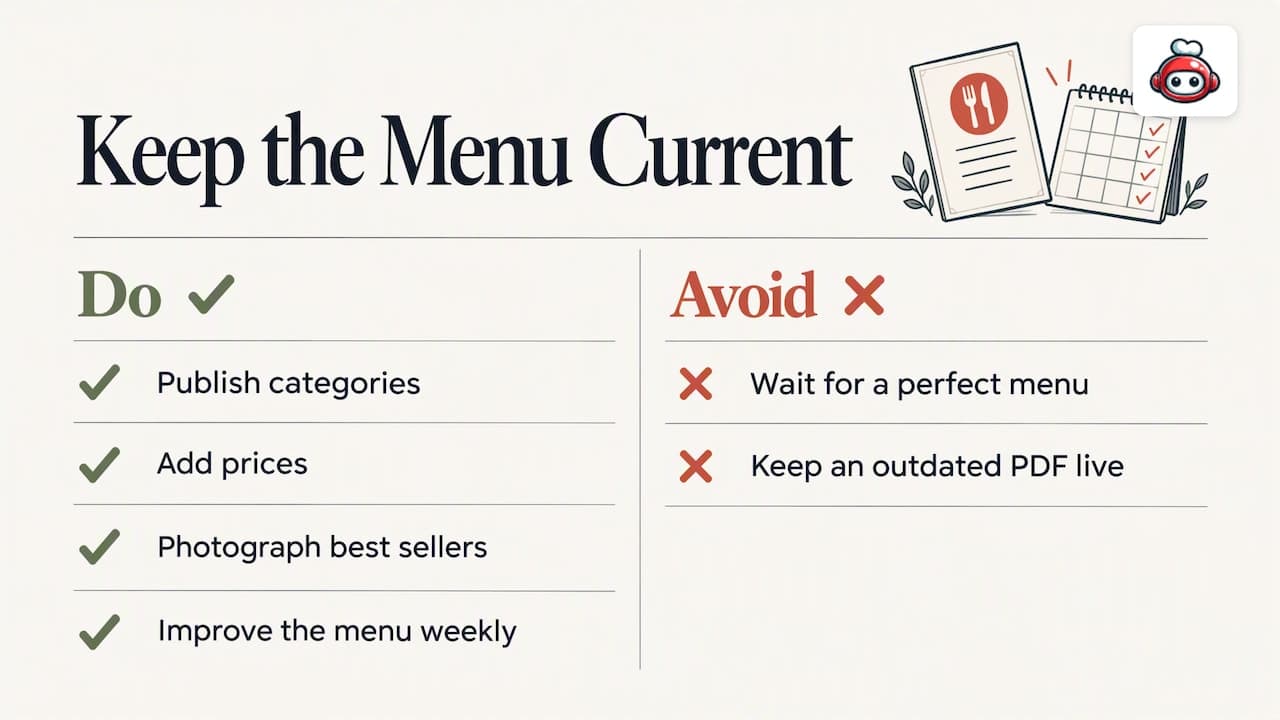
One caution from experience: do not wait for a perfect menu. Publish with categories, prices and photos of your best sellers, then improve weekly. A live, slightly plain menu beats a beautiful PDF that is out of date.
*— ADMIN*
Where RESTOBOT fits
If you do not already have a site, or you are tired of patching widgets onto one, RESTOBOT gives you a website with the menu built in, plus online ordering, reservations and loyalty cards. Sites can be created instantly and launched within a day.
The MENU plan starts from 69 EUR per month, and the FULL plan, with the complete feature set, from 119 EUR per month. Annual billing is listed at 59 EUR per year for MENU and 99 EUR per year for FULL. See the full plan details and pricing to pick the one that suits your venue.
Staff can also receive voluntary gratuities from guests through online tips, available on all plans, and a worker can register alone even if the venue is not on RESTOBOT.
Common mistakes when embedding a menu
- Pasting into a text block. The code appears as words on the page. Use an HTML or embed element.
- Forgetting to republish the site. Some builders need a manual publish after adding the snippet.
- Leaving old PDFs live. Search engines and old links keep sending guests to out-of-date prices. Remove them or redirect them to the new menu page.
- Photos that are too large. Slow loading is the quickest way to lose a mobile visitor.
- No fallback. If a script is blocked by a browser extension or a corporate network, a direct link still works.
- Ignoring reviews. A good menu page works best alongside social proof. See how to embed Google reviews on your website.
Finally, take a hard look at the basics before buying more tools. Our piece on restaurant operational efficiency argues that fixing waste comes before adding technology. If you also sell catering, online ordering for catering shows how to go live in a day.
A quick pre-launch checklist
- Every category and dish is present, with final prices.
- Top sellers have photos at a consistent ratio.
- Dietary labels and allergen information are checked by whoever knows the kitchen best.
- The embed sits on its own page, linked from the main navigation and homepage button.
- The page opens quickly on mobile data, and every tap target works.
- A direct link and QR code lead to the same menu.
- Old PDFs are removed or redirected.
- One named person owns updates, so prices stay current.
FAQ
Do I need a developer to embed an online menu?
Usually not. The process is configuration, code generation and paste-in, not custom development. You only need help if your site template is unusual or you cannot find where to add an HTML block.
Can I embed a menu in WordPress, Wix or Squarespace?
Yes. Widget providers list support for WordPress, Wix, Squarespace, Webflow, Shopify and plain HTML. You add the generated code in an HTML or embed block on the page where the menu should appear.
Is an embedded menu better than a PDF?
For most restaurants, yes, because prices and dishes can be updated in one place without re-uploading a file. A PDF is fine as a printable backup, but it cannot offer live availability, ordering or reservations.
How do I make sure the menu works on phones?
Open the published page on at least one iPhone and one Android phone. Scroll through every category, open a dish and tap each button. If the layout looks cramped, widen the container or move the embed out of a narrow column.
Should I also keep a QR code and a direct link?
Yes. They act as a fallback if a script is blocked, and the QR code serves guests at the table. Both should point to the same live menu so nothing is out of step.
Sources
- Elfsight: Restaurant Menu widget (guide)
- Elfsight: how to create a Restaurant Menu widget
- Elfsight: Restaurant Menu widget for website
- Speisekarte.de: digital menu embedding
- Food Standards Agency: allergen information for consumers
- Hook Digital: website design and development
- Blucat Group: restaurant website development
- Baby Love Growth: SEO for restaurants