

A restaurant POS integration links your till to other systems, so orders, payments and menu data flow without retyping. The main gain is fewer order errors and one central view of every sale. Online ordering and delivery or courier connections are the two integrations most operators start with, because they remove the most manual work from busy service hours.
***
TL;DR:
>
- Marketplaces charge 30% of net order value plus VAT, nearly 40%; with courier delivery, guests pay the delivery fee while restaurants keep food revenue. - Use one canonical menu, map every item, modifier, tax, and fee before launch, then test refunds, split bills, modified dishes, and cancellations. - Go live on the busiest channel first, rehearse with staff before service, and assign someone to check failed orders daily and reconcile payments weekly. - Use APIs and webhooks where possible, but plan for dropped events, mismatched menu data, and timeouts with alerts, daily checks, and a manual fallback.
***
Table of Contents
- Why do restaurants connect other systems to their POS?
- Which integrations can you connect to your POS?
- How do POS integrations work technically?
- What is the step-by-step checklist for launching integrations?
- What changes day to day, and what should you measure?
- What do successful integrations look like in different restaurants?
- How should you handle security and compliance?
- How do you keep integrations flexible as the restaurant grows?
- How do you troubleshoot common integration problems?
- What do POS integrations cost?
- Our view: pick one menu and defend it
- Get your integrations live without the commission
- FAQ
- Sources
Why do restaurants connect other systems to their POS?
A POS is the place where a sale is recorded, paid for and stored. Point-of-sale systems are generally described as recording sales transactions, handling payment processing and keeping transaction records. The trouble starts when orders arrive from somewhere else: your website, a delivery app, a phone call. Each extra channel is a new place for a mistake, unless it feeds the same system.
Integrations are built around a few practical goals:
- Accuracy: an order enters once and is never retyped from a tablet or a printout.
- Speed: tickets reach the kitchen at the moment of payment, not after someone notices them.
- One source of truth: sales, refunds and promotions sit in one place for reporting.
- Control of margin: you see which channels cost you money and which do not.
That last point matters more than it first appears. Uber Eats, Glovo, Bolt Food, Wolt, Just Eat, Pyszne and similar marketplaces charge 30% of the net order value plus VAT, almost 40% in total. A direct ordering channel on a subscription model carries no such commission: RESTOBOT's is 0%, and we charge only a monthly subscription.
The biggest gains land with front-of-house staff, who stop re-entering orders, with kitchen leads who get clean tickets, and with managers who finally see consistent numbers at close.
Which integrations can you connect to your POS?
Think of each integration as the answer to one operational problem. Here is what each delivers.
Online ordering
Your own website ordering should be the main, canonical route for guests who already know you. Orders pushed into the POS keep modifiers, notes and totals intact, and a zero-commission channel keeps the whole order value with you.
Delivery partners and couriers
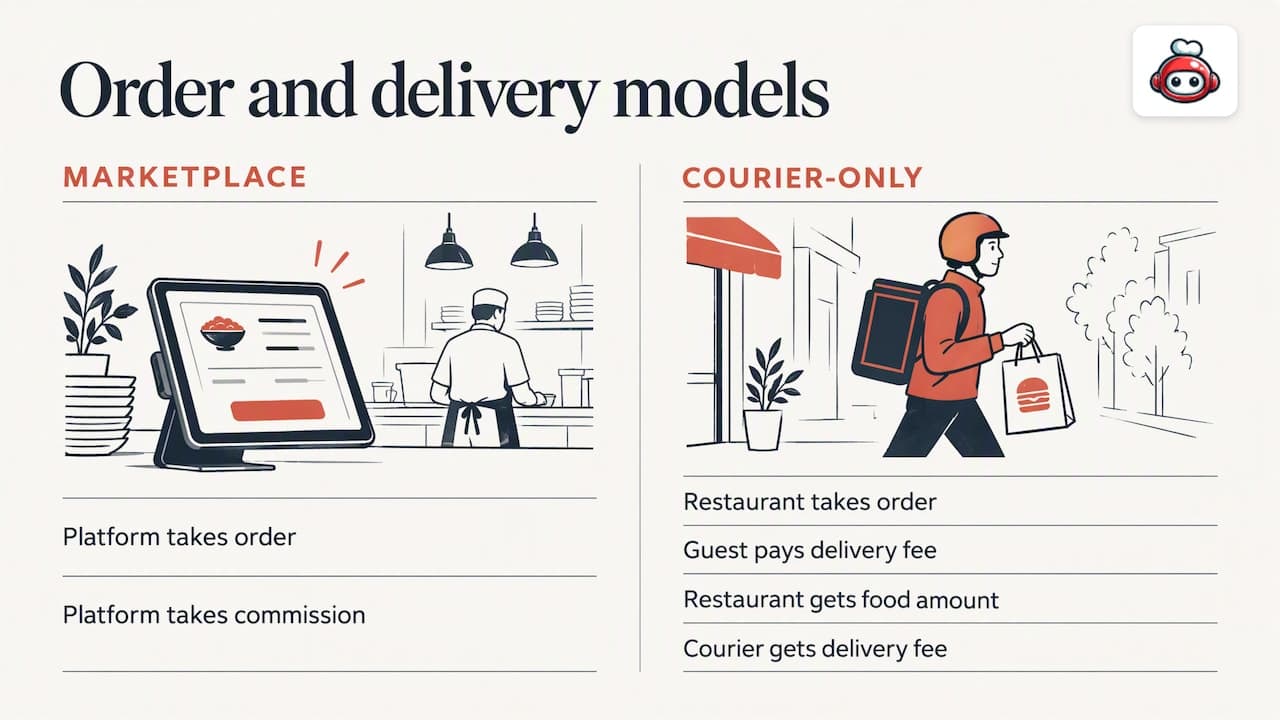
There are two different models, and they should not be confused. With a marketplace, the platform takes the order and the commission. With a courier-only service such as Wolt Drive, you take the order yourself, the delivery fee is added to the total and paid by the guest, the food amount goes to you and the delivery fee goes to the courier. Marketplaces themselves invest heavily here: Uber Eats bought OrderTalk to push orders straight into restaurant systems. For more on the courier side, see our overview of delivery management software.
Payments and gateways
A payment integration passes the authorisation result to the POS, so a paid order is marked paid and a refund appears in both places. Without it, someone reconciles card reports against till reports by hand. Our note on online payments for restaurants covers this in more depth.
Kitchen display systems and order routing
A kitchen display system (KDS) replaces paper tickets with a screen and routes items to the right station. It cuts tickets that get lost, smudged or misread.
Inventory and menu sync
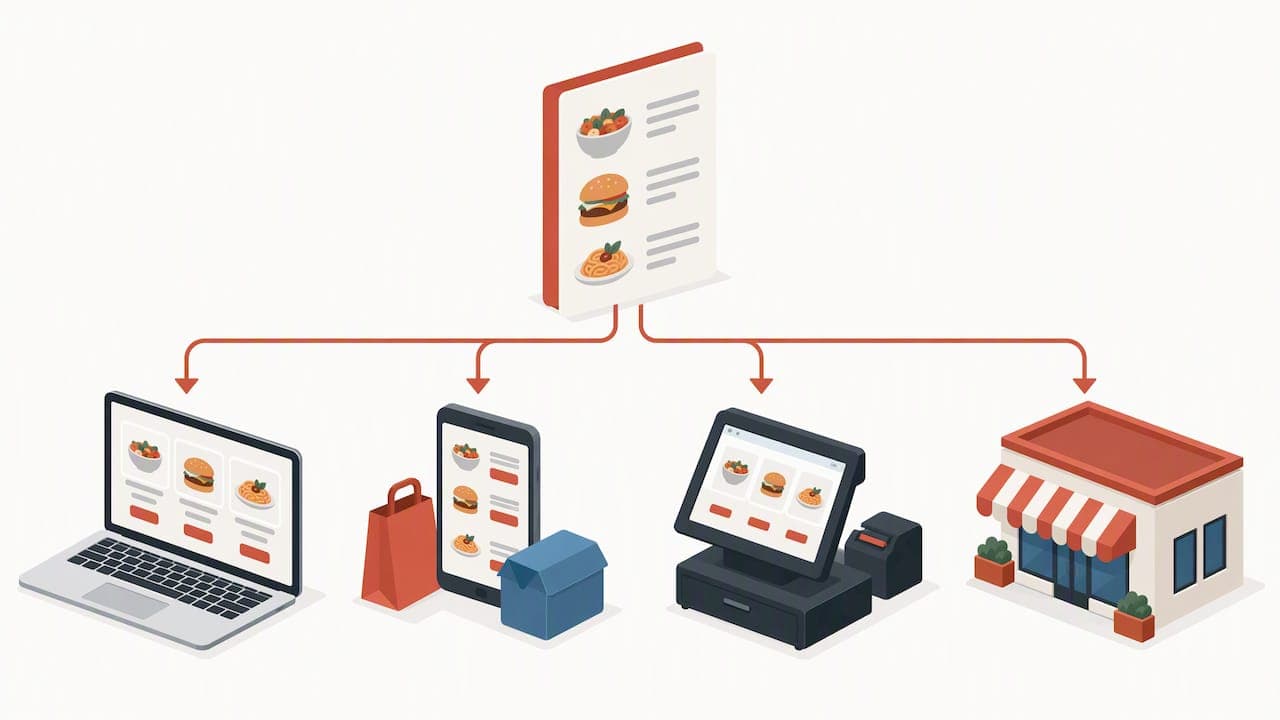
When a dish sells out or a price changes, every channel should know within moments. A single canonical menu prevents drift, where the website says one price and the till another. Our POS menu sync playbook goes through it step by step.
Loyalty and CRM
Transaction data from the POS becomes useful segments: regulars, lapsed guests, big spenders. Loyalty cards then reward the behaviour you want more of.
Reservations and table management
Linking bookings to the floor plan gives one picture of availability and stops two channels selling the same table.
Analytics and reporting
Combined sales, promotion and margin reports show which dishes and channels earn their place on the menu.
Staff management and tipping
Digital tips let guests leave gratuities for individual workers through a personal tips profile. Workers have a public profile with a rating and comments, and set their own payout schedule in the payment provider. A worker can register alone, even if the venue is not on RESTOBOT.
Pro Tip: *Start with the channel that already sends you the most orders and integrate that one fully before adding the next.*
How do POS integrations work technically?
You do not need to write code, but you should understand the patterns well enough to question a vendor. A developer guide on how POS integration works describes the common behaviour: orders pushed from a marketplace to the POS, event-driven workflows and reconciliation considerations.
- APIs: two systems exchange structured objects such as orders, menu items, modifiers and refunds on request.
- Webhooks: instead of asking "any new orders?" every minute, the sending system pushes an event the moment something happens, giving near-real-time delivery.
- Middleware or connectors: a layer in the middle translates between systems. It suits cases where several tools must talk to one POS, while a direct custom integration makes sense for one important, stable connection. A custom build can be as light as a no-code project, as in this restaurant management app example.
- Data mapping: menu IDs, modifiers, taxes, delivery fees and payment references must match across systems. A burger with an extra patty is a different item in every tool unless you map it.
- Monitoring: plan for failures such as a dropped webhook, a rejected order or a timeout. Alerts and a daily check of unsent orders catch most of them. A stable network matters too, and IT guidance for hospitality is worth a look if your connectivity is shaky.
What is the step-by-step checklist for launching integrations?
Work through the list in order. Skipping steps one and two is the most common reason go-live goes wrong.
- Choose priority channels and one canonical menu source. Decide where menu changes are made, and nowhere else.
- Prepare data mapping and sync rules before cutover. List every item, modifier, tax rate and fee, and agree what happens on a conflict.
- Write a test plan with edge cases. Test normal orders, then refunds, split bills, heavily modified dishes and cancelled orders.
- Train staff and run a rehearsal. Run a fake service with the KDS and fulfilment flow so nobody learns on a live Friday.
- Set up monitoring and reconciliation. Decide who checks failed orders daily and how sales are matched to payments weekly, and write down a manual fallback.
- Roll out in phases. Go live on one channel, watch it, then add the next. Involve the manager, a kitchen lead and one front-of-house representative at every stage.
Pro Tip: *Run the rehearsal with your slowest, most nervous team member. If they can handle it, everyone can.*
What changes day to day, and what should you measure?
Technical work only pays off if it shows up in daily numbers. Track these:
- Order errors and complaints: fewer retyped orders should mean fewer wrong dishes and refunds.
- Speed: time from order to ticket, and table turnover or delivery times.
- Admin time: hours spent on manual reconciliation should fall.
- Reporting quality: cleaner data supports better pricing, promotion and menu decisions.
Marketplace commission is 30% of the net order value plus VAT, almost 40% in total, and direct ordering avoids it. That makes channel mix one of the most important metrics on your list.
Industry reporting such as the National Restaurant Association's Restaurant 2030 report points to technology adoption and operational priorities as the direction of travel, which is why this kind of measurement is becoming standard.
What do successful integrations look like in different restaurants?
These are illustrative scenarios, not client results.
A busy café. Counter staff take walk-in orders while website orders arrive as the same kind of ticket. With ordering and payments feeding one POS, the morning rush stops depending on someone watching a tablet.
A full-service restaurant. Reservations, table management and a KDS share a data set. Hosts see real availability, and the kitchen sees courses by table, so a big party does not overwhelm one station.
A delivery-heavy kitchen. Orders come from the restaurant's own site and a courier service delivers them. The guest pays the delivery fee, the kitchen keeps the food revenue, and nothing is lost to a 30% marketplace cut on those orders.
A multi-site group. One canonical menu is edited centrally and pushed to every location, so prices and availability match everywhere and group reporting is trustworthy.
What these have in common is not the size of the budget but the discipline: one menu source, mapped data, tested edge cases and a named person watching the dashboard.
How should you handle security and compliance?
Every integration is a new door into your systems, so treat each one like one. Start with the basics: limit access to named staff, remove access when people leave, and keep software updated.
For payments, the safest pattern is to let a certified payment provider handle card data rather than storing it yourself. That keeps card numbers out of your own systems and out of your integrations. Ask each vendor how card data is handled and where it is stored.
For guest data, collect only what you need. Names, phone numbers and order history feed loyalty and CRM tools, so be clear with guests about what you keep and why. Data protection rules vary by country, so check the rules that apply to your location with a qualified adviser rather than relying on a vendor's summary.
Practical questions to ask any integration partner:
- Who can see order and customer data, and is access logged?
- Is data encrypted in transit between systems?
- What happens to your data if you leave?
- How are keys and credentials for the API stored and rotated?
Finally, keep an exit plan. If an integration is shut off or a vendor goes down, you should still be able to take and fulfil orders manually.
How do you keep integrations flexible as the restaurant grows?
The setup that suits one site and two channels often creaks at three sites and six channels. Plan for growth early, while changes are cheap.
Favour tools that connect through standard APIs and webhooks, because they can be swapped or added without rebuilding everything. Keep your canonical menu in one place and treat every other system as a consumer of it. When you open a second location, you copy a menu structure rather than rebuilding one.
Avoid hard-coding things that change often, such as delivery fees, opening hours or promotions. Store them as settings so a manager can change them without a developer.
Think about modularity too. If a delivery partner raises its fees, you should be able to disconnect it without disturbing payments or the KDS. If you launch a loyalty scheme next year, it should plug into existing sales data rather than demand a new database.
Also check how a vendor prices growth. A plan that is cheap at one site can become costly per location, per integration or per terminal. Ask what happens to the price at double your current size before you sign.
How do you troubleshoot common integration problems?
Most issues fall into a handful of patterns, and a calm checklist solves most of them.
Orders not arriving in the POS. Check connectivity first, then whether the webhook or API credentials have expired. Look at whether the order was rejected for an unmapped item.
Wrong items or missing modifiers. This is almost always a data mapping problem. Compare the menu IDs and modifier names on both sides and fix the mismatch at the source.
Menu drift. Prices or availability differ between channels. Find out who edited the menu outside the canonical source and lock that route.
Payment and POS totals disagree. Check delivery fees, taxes and refunds, which are the usual culprits. Reconcile one day at a time rather than a month.
Duplicate orders. A retry after a timeout can create twins. Ask your vendor how duplicates are detected.
Slow or frozen screens at peak. Look at network capacity and the number of devices competing for it.
When you contact support, bring evidence: the order ID, the time, the channel and a screenshot. Users often say that integration reliability and vendor support shape how happy they are with a tool, so test how fast support answers before you need it.
What do POS integrations cost?
Costs usually take a few shapes, and it helps to separate them so you can compare offers fairly.
- Subscription: a monthly or annual fee for the platform. This is the most predictable cost.
- Integration or setup fees: a one-off charge for connecting a system, which some vendors waive.
- Hardware: tablets, KDS screens, printers and terminals.
- Payment processing: a fee charged by the payment provider, which is not set by us.
- Courier fees: with a courier-only model, the delivery fee is added to the order and paid by the guest.
- Marketplace commission: 30% of the net order value plus VAT, almost 40% in total, charged to the restaurant.
Keep the last two firmly apart. A courier fee is paid by the guest and does not reduce your food revenue, while a marketplace commission comes out of what you earn.
Our own plans are subscription-based. LOYALTY starts from 39 EUR per month, and MENU and FULL plans are listed on our pricing page, with the MENU plan from 69 EUR per month and FULL from 119 EUR per month. Our platform offers POS integration.
Our view: pick one menu and defend it
Operators who integrate well tend to make one dull decision early and stick to it: there is exactly one place where the menu is edited. Every other system, the website, the delivery channels and the till, reads from it. Most of the weird problems we hear about, a price that differs online, a dish that sold out on one channel only, trace back to a second place where someone quietly edited the menu.
The second habit is starting small. Connect the channel with the most orders, prove it for a couple of weeks, then move on. We make it easy to get going: after your application is confirmed, your site is created instantly, and launching an establishment takes one day.
We also care about the people at the table. Tips for workers are available on all plans, and workers can set up a profile of their own on our tips page even if their venue is not with us. Industry research on tipped employees underlines how much gratuities matter in hospitality.
*— ADMIN*
Get your integrations live without the commission
If you want these pieces working together, we built our platform to do exactly that: website, online ordering, delivery coordination, reservations, loyalty and POS integration in one place. Our commission on orders is 0%, you pay a monthly subscription, and our platform offers POS integration.
We help with onboarding questions and adding photos. Your site is created instantly once your application is confirmed, and launch takes one day. See what is included on our pricing page, and if your team receives gratuities, point them to our tips page so they can set up a profile. For a wider look at how the pieces fit, read about launching a commission-free tech stack.
FAQ
What are the best POS systems for restaurants?
The best system is the one that fits your service style and connects to the channels you use. Compare how well each handles online ordering, payments, kitchen routing and reporting, rather than looking only at the till screen.
How do I choose billing software for a restaurant?
Look for software that records sales, handles payments and reconciles cleanly with your channels. Check that it integrates with your POS and that refunds and delivery fees appear correctly in reports.
What are the alternatives to Toast?
Several restaurant POS and management platforms compete in this space, and the right one depends on your country, size and integration needs. Shortlist by the integrations you need and test how each handles your edge cases before you commit.
Do I need an API to integrate my POS?
Most integrations use APIs and webhooks, but you usually do not write them yourself. A vendor or connector handles the technical layer, while you focus on data mapping and testing.