

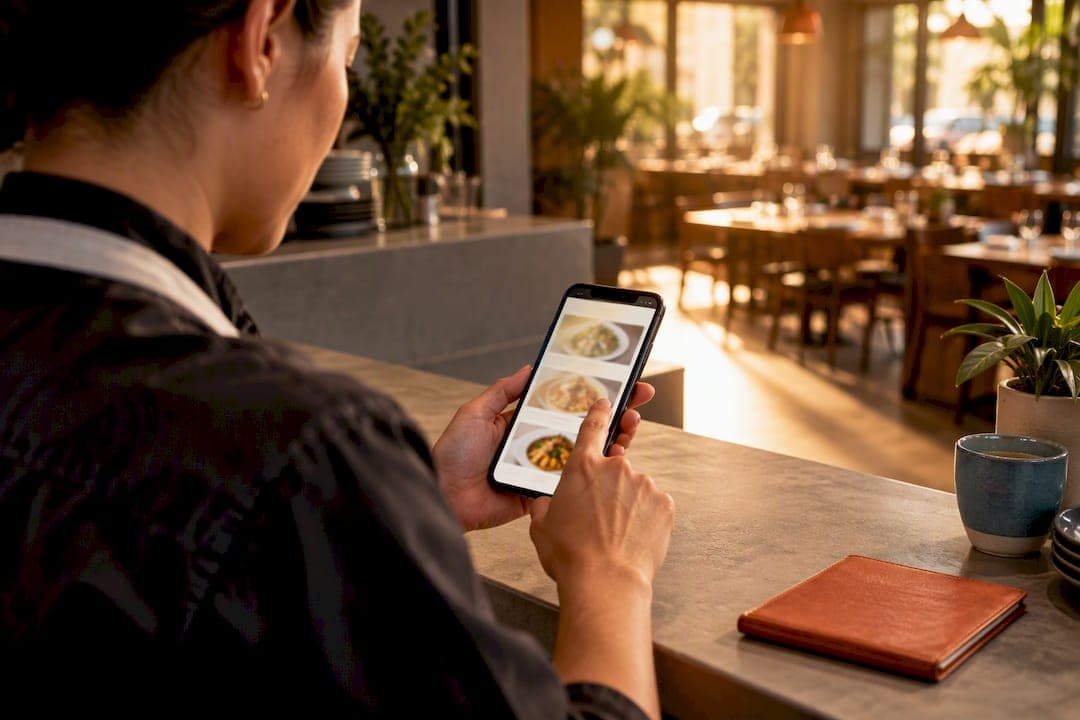
Test your menu mobile-first, then let your POS data tell you which items to push. That combination, ranked "Stars" by contribution margin pushed to the top of a phone-friendly layout, is the single fastest way to raise average order value and cut abandoned carts. Pair it with guest checkout and one strong photo per featured item; most operators see the payoff inside a few weeks, not months.
***
TL;DR:
>
- Prioritize mobile-first menu design by featuring high-margin "Star" items with strong photos and simple descriptions to boost order value and reduce abandonment. - Implement a recurring menu review process using POS data to classify items into stars, cash cows, puzzles, and dogs, then optimize one variable at a time based on measurable results. - Focus on speedy, user-friendly mobile ordering by compressing images, streamlining navigation, and ensuring checkout is quick, clear, and free of unnecessary prompts or upsells. - Price items by contribution margin rather than food-cost percentage alone, and leverage off-premises bundles and app-only deals to increase profit while satisfying customer demand. - Track key metrics such as item views, conversion rates, and order value monthly, segment data by channel and time, and test changes over two to four weeks to inform continuous menu improvements.
***
Table of Contents
- Quick, High-Impact Fixes You Can Make This Week
- The Menu Engineering Workflow: POS Data, Classification, and Monthly Review
- Mobile-First Design: Photos, Descriptions, and a Checkout That Doesn't Lose Orders
- Pricing, Bundles, and Deals That Protect Your Margin
- What to Track: Metrics, Segments, and a Testing Cadence You Can Trust
- Before You Change Anything: Operational Risks Worth Checking First
- How RESTOBOT Fits Into This Workflow
- Personalizing the Menu to Match How Each Customer Orders
- Making the Menu Work for Every Customer, Including Those Using Assistive Tech
- Getting Found: SEO Basics for Your Online Menu
- An Owner's Take: Build the Rhythm Before You Chase the Perfect Menu
- Get Your Menu Optimization Workflow Running Without Marketplace Fees
- Sources
- FAQ
Quick, High-Impact Fixes You Can Make This Week
Before touching pricing or running a full menu audit, fix the things that cost you orders every single day. These are the changes with the shortest distance between "did it" and "saw it in sales."
Start with the phone experience, since that's where most orders now happen. Bump body text to at least 16 pixels, make every button large enough to tap with a thumb, and compress images so they load in under two seconds on a mobile connection. Then trim your navigation: a hungry customer should reach any dish in three taps or fewer, with category labels that describe the food, not your kitchen's internal jargon.
Here's what to knock out this week:
- Cap each category page at one scroll of choices before requiring a tap to "see more"
- Replace vague labels ("Chef's Specials") with descriptive ones ("Grilled Seafood")
- Write one 10 to 20 word description per hero item using sensory, specific language ("charred," "smoky," "hand-pulled") rather than adjectives like "delicious"
- Show prep time, current availability, and full price (with any fees) before the customer taps "add"
- Turn on guest checkout and keep the cart visible on every screen
- Build one bundle or app-only limited-time deal and pin it near the top of the menu
Pro Tip: *Don't redesign the whole menu at once. Change your top three categories first, watch conversion for a week, then roll the same fixes to the rest. You'll know what actually worked instead of guessing.*
The Menu Engineering Workflow: POS Data, Classification, and Monthly Review
Menu engineering isn't a one-time cleanup. It's a repeating cycle: pull the data, classify every item, change one thing, remeasure, and do it again next month. Cornell's revenue management research frames this as a recurring management process, not a purge you run once and forget.
- Export at least one month of item-level POS data, broken out by category, so you're comparing apples to apples within each choice set (starters against starters, not against desserts).
- Calculate contribution margin per item: price minus recipe cost. Then calculate menu mix, meaning each item's share of total sales within its category.
- Classify every item into one of four buckets. Stars carry high margin and high sales volume; feature them prominently and protect their quality. Cash Cows (sometimes called Plowhorses) sell well but carry thinner margins; consider a small price nudge or a cheaper plate presentation before touching the recipe. Puzzles have strong margin but weak sales; these need better photos, better placement, or a rename, since the profit is there but customers aren't finding the item. Dogs underperform on both counts and are candidates for removal or a full rework.
- Change one variable at a time. Move a Puzzle's position, swap its photo, or rewrite its description, then leave everything else alone.
- Remeasure over a two to four week window, long enough to smooth out day-to-day noise, then reclassify and repeat next month.
One caution worth repeating: don't chase food-cost percentage in isolation. A high-volume item with a thinner margin may need a portion or bundle adjustment, not removal. And re-cost every recipe whenever a supplier price, portion size, or packaging cost shifts. A dish that was a Star in January can quietly slide into Dog territory by March if your costs moved and nobody noticed.
Mobile-First Design: Photos, Descriptions, and a Checkout That Doesn't Lose Orders
Most of your customers are ordering from a phone held in one hand, often while distracted. Fifty-seven percent of American adults used mobile ordering recently, and that number climbs to 74% among millennials. Design for that thumb and that attention span first, then check that the desktop version still works.
On photos and copy:
- Use one clear hero image per high-margin item. A single sharp photo outperforms a gallery of mediocre ones.
- Serve images in a compressed, modern format and lazy-load anything below the fold so the first screen renders fast.
- Keep descriptions short and sensory. Name the modifiers (spice level, size, add-ons) and flag allergens clearly rather than burying them in a footnote.
On checkout, Baymard's ongoing checkout research points to a consistent set of fixes: put guest checkout first and visible, cut every field you don't strictly need, label buttons in plain language ("Place Order," not "Submit"), and validate form entries as the customer types rather than after they hit submit. Show the full cost, taxes and delivery fee included, before the final tap.
Avoid inserting upsells, surveys, or account-creation prompts mid-checkout. Save optional choices, like a side swap or extra sauce, behind a "customize" toggle so the main path stays short. Small friction removed early in the funnel tends to matter more than shaving a step off the end.
Pricing, Bundles, and Deals That Protect Your Margin
Price by contribution margin, not by food-cost percentage alone. A $14 sandwich with a $3 recipe cost and steady volume can outperform a $22 entrée with a thin margin, even though the entrée "looks" more premium on paper.
For off-premises orders specifically, bundles do heavy lifting. Nearly 80% of off-premises customers use deals like BOGO offers or off-peak discounts, and the same research found customers will pay more for packaging that keeps food quality intact during delivery.
- Build one speed-and-value bundle (main plus side plus drink) priced to beat ordering the items separately by a small, visible margin
- Test a limited-time, app-only offer to drive repeat visits without discounting your full public menu
- Show delivery fees and the final total before checkout, never as a surprise on the last screen
- Layer in a loyalty incentive, points or a signup discount, to convert a one-time promo customer into a repeat one
- Run any new promotion through your kitchen mentally first: can you fulfill 30 extra orders of it on a Friday night without backing up the line?
What to Track: Metrics, Segments, and a Testing Cadence You Can Trust
A menu change means nothing without a scorecard to judge it against. Track item views, add-to-cart rate, item-level conversion, average order value, and contribution margin per order as your core five. Layer in modifier attach rate, bundle take rate, checkout completion rate, average prep time, and refund rate to catch operational side effects a sales number alone would miss.
| Metric | What it tells you | Watch for |
|---|---|---|
| Item views | Whether customers are finding the item | Low views on a high-margin item flag a Puzzle |
| Add-to-cart rate | How compelling the photo/description is | Drop-off here means rewrite the copy first |
| Item conversion | Views that turn into completed orders | Falling conversion after a price change signals resistance |
| Average order value | Whether bundles/upsells are working | Flat AOV despite a new bundle means it's not landing |
| Contribution margin per order | Real profit impact, not just revenue | Rising sales with falling margin is a false win |
| Checkout completion rate | Friction in the ordering flow itself | A sharp drop mid-checkout usually points to a form field |
Segment every one of these by channel (website versus app versus delivery marketplace), daypart, device, new versus returning customer, and location if you run more than one. A change that looks flat overall can be a strong win at dinner and a quiet loss at lunch, and averaging the two hides both stories.
Run each test as a single-variable change over a two to four week window, long enough to average out weekday noise, then reclassify and move to the next test the following month.
Before You Change Anything: Operational Risks Worth Checking First
A menu change that spikes orders but breaks your kitchen is a loss dressed up as a win. Cornell's operational case studies tie real revenue gains to changes paired with execution and staff training, not menu edits made in isolation.
Before you promote anything new, work through this short list:
- Confirm your supplier can reliably deliver every ingredient at the volume a promoted item might now sell
- Box a delivery version of the dish and let it sit 20 minutes; check whether it still looks and tastes right
- Ask your kitchen lead whether a busy Friday can absorb the extra volume without slowing every other ticket
- Brief front-line staff on exactly what's being promoted so their suggestions match what the menu is pushing
- Pilot the change on one shift or one location before it goes live everywhere
Pro Tip: *Run every new promotion through a single Friday dinner shift before pushing it app-wide. One bad night tells you more about kitchen bottlenecks than a week of clean data ever will.*
How RESTOBOT Fits Into This Workflow
Running this playbook by hand across spreadsheets and three different ordering apps is where most owners lose momentum. The platform builds the instant website and embedded menu quickly after application approval, with omnichannel ordering across the website and a Telegram bot, item-level analytics for the classification work above, digital loyalty cards for Apple and Google Wallet, and zero commission on orders and tips. One dashboard, one data source, one place to run the monthly review instead of stitching numbers together from separate systems.
Personalizing the Menu to Match How Each Customer Orders
A static menu treats a first-time visitor the same as a regular who orders the same three dishes every week, and that's a missed opportunity on both ends. Dynamic menu adaptation uses order history, time of day, and device signals to reorder what a returning customer sees first, without hiding anything or changing prices per person.
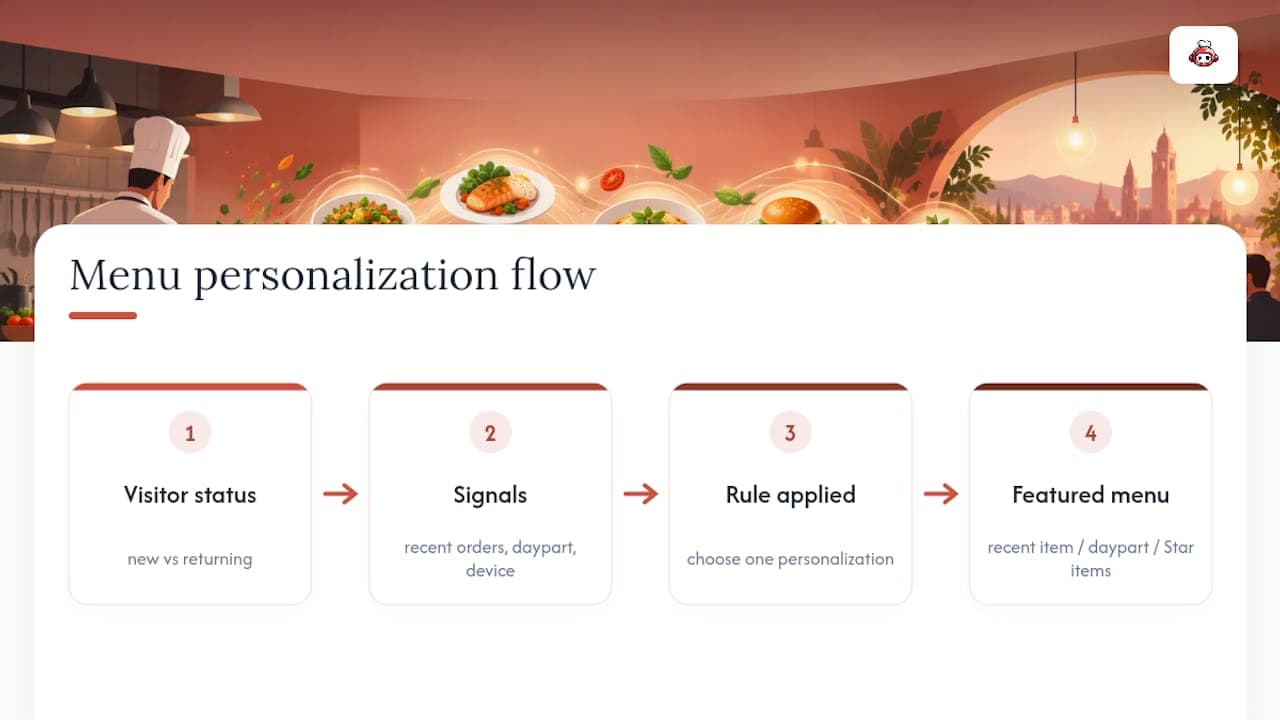
The simplest version: surface a customer's last order or favorite item at the top of the page when they return, so reordering takes one tap instead of a rebuild from scratch. A slightly more advanced version adjusts what gets featured by daypart, showing breakfast items before 11 a.m. and dinner bundles after 5 p.m., so the "top of menu" real estate always matches what people are actually likely to buy right now.
New visitors benefit from a different kind of personalization: showing your Star items (the high-margin, high-volume ones from your classification work) as the default featured set, since you have no order history to work from yet. Once that customer places a first order, the data starts feeding back into what they see next time.
Keep this simple at first. Overengineering personalization, like showing five different menu layouts based on obscure behavioral signals, adds complexity without a proportional payoff for most independent restaurants. Start with "show recent orders" and "adjust by daypart," measure the lift in reorder rate, and only add more sophistication if the data justifies it.
Making the Menu Work for Every Customer, Including Those Using Assistive Tech
An online menu that a screen reader can't parse, or that a customer with low vision can't read, is losing orders you'll never see counted as "lost." Accessibility isn't a separate project bolted onto your menu design; it's part of the same mobile-first work covered earlier.
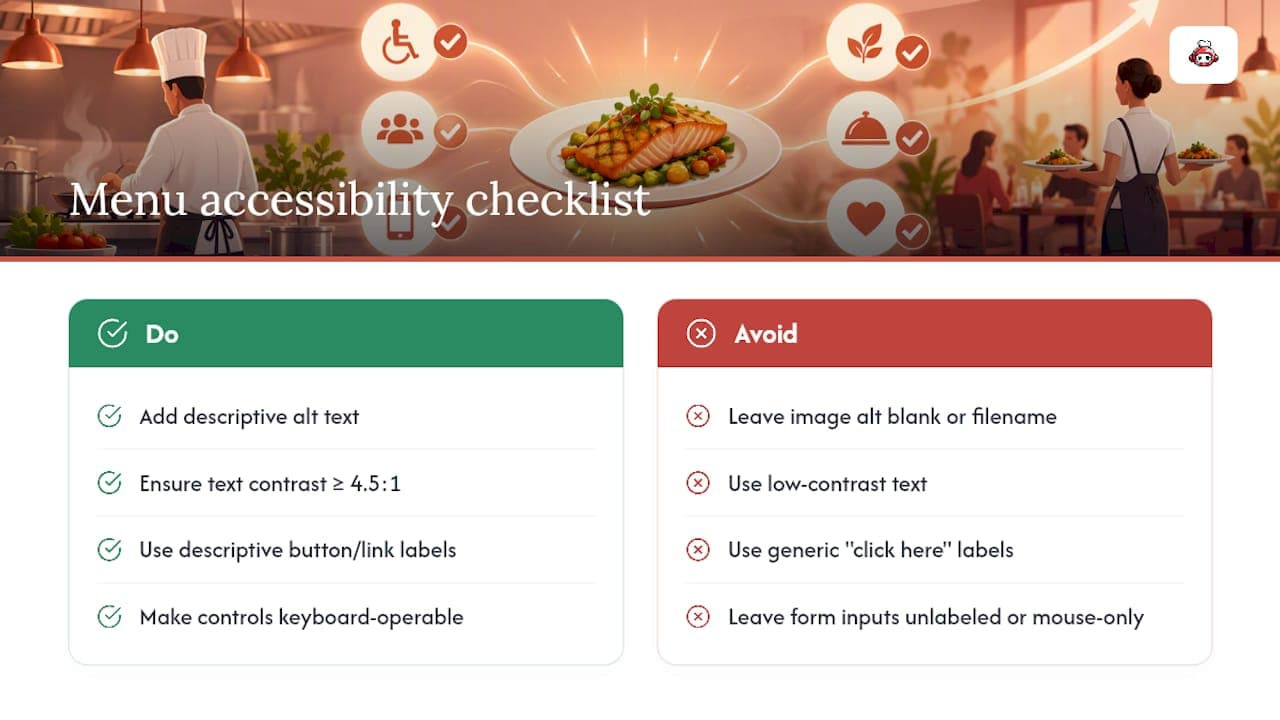
A few fixes carry outsized impact. Every food photo needs descriptive alt text ("grilled salmon with lemon and asparagus"), not a filename or a blank tag, so a screen reader can actually convey what the dish is. Text and background need sufficient contrast, generally a ratio of at least 4.5 to 1 for body copy, so someone with low vision or anyone squinting at a phone in bright sunlight can still read your prices. Buttons and links need real, descriptive labels ("Add Grilled Salmon to cart") instead of generic ones like "click here," which tell an assistive-technology customer nothing about what they're about to do.
Form fields on your checkout, the same ones covered in the design section, need proper labels tied to each input so a screen reader announces what's expected instead of leaving the customer guessing. And every interactive element, from category filters to the "add to cart" button, needs to be reachable and operable using a keyboard alone, not just a mouse or a touchscreen tap.
None of this requires a redesign. It requires an audit: run your live menu through a free accessibility checker, fix what it flags, and retest after your next design change rather than treating accessibility as a one-time box to check.
Getting Found: SEO Basics for Your Online Menu
A beautifully optimized menu does nothing if nobody finds it in a search result first. Menu SEO starts with structure: each dish or category should live on its own crawlable page or clearly indexed section, not buried inside a PDF or a JavaScript-heavy carousel that search engines struggle to read.
Write real, descriptive text around every dish, not just a name and a price. "Wood-fired margherita pizza with fresh mozzarella and basil" gives search engines (and hungry humans) far more to work with than "Pizza #3." Include your neighborhood or city naturally in your page copy and page titles, since most menu searches carry local intent ("pizza near downtown," not just "pizza").
Keep your Google Business Profile menu link pointed at your actual live menu page, not a static PDF that goes stale the moment you change a price. A mismatched or outdated Google listing is one of the most common, and most fixable, reasons a restaurant's menu underperforms in local search despite solid food and fair prices. Page speed matters here too: the same compression and lazy-loading work that helps mobile conversion also helps your search ranking, since slow-loading pages get pushed down in results.
An Owner's Take: Build the Rhythm Before You Chase the Perfect Menu
Block 30 to 60 minutes weekly to review the numbers, and one focused window monthly to actually implement changes. Test small, get your staff on board with what's being pushed, and resist the urge to overhaul everything at once. The rhythm matters more than any single fix.
*— ADMIN*
Get Your Menu Optimization Workflow Running Without Marketplace Fees
Everything above assumes you can move fast: test a bundle this week, reclassify items next month, adjust checkout the week after. That's hard to do on a platform charging you a cut of every order you're trying to optimize. The platform deploys your website and embedded menu rapidly, with zero commission on orders and tips, so a pricing test or a new bundle doesn't quietly cost you margin on top of the marketplace fee. Review the LOYALTY, MENU, and FULL plans to see which tier fits your current setup, or look into the tips feature if you want your staff collecting commission-free tips independent of whether your kitchen runs on RESTOBOT at all.
Sources
The NRA's 2025 Off-Premises Restaurant Trends report and its companion press release supply the mobile-adoption and value-deal figures cited throughout. Cornell's revenue management and restaurant revenue papers ground the menu engineering workflow. Baymard's checkout research informs every checkout fix above. For a broader industry view, see this analysis of online ordering's effect on operations.
FAQ
What is the 30/30/30 rule for restaurants?
There's no single standardized "30/30/30 rule" backed by the research covered here; the term gets used differently across operator forums, sometimes for cost splits, sometimes for time management. Rather than lean on an unverified rule, use the contribution-margin and menu-mix classification method detailed above, which comes directly from Cornell's revenue management research.
What is ERP in restaurants?
ERP stands for enterprise resource planning, software that centralizes inventory, purchasing, accounting, and sometimes labor scheduling into one system for larger, multi-location operators. Independent restaurants and small groups more often rely on a combination of POS data and an operations platform like RESTOBOT rather than a full ERP suite, since the workflow in this article, exporting POS data, classifying items, and testing changes, doesn't require enterprise-level software to run.
How does Olo work for restaurants?
Olo is a third-party ordering and delivery technology provider that restaurants integrate with to manage digital orders across multiple channels. It's one option among several off-premises technology providers; the menu optimization principles in this article, mobile-first design, contribution-margin pricing, and checkout fixes, apply regardless of which ordering platform sits underneath your menu.
What are the 7 menu pricing methods?
Common approaches include cost-plus pricing, competitor-based pricing, contribution-margin pricing, psychological pricing (like pricing just under a round number), bundle pricing, value-perception pricing, and dynamic or demand-based pricing. This article prioritizes contribution-margin pricing over food-cost-percentage pricing alone, since it's the method Cornell's research ties most directly to actual profit outcomes.
How much does RESTOBOT cost?
RESTOBOT offers three plans: LOYALTY at €49 per month, MENU at €99 per month, and FULL at €199 per month, all listed on the pricing page. The standalone tips feature for individual staff has no published price and is available separately from these restaurant plans.