


Google requires every review on your Business Profile to reflect a genuine customer experience, free of payment, incentives, or coordinated posting. You cannot delete a review yourself, even a false or unfair one; your only path is to report it through Google's Reviews Management Tool and, if denied, file a one-time appeal. Repeated violations, especially review gating or incentivized reviews, can trigger removals, profile restrictions, or suspension.
***
TL;DR:
>
- Fake reviews from non-visitors or competitors, as well as incentivized or gated reviews, violate Google's policies and can lead to profile removal or suspension. - Reporting harmful reviews requires flagging them directly in Google Maps or Business Profile manager, then submitting evidence through the reviews management tool, with appeals possible only after denial. - Google's hybrid moderation system detects suspicious review patterns, such as sudden spikes or identical wording, and enforcement on review gating practices is tightening through 2026. - Consistent, unbiased review requests sent via the same neutral link or QR code, without incentives or sentiment filtering, are the safest way to ensure policy-compliant review growth. - Business owners should avoid requesting reviews from staff, family, or vendors, and instead use standardized channels to prevent conflicts of interest and maintain review authenticity.
***
Table of Contents
- Google Reviews Policy: What's Allowed and What's Prohibited
- How Do You Report a Review That Violates Policy?
- How Does Google Detect Fake and Manipulated Reviews?
- What Can You Actually Ask Customers to Do?
- What Happens If Google Restricts or Suspends Your Profile?
- Best Practices Checklist for Compliant Review Collection
- How Does Google Handle Privacy and Data in Reviews?
- What Are the Rules for Responding to Reviews?
- Google Business Profile Reviews vs. Other Google Review Systems
- Can Competitors Post Fake Negative Reviews About You?
- What Counts as a Conflict of Interest Review?
- Practical Notes From RESTOBOT
- Keep Your Review Growth Compliant With RESTOBOT
- Sources
- FAQ
Google Reviews Policy: What's Allowed and What's Prohibited
Google's contribution policy draws a hard line between reviews shaped by a real visit and content designed to game the system. The rules apply the same way whether you run a five-table diner or a regional chain, and ignorance of a specific clause is not a defense Google recognizes during an appeal.
Prohibited content generally falls into these categories:
- Fake or misleading content, including reviews from someone who never used the business, or content posted by a competitor pretending to be a customer.
- Spam and repeated posting, such as duplicate reviews across multiple accounts or reviews copy-pasted across unrelated listings.
- Hate speech, harassment, or threats directed at staff, owners, or other reviewers.
- Illegal content, including anything promoting counterfeit goods or unlicensed activity.
- Sexually explicit or violent material, regardless of whether it's framed as a joke or exaggeration.
- Privacy violations, like posting another person's personal information without consent.
Rating manipulation is its own category, and it's the one that trips up otherwise honest restaurant owners most often. Incentivized reviews (a free appetizer for a five-star post), paid reviews, posting from multiple staff accounts, and asking employees or family members to review the business all violate policy. So does review gating, which is routing happy customers to Google and unhappy ones to a private feedback form.
Some content sits in gray territory. A review that mentions a server by name is fine; a QR code kiosk that only appears at checkout for tables that seemed satisfied is not. Regulated categories like alcohol, gambling, or health services carry extra restrictions on calls-to-action within review responses, so a bar owner offering "one free drink for a review" isn't just risking Google's rules but also wandering into FTC territory.
How Do You Report a Review That Violates Policy?
Google gives you exactly one legitimate tool for this: reporting, not deleting. Here's the flow.
- Flag the review directly on Google Maps or through your Business Profile manager by clicking the three-dot menu next to the review and selecting "Report review."
- Use the Reviews Management Tool for a more structured submission, where you select a specific reason category, such as fake engagement, spam, off-topic content, or hate speech, rather than a generic complaint.
- Wait for triage. Google's system runs the report through automated screening first, then routes ambiguous cases to a human moderator.
- Check the status. Reports typically show as decision pending, reviewed, or escalated, and resolution usually takes several days.
- File a one-time appeal if the report is denied and you still believe the review violates policy. Include timestamps, screenshots, POS records showing no transaction occurred, or any other evidence that supports your case.
- Escalate to Business Profile support if the appeal stalls, bringing the same documentation plus your case reference number.
Pro Tip: *Don't report a review just because it's negative or unfair. Google won't arbitrate customer service disputes, and a pattern of reporting legitimate criticism can flag your own account for review.*
One detail catches owners off guard: reviews removed for policy violations are not reinstated, according to Google Maps Help, so a mistaken removal request on your own end can permanently cost you a review you actually wanted to keep.
How Does Google Detect Fake and Manipulated Reviews?
Google runs a hybrid moderation system. Machine-learning models scan every incoming review first, and human moderators step in for cases the algorithm flags as ambiguous or high-risk. This two-layer setup is why a single suspicious review rarely gets pulled instantly, but a pattern of them often does.
The automated layer looks for signals that a human reviewer would probably never generate on their own:
- A sudden spike in review volume compared to your historical baseline.
- Multiple reviews with near-identical phrasing or structure.
- Reviews posted from the same device or IP address in a short window.
- Rating distributions that look statistically unnatural, like a wall of five-star reviews with no variation in language.
Industry reporting shows enforcement against review gating and on-site kiosks tightened through 2026, with more removals and profile restrictions tied to practices that selectively steer customers toward posting, according to analysis from Chris Brannan. The practical takeaway: a tablet at the host stand that only appears for tables who tipped well or smiled on the way out reads to Google's systems almost exactly like a bot farm, even when every review behind it is technically genuine.
What Can You Actually Ask Customers to Do?
The safest version of review solicitation looks almost boring: the same link, sent to everyone, every time.
Allowed practices include:
- Asking every customer to leave a review using one consistent link or QR code, regardless of how the visit went.
- Placing neutral signage at the register or on the receipt that invites feedback without steering sentiment.
- Sending a follow-up email or text to your full customer list, not a filtered segment.
Forbidden practices include:
- Review gating, or routing customers to Google only after they've indicated satisfaction elsewhere.
- Incentives of any kind, including discounts, free items, or loyalty points tied to leaving a review. If your loyalty program awards points for reviews specifically, that's a policy violation, not a marketing perk.
- On-site pressure, like a manager standing over a table asking for a review before the check is paid.
- Scripts that ask customers to mention specific staff by name, which can look like coordinated promotion rather than organic feedback.
Employees, family members, and contractors should never post reviews for the business they work for or supply, even flattering ones written in good faith. Put this in writing as a staff policy, not just a verbal rule, since Google's enforcement doesn't care whether the violation was malicious or well-meaning.
Pro Tip: *Audit any reputation software you use for a routing step that asks "How was your visit?" before showing the review button. If negative answers get funneled to a private form and positive ones get pushed to Google, that's textbook gating even if a vendor sold it to you as a "review management best practice."*
What Happens If Google Restricts or Suspends Your Profile?
Consequences scale with the severity and pattern of the violation, not just a single bad review.
- Individual review removal for content that clearly breaks policy, sometimes without notification to either party.
- Silent removals, where reviews disappear without an explicit takedown message, often after an automated sweep.
- Profile restrictions, reducing which features (like posting updates or responding publicly) your listing can use.
- Temporary or permanent suspension for repeated or severe manipulation, such as documented incentive campaigns or gating schemes.
Regulatory overlap adds another layer of risk. The FTC's rules on endorsements and reviews prohibit deceptive testimonials and review suppression in the U.S., and violations can carry civil penalties separate from anything Google does to your listing.
If you're restricted or suspended, collect evidence immediately: screenshots of your actual review-request process, POS timestamps, and staff training records showing you never incentivized or gated. File your appeal with that documentation attached, and build a review-request workflow going forward that's consistent enough to survive an audit.
Best Practices Checklist for Compliant Review Collection
A clean, auditable process protects you twice: it earns real reviews, and it holds up if Google ever asks questions.
- Ask every customer, not a filtered subset, using the same public review link across receipts, emails, and table cards.
- Standardize the channel. A QR code that leads to one Google review URL, deployed consistently across your Telegram bot messages, email footer, and printed receipts, is safer than a patchwork of tools.
- Never attach an incentive. No discount, no free side, no loyalty points tied to the act of posting.
- Never route by sentiment. One link, one destination, for every customer regardless of how the meal went.
- Respond to every review, positive and negative, professionally and without defensiveness.
- Keep internal complaints separate from the public review funnel, so unhappy customers still get heard without pressure to avoid Google.
- Set a volume threshold for your own monitoring, so a sudden 300% jump in reviews triggers an internal check before it triggers Google's.
- Audit your review tools quarterly for any setting that filters, delays, or routes based on predicted sentiment.
| Practice | Compliant Approach | Common Violation |
|---|---|---|
| Timing | Send request promptly to all customers | Delay request until visible satisfaction is confirmed |
| Channel | One consistent link/QR across all touchpoints | Different links for different customer segments |
| Incentive | No reward tied to posting | Discount, item, or points for a review |
| Routing | Same destination for every response | Sentiment-based redirect to private form |
When a high-profile negative review appears, resist the urge to solicit a wave of counter-reviews. Respond publicly, address the specific complaint, and let your normal, steady request cadence continue rather than launching a visible campaign that looks like damage control to Google's detection systems.
How Does Google Handle Privacy and Data in Reviews?
Reviewers' personal information carries real protection under Google's policies, and that protection cuts both ways for business owners. A customer's name, profile photo, and review history are visible publicly, but Google restricts businesses from using that information outside the platform, such as scraping reviewer names to contact them directly about a negative post.
Posting someone else's private information, whether it's a phone number, home address, or a photo taken without consent, inside a review or a business response violates policy and can get the content removed regardless of who posted it. This matters for owners who get tempted to publicly identify a reviewer they believe is lying, perhaps by naming which reservation slot or delivery order they think matches the complaint. That kind of response can itself become a reportable privacy violation.
Google also retains data about reviewer behavior, device signals, and posting patterns for its own moderation systems, which is part of how it detects the fake-account and multiple-posting patterns discussed earlier. Business owners don't get access to that backend data, and requesting a reviewer's IP address or account details from Google as "proof" of a fake review isn't something the reporting tool provides. Your evidence needs to come from your own records, like POS logs or reservation timestamps, not from Google's internal data on the reviewer.
What Are the Rules for Responding to Reviews?
Google gives business owners open latitude to respond publicly to any review, but that latitude comes with the same content restrictions that apply to reviews themselves. A response can't include harassment, hate speech, or someone else's private information, and Google can remove an owner's reply independently of the review it's attached to.
Practical guidelines worth following:
- Respond to negative reviews without disputing basic facts in a way that looks defensive; address the concern and note the corrective step taken.
- Never offer a discount or refund in a public response explicitly tied to editing or removing the review, since that can read as post-hoc incentivization.
- Avoid naming reviewers by full name or including identifying details in your reply, even when you're certain you know who they are.
- Keep responses professional even when a review is clearly false; a hostile public reply does more reputational damage than the original review.
One habit worth building: respond within a few days of every review, not just the negative ones. Consistent responses across positive and negative reviews signal an actively managed profile, and that consistency also happens to look nothing like the sporadic, defensive posting pattern automated systems associate with manipulation attempts.
Google Business Profile Reviews vs. Other Google Review Systems
The reviews attached to your Business Profile on Maps and Search operate under the contribution policy covering user-generated content across Google's mapping products. That's a different rulebook, administered separately, from reviews on Google Play or the Google Store.
Google Store review guidelines focus on app and product feedback specifically, banning promotional content, personal contact information, and reviews unrelated to the actual product experience, and they rely partly on third-party moderation vendors rather than Google's own hybrid system. A restaurant with its own ordering app might see reviews on both surfaces: a Business Profile review about the dine-in experience, and a separate app review about whether the checkout flow crashed.
The practical difference for a restaurant owner is where enforcement and reporting happen. A fake review on your Maps listing gets reported through the Business Profile Reviews Management Tool discussed earlier. A fake or abusive review on your restaurant's mobile app, if you have one, gets reported through a completely separate Play Store or App Store flow, with its own timeline and its own moderation team. Confusing the two systems is a common reason owners report a review through the wrong channel and then wonder why nothing happens for weeks.
Can Competitors Post Fake Negative Reviews About You?
Competitor sabotage is explicitly covered under Google's fake-engagement rules, and it's one of the more clear-cut violation categories to report. A review from someone who never patronized your business, especially one that reads like it's describing a different establishment or uses generic complaints with no specific details, qualifies as fake content under the contribution policy.
The catch is proof. Google doesn't take your word that a review came from a competitor; you need supporting evidence. Useful signals include a reviewer account with a pattern of one-star reviews left exclusively for businesses in your category and area, a review that references details inconsistent with your actual location or menu, or a reviewer profile with no other review history at all, posted right after a public dispute or a new competitor opening nearby.
Report it the same way you'd report any fake review, selecting the "fake engagement" or "not based on a genuine experience" category in the Reviews Management Tool, and include whatever circumstantial evidence you have in the appeal if the first report is denied. Don't publicly accuse a named competitor in your response to the review itself; that response is visible to everyone and can expose you to a defamation claim even if your suspicion turns out to be accurate. Let the report process run and keep your public reply factual and short.
What Counts as a Conflict of Interest Review?
Google's policy treats a conflict of interest as any review where the person posting has a financial, personal, or professional stake in the business they're reviewing, and that stake goes undisclosed or the review exists specifically because of that relationship.
The clearest examples include an owner reviewing their own business under a personal or alternate account, an employee posting a glowing review of their workplace, or a family member of the owner reviewing the business without disclosing the relationship. A vendor who supplies your restaurant leaving a five-star review, or a marketing consultant you hired posting reviews as part of a paid campaign, both fall under the same restriction.
This extends further than most owners assume. A friend of the owner posting a review as a favor, even with no direct financial tie, blurs into the same territory if the review was solicited specifically because of that personal relationship rather than an actual dining visit. Google's prohibited content policy doesn't require proof of payment to flag conflict-of-interest content; a demonstrable relationship plus a lack of a genuine, independent experience is enough.
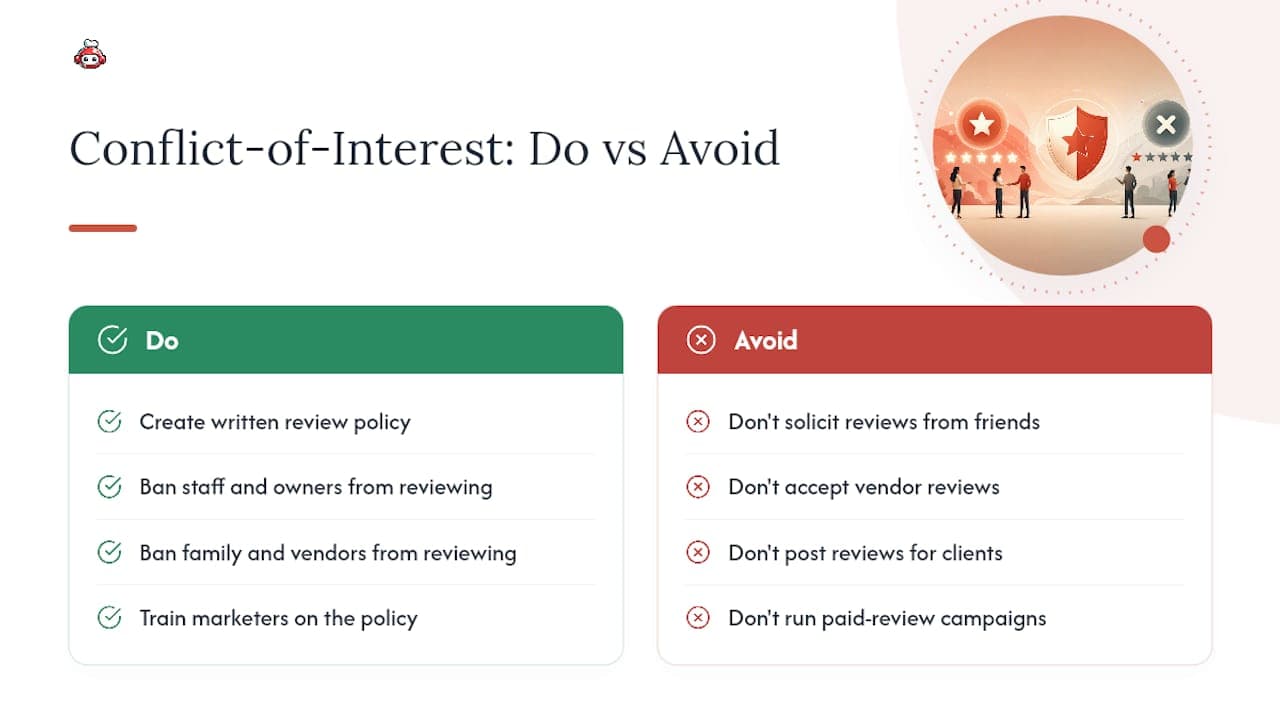
The fix is procedural: put a written policy in place barring staff, owners, family, and vendors from reviewing the business, and make sure anyone managing your marketing understands this applies to them too. A single conflict-of-interest review rarely triggers profile-level action on its own, but a documented pattern of them is exactly the kind of evidence that supports a harsher enforcement response.
Practical Notes From RESTOBOT
Restaurants that treat review requests as a routine, automated step, the same link to every table, every order, every reservation, tend to build cleaner, faster-growing profiles than ones that rely on staff judgment call by call. Consistency reads as authentic to Google's systems precisely because it's boring: no spikes, no sentiment filtering, no scripts.
RESTOBOT's clients avoid gating by design: the same review link goes out through every channel, whether it's the website, the Telegram bot, or a table QR code, with no branch logic based on how the visit went.
*— ADMIN*
Keep Your Review Growth Compliant With RESTOBOT
Running review requests through five different tools, a receipt printer, a staff script, a third-party kiosk, is exactly how businesses accidentally end up gating without realizing it. RESTOBOT centralizes review collection into one consistent flow: a single neutral link or QR code that appears the same way on every receipt, confirmation email, and table card, sent to every guest regardless of how the visit went.

There's no sentiment-based routing built into the system, no branch logic that shows the Google link only to happy tables, because that's precisely the pattern Google's enforcement targets. RESTOBOT pairs this with the same omnichannel ordering and reservation tools restaurants already use, so review requests ride on infrastructure you're running anyway instead of a bolted-on gadget at the host stand.
If you're not sure whether your current review-request setup counts as gating, check out RESTOBOT's platform and ask for a quick audit of your existing flow before your next marketing push.
Sources
FAQ
Can I delete a negative Google review myself?
No. Business owners cannot directly delete customer reviews; you can only report a review through the Reviews Management Tool if it violates policy.
How long does Google take to review a reported review?
Reports typically take several days to evaluate, moving through automated screening first and human review for ambiguous cases, according to Google's own guidance.
Is offering a discount for a Google review allowed?
No. Incentivizing reviews with discounts, free items, or loyalty points is explicitly prohibited under Google's contribution policy, regardless of the review's actual content.
What is review gating and why is it banned?
Review gating means routing customers to Google only after they show signs of satisfaction, while steering unhappy customers elsewhere; it creates an artificially inflated rating and violates Google's rules on authentic feedback.
Can I ask my staff to review my own restaurant?
No. Employees, family members, and contractors leaving reviews for a business they're connected to counts as a conflict of interest violation, even without payment involved. A platform like RESTOBOT that uses one uniform review link for every guest helps keep your request process separate from this kind of internal posting risk.
Recommended
- How to get 100 Google reviews per month for your restaurant — automatically | RESTOBOT | RESTOBOT
- Reserve with Google for restaurants: how to set it up in 1 day | RESTOBOT | RESTOBOT
- RESTOBOT Blog — guides for restaurants | RESTOBOT | RESTOBOT
- Apple Wallet and Google Wallet loyalty cards for restaurants — end of paper stamp cards | RESTOBOT | RESTOBOT