

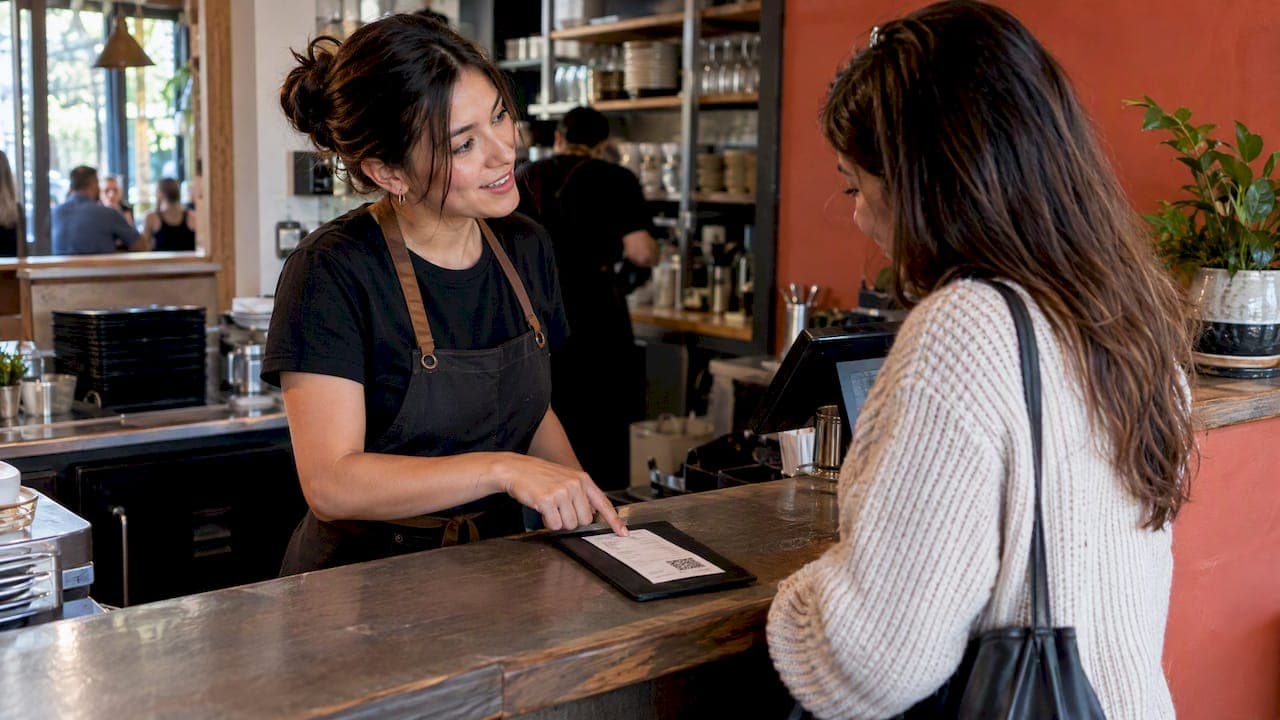
The most reliable way to get more Google reviews is to make leaving one take under 30 seconds, then ask every happy guest at the right moment. Create your Google review link or QR code, put it where guests already look (the receipt, the table, the thank-you message), train staff to ask after a good experience, and reply to every review you get. Do all of that without offering rewards or filtering out unhappy guests, because Google and UK consumer law both treat those tactics as manipulation.
This guide walks through each step in the order you would do it, with the rules that keep your reviews safe.
TL;DR
- Generate your review link and QR code in your Google Business Profile, then print it on receipts, table cards and thank-you messages.
- Ask at the moment of a good experience, in person or straight after the visit, and keep the request short and personal.
- Never pay, discount or reward guests for reviews, and never send only happy guests to Google. Both break Google's rules, and undisclosed incentives are also a problem under UK law.
- Reply to every review, quickly and politely, and treat negative ones as free feedback.
- Automate the routine part (sending the request) so every guest gets asked, not just the ones your team remembers.
Table of Contents
- Why the number and recency of reviews matter
- Step 1: Claim and tidy your Business Profile
- Step 2: Create your review link and QR code
- Step 3: Ask at the right moment
- Step 4: Stay inside the rules
- Step 5: Reply to every review
- Step 6: Turn feedback into better service
- Perspective: why we think asking should be automatic
- Automating review requests without breaking the rules
- What about the staff who earn those reviews?
- Promo: put it all in one place
- A 30-day plan to increase your Google reviews
- FAQ
- Sources
Why the number and recency of reviews matter
Reviews are the first thing many guests read before booking a table. Sites ranking for this topic repeat that a higher volume of positive reviews helps a restaurant appear in local search, though Google does not publish an exact formula, so treat it as a likely benefit rather than a guarantee. What is certain is the practical effect: a profile with 400 recent reviews looks alive, and one with 30 reviews from three years ago looks forgotten.
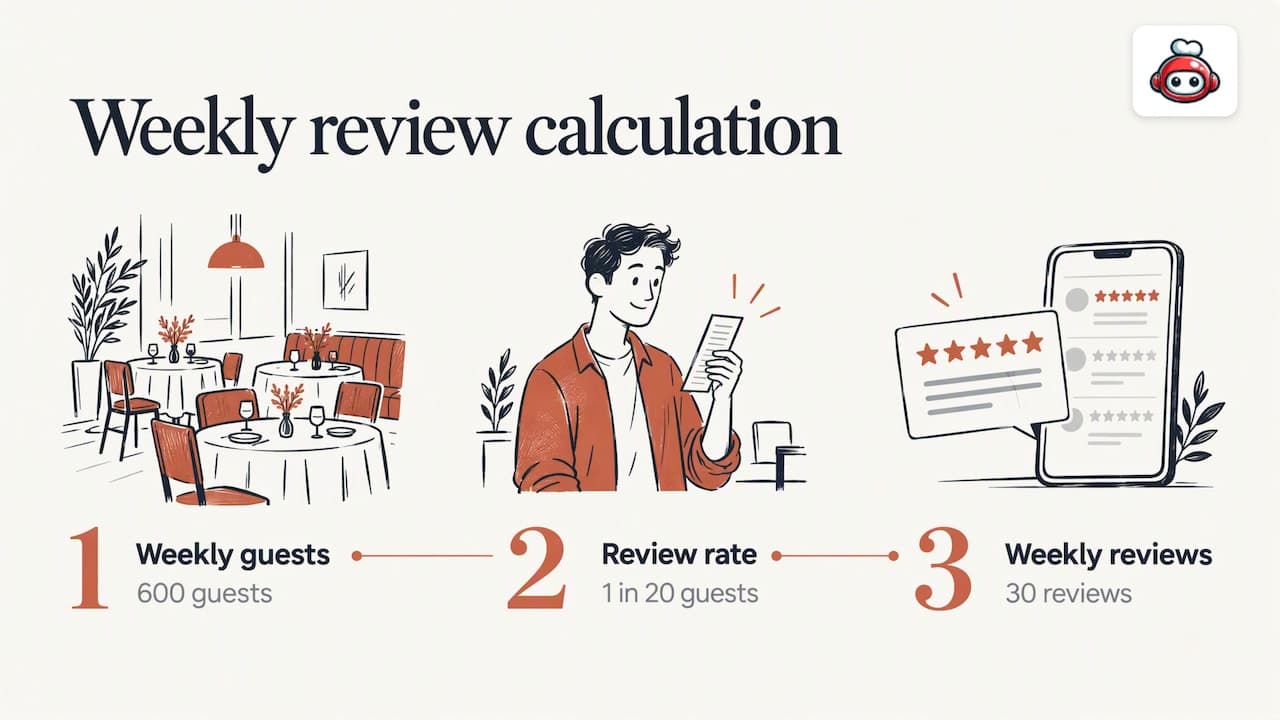
Set a simple target and review it every few months. A realistic one is a number of new reviews per week, based on your covers. If you serve 600 guests a week and one in 20 leaves a review, that is 30 reviews a week. Most restaurants sit well below that, which is why the gap is almost always in asking, not in food or service.
Step 1: Claim and tidy your Business Profile
You cannot reply to reviews, or generate a review link, until the profile is verified. Google's restaurant guide covers the basics: claim and verify the profile, keep your business information and menu current, add interior and exterior photos, and create posts. Guests who find a complete, active profile are more willing to add to it.
A quick check before you start asking for reviews:
- Opening hours, phone number and address are correct, including bank holiday hours.
- The menu is current and links to your ordering or booking page.
- Photos show the room and the food as it looks today.
- Someone on your team has owner access and gets notifications for new reviews.
If you want a fast walk-through, our 10-minute Google Maps profile check covers the same ground.
Step 2: Create your review link and QR code
Google makes this easy. In your Business Profile, open Read reviews and choose Get more reviews, then copy the link or download the QR code from a computer browser. Google suggests putting it on receipts, thank-you emails, the end of chats or in-store displays. It can also be shared by email, WhatsApp or Facebook.
Two practical points:
- Guests need to be signed in to a Google Account to post. A non-Gmail email address can be used to create one, so a guest without Gmail is not blocked.
- Test the code yourself on an iPhone and an Android phone, in the lighting of your dining room, before printing 200 copies.
For more detail on the formats, see our guides to Google review links for SMS, receipts and QR codes and the Google review QR code roll-out.
Where QR codes work best in a restaurant
| Placement | Why it works | Watch out for |
|---|---|---|
| Printed receipt or card wallet | Guest is relaxed, phone is already out | Needs a short prompt line, not just a code |
| Table card or menu back | Visible throughout the meal | Looks cluttered if it competes with the menu |
| Counter or till sign (cafes, takeaways) | Catches queueing guests | Lower conversion than a personal ask |
| Thank-you message after the visit | Easy to tap, no printing | Must go out within hours, not days |
| Takeaway bag sticker | Reaches delivery and collection guests | Guest may be eating, so make the message brief |
A code on its own performs poorly. A code with one sentence beside it ("Enjoyed tonight? A quick Google review helps a small team like ours") performs better, because it tells the guest what to do and why.
Step 3: Ask at the right moment
Timing matters more than wording. A New Zealand local-government tourism guide advises asking when you know the guest had a good experience, using an in-venue sign or an end-of-visit request. Mailchimp's advice on review requests is similar: keep them brief and personal, send them after the interaction, include a direct link, and avoid asking too often or at the wrong time.
Translated to a restaurant floor:
- At the table. When a guest says the meal was lovely, that is your moment. "That's so kind. Would you mind putting that on Google? The code is on your receipt."
- At payment. Hand over the receipt with the QR code and one line of thanks.
- After the visit. A message the same evening, while the meal is fresh, with a direct link and one clear action.
- After a booking or an order. Guests who booked through your website or ordered online are already in your system, so you can follow up without chasing.
What to avoid: asking a guest who has just complained, asking in the middle of service, or sending three reminders. One polite request is enough.
A short script your team can use
Keep it to two sentences and let staff use their own words. Something like: "I'm really glad you enjoyed it. If you have a minute, a Google review makes a real difference to us, and the code is right there on the bill." Personal beats scripted every time, so give staff the principle, not a speech to recite.
Step 4: Stay inside the rules
This is the part that protects the reviews you have worked for.
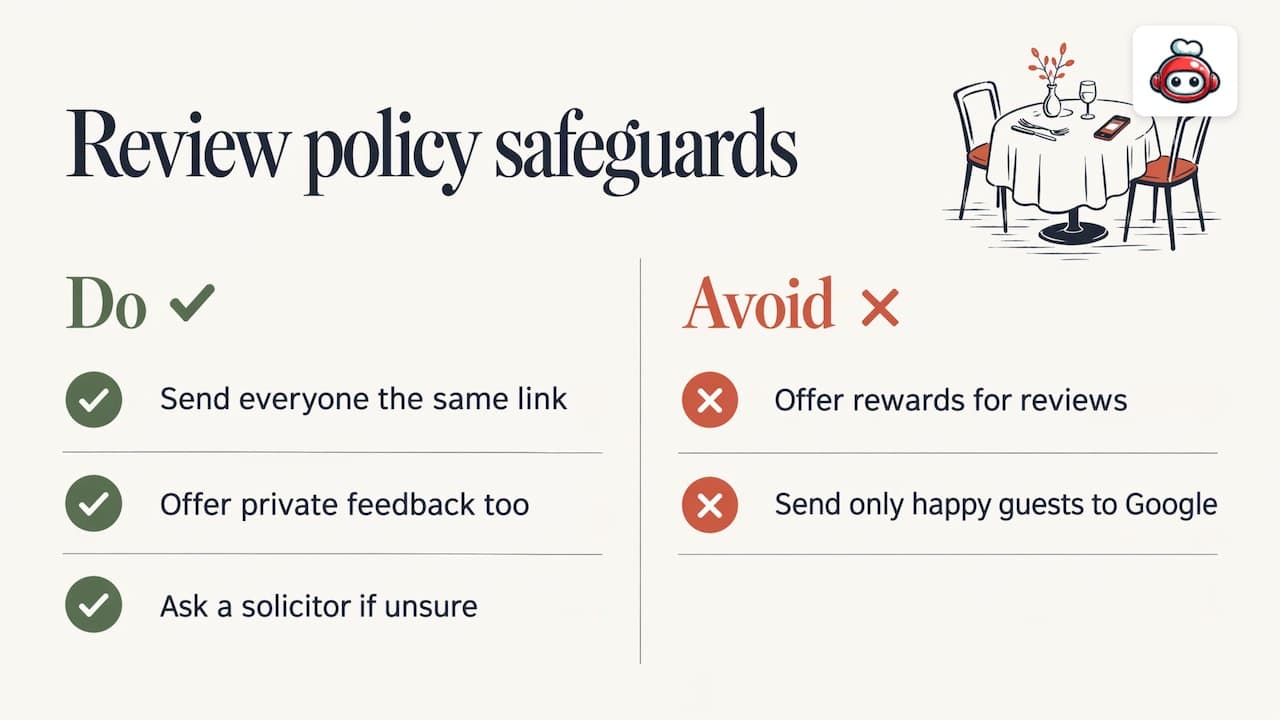
No incentives. Google requires reviews to reflect genuine experiences and prohibits incentives, including free or discounted goods or services, for posting, changing or removing reviews. A free dessert in exchange for five stars is out. So is a prize draw for reviewers.
No review gating. Review gating means asking guests whether they were happy and only sending the happy ones to Google. Google's Maps content policy treats this as rating manipulation, as explained in this overview of the gating policy. Send the same link to everyone. Offer a private feedback address as well if you like, but never instead of the public link.
UK law. In the UK, the Digital Markets, Competition and Consumers Act 2024 bans fake and misleading consumer reviews, including undisclosed incentivised reviews, and the Competition and Markets Authority enforces it. That is one more reason to keep every request honest. We are not lawyers; if you are unsure whether a specific campaign is compliant, ask a solicitor or read the CMA's own guidance.
For a fuller explanation, read what Google's reviews policy means for your business.
Step 5: Reply to every review
Replies do two jobs. They show the reviewer you listened, and they show every future reader how you treat guests. Google's advice is to reply professionally, politely and promptly. It also recommends replies that are short, simple, useful and conversational rather than promotional, and tailored to the reviewer instead of one identical thank-you pasted everywhere.
Replying to positive reviews
Name something specific the guest mentioned (the lamb shoulder, the quick service on a busy Friday) and invite them back. Two sentences are enough.
Replying to negative reviews
Google's guidance for negative reviews is to protect privacy, avoid personal attacks, acknowledge mistakes where appropriate, apologise with empathy and move complicated discussions offline. In practice:
- Thank them for the feedback, and apologise for the specific issue.
- Do not mention names, booking details or anything that identifies other guests.
- Offer a contact (a manager's email or phone line) to resolve it.
- Do not argue, even when the review is unfair. Future readers judge your tone, not the reviewer's.
Reviews that break the rules
If a review looks fake, off-topic or abusive, you can flag it as violating Google's content policies. Your profile must be verified to reply. Google also checks replies for policy compliance, which usually takes around 10 minutes but can take up to 30 days, so do not panic if a reply does not appear immediately.
We have written three reply paths with ready scripts in how to respond to Google reviews.
Step 6: Turn feedback into better service
Reviews are free market research. Google suggests using negative reviews to understand what customers expect and to improve future experiences, replying constructively and following up on concerns. Google's own restaurant guide also frames the star rating as a result of operations: its own FAQ answer points to food quality, service and atmosphere as the real levers.
A 15-minute monthly routine is enough:
- Read every review from the last 30 days.
- Tag each one: food, speed, service, atmosphere, price, booking or delivery.
- Pick the one tag that appears most often in negative reviews, and fix it first.
- Tell the team about the specific praise too. A named compliment is the best motivation you can give a waiter.
Perspective: why we think asking should be automatic
At RESTOBOT we see the same pattern in restaurants of every size: the food is good, the guests are happy, and almost nobody is asked to say so. A manager remembers to ask on a quiet Tuesday and forgets on a packed Saturday, which is exactly when the most guests are there.
>
That is why we built review boosting into the platform alongside the website, online ordering, reservations and loyalty cards. When a guest has ordered or booked through your channels, the request to review on Google and TripAdvisor can go out as part of the normal flow, with the same link for everyone and no gating. Consistency, not cleverness, is what moves the numbers.
>
We also think the guest relationship should belong to the restaurant. We charge a monthly subscription and no commission on orders, so the data and the money stay with you, and so do the reviews that follow.
>
*the author*
Automating review requests without breaking the rules
Manual asking works, but it depends on memory. Automation removes that dependency: every booking, order or visit triggers the same polite message with the same link. Read how we set this up in automating review requests in an afternoon, or see the approach behind collecting 100 Google reviews a month automatically.
If you want to compare tools for monitoring and replying, this step-by-step guide to managing online reputation is a sensible starting point. Whatever you choose, check three things: it sends the same link to every guest, it does not filter by sentiment, and it does not offer rewards.
Once reviews are growing, show them off. Our guide to embedding Google reviews on your website explains the free widget options.
What about the staff who earn those reviews?
A review of the restaurant is not the only way to recognise good service. Staff should not write or solicit glowing reviews of their own workplace, as that would defeat the point of genuine feedback. A better route is to let guests recognise the individual. With RESTOBOT Online tips, a waiter, bartender or barista creates a personal profile and guests scan a QR code to leave a voluntary tip, a rating and a comment. The money goes to the worker's own account with no platform commission. The worker sets the payout schedule with the payment provider, and the profile can be used even if the venue is not on RESTOBOT.
For the venue, this is a useful companion to Google reviews: public praise lands on a named person, and happy guests are already in a positive frame of mind. Tips are available on all plans. If anyone asks about the tax side of tips, that is the worker's own responsibility.
Promo: put it all in one place
If you would rather not stitch together a website, a menu, a booking form and a review tool, RESTOBOT combines them. Plans start at €39 per month (LOYALTY), €69 per month (MENU) and €119 per month (FULL), or €29, €59 and €99 per year on the annual prices listed. You can launch your site instantly and go live within one day. See MENU and FULL plan details to choose the one that fits your venue.
A 30-day plan to increase your Google reviews
| Week | Action |
|---|---|
| 1 | Verify the profile, fix hours and photos, generate the link and QR code |
| 2 | Print codes for receipts and tables, brief the team on the two-sentence ask |
| 3 | Switch on a post-visit message for bookings and online orders, reply to every existing review |
| 4 | Count new reviews, tag the themes, fix the top complaint and share praise with the team |
Repeat monthly. Growth is gradual, and the compounding effect of steady asking is what matters.
FAQ
Can I offer a discount for a Google review?
No. Google prohibits incentives of any kind, including free or discounted goods or services, for posting, changing or removing a review. In the UK, undisclosed incentivised reviews are also a target of consumer-protection enforcement. Thank guests warmly instead.
How many Google reviews should a restaurant aim for?
There is no official number. Set a target based on your covers, such as a set number of new reviews each week, and check progress every few months. Steady recent reviews matter more than one burst followed by silence.
Can I ask only happy customers to review us?
You can choose a good moment to ask, such as when a guest compliments the meal, but you should not screen guests and send only the satisfied ones to Google. That is review gating, which Google treats as rating manipulation. Send the same link to everyone.
Do I need to reply to every review?
Yes, as far as you can. Replying to positive and negative reviews shows guests that feedback matters. Keep replies short, specific and polite, and flag any review that breaks Google's content policies.
Can guests without a Gmail address leave a review?
Yes. They need a Google Account, but a non-Gmail email address can be used to create one. A QR code that opens straight to your review form keeps the process quick.
Sources
- Tips to get more reviews, Google Business Profile Help
- Create a Google link or QR code to request reviews, Google Business Profile Help
- Manage customer reviews, Google Business Profile Help
- Get started with a Business Profile for your restaurant, Google Business Profile Help
- Google Reviews tourism playbook, Otago Regional Council
- How to Ask for Google Reviews, Mailchimp
- CMA begins to crack down on fake website reviews, EM Law
- Google review gating policy overview, Sterling Sky