


A combo meal ordered online is a fixed bundle, usually a main, a side and a drink, sold at one price and delivered or collected ready to eat. It is not a meal kit and it is not a supermarket ready meal. If you are ordering, the things to check are what is in the bundle, what can be swapped, and the allergen details. If you run a restaurant, the job is to list each combo clearly, price it so the saving is obvious, and keep your own menu in control rather than handing a third of every order to a marketplace.
This guide covers both sides, because the same details cause problems for each.
TL;DR
- A combo meal is a prepared bundle at a single price. Meal kits arrive as raw ingredients, and prepared meals usually need reheating.
- Before ordering, check the current menu, the pickup or delivery window, any substitutions and the allergen information. Write allergy requests clearly.
- Restaurants should show every component of a combo, the swap options and one clear price, and keep the online menu in line with the kitchen.
- Marketplaces charge 30% of the net order value plus VAT, almost 40% in total. RESTOBOT charges 0% commission on orders and only a monthly subscription.
- A restaurant website with its own ordering can go live in a day.
Table of Contents
- What a combo meal online actually is
- What to check before you order a combo online
- Why restaurants sell combos
- How to present combos clearly on your online menu
- Pricing combos without confusing guests
- The commission problem
- Our perspective: combos belong on your own channel
- Fulfilling combo orders without chaos
- Getting found for combos
- Put your combos on your own site with RESTOBOT
- FAQ
- Sources
What a combo meal online actually is
Search for "combo meals online" in the UK and you will see a mixed bag: restaurant menus on delivery apps, weekly meal boxes, ready meals, and even Cambridge restaurant kits to cook at home. They are different products.
A combo meal is a set of items from one restaurant, priced together. Think a burger, chips and a drink, a curry with rice and a naan, or a lunch box with a main and two sides. It is cooked by the venue and arrives ready to eat.
A meal kit is something else. According to Food & Wine's testing of delivery services, kits include all or most of the raw ingredients for a dish, which you still prepare and cook yourself, while prepared meals arrive fully cooked and usually need reheating. A combo sits closest to the second group, except that it is typically made fresh for your order and eaten straight away.
The distinction matters for three practical reasons:
- Timing. A combo is meant to be eaten within minutes of arriving. A kit or ready meal can wait in the fridge.
- Customisation. A combo can often be changed at the order stage (no onions, swap the side). A box is fixed.
- Responsibility. With a combo, the restaurant's kitchen handles the allergens and the order accuracy. With a kit, you do the cooking.
What to check before you order a combo online
Most bad combo orders come from small assumptions: a menu that was out of date, a drink you thought was included, a missing sauce. A short routine prevents most of them.
Read the bundle line by line
Check exactly what the price covers. Is the drink a can or a fountain cup? Is the side a regular or a large? Are dips and sauces included or extra? If the listing does not say, assume nothing and look for a description or message the restaurant.
Use a current menu and check the window
A pickup checklist from Menus.top advises using a current menu, checking opening hours and pickup windows, and writing allergy requests clearly. Combos are often limited to lunchtime or certain days, so confirm that the deal is valid for the time you are ordering.
Allergies: ask, do not assume
If anyone eating has an allergy, treat a substitution with care. The Food Standards Agency says that for takeaways, businesses must provide allergen information before you buy and again when the food is delivered, and must tell you whether the food contains any of the 14 allergens. Its guidance on ordering food with an allergy also advises you to ask whether a meal is suitable for you and whether its ingredients have changed.
Swapping a side does not make a combo safe by itself. The same guidance says you can ask how the kitchen handles food and whether cross-contamination is possible. Do that before you pay, not at the door.
Ordering for a group
Group combos are where errors multiply. Based on the same checklist, a few habits help:
- Have one person place the order and another confirm it.
- Keep a shared note of recurring preferences, so you are not rebuilding the order from memory each time.
- Read the basket from bottom to top to catch mistakes the eye skips.
- Group items by person, and double-check counts of sides and sauces.
- Label special requests clearly so the kitchen can see them during assembly.
The Food Standards Agency adds one more tip for groups: you can ask the business to label containers so everyone knows which is theirs. That is especially useful when one combo is nut-free and the rest are not.
If you are planning a larger event order, such as a team lunch of twenty combos, speak to the restaurant directly rather than keying it into the app. Many venues offer a dedicated route for this, and it is where portion assumptions get tested. A common mistake is ordering one combo per person when some guests want a larger main, or ordering sides for the table separately and duplicating them.
Why restaurants sell combos
For a venue, a combo does several jobs at once. It gives the customer a quick decision, lifts the average order by pulling in a side and a drink, and lets the kitchen standardise preparation. A bundle that is cooked and packed the same way every time is faster to assemble than a custom order built from scratch.
Combos also help on slow days or hours. A lunch combo, a family bundle or an evening two-for-one gives guests a reason to order from you rather than scroll on. But a combo only works online if it is easy to understand and the restaurant can actually fulfil it.
How to present combos clearly on your online menu
On a screen there is no waiter to explain the offer. The listing has to do it.
Name the bundle and list every component
Use a name that says what it is, such as "Katsu curry combo", then list what is inside in a line underneath: main, side, drink. If the drink can be chosen, say from which options. A guest who has to open the item to find out what is in it will often leave.
Show the choices as steps
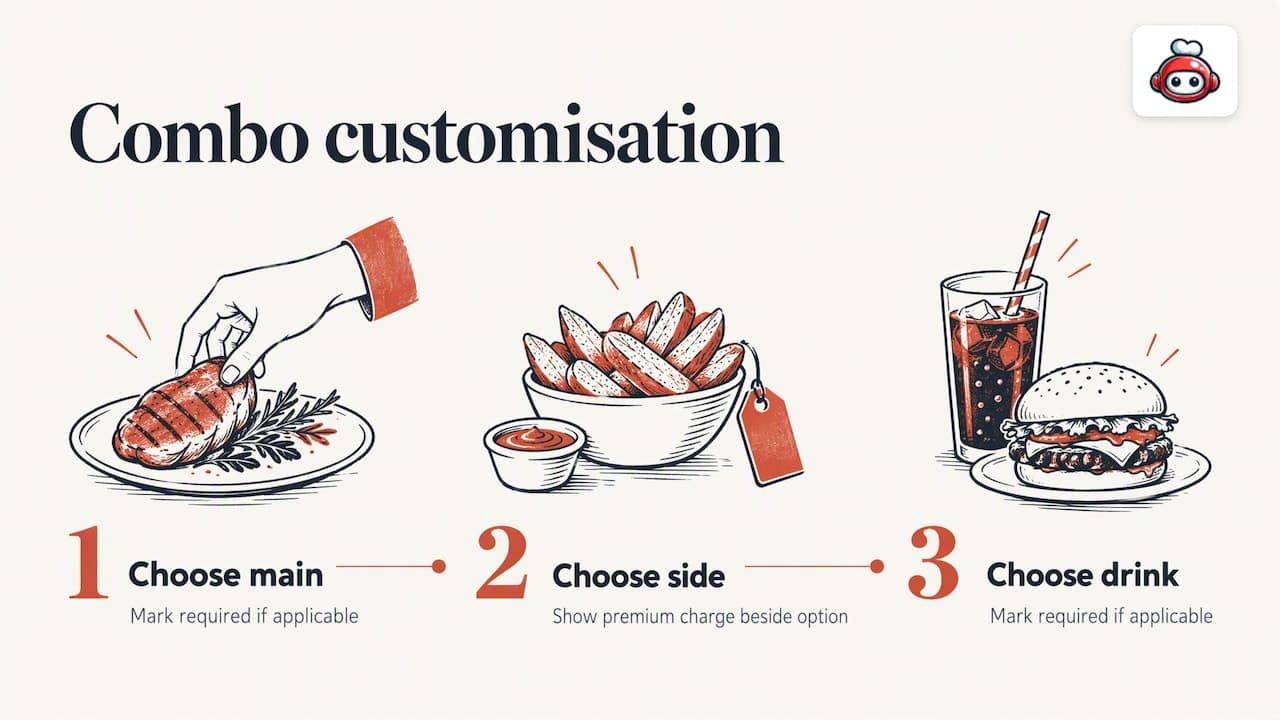
Build customisation as ordered choices: pick a main, pick a side, pick a drink. Mark required choices as required, and show any extra charge beside the option (for example a premium side) rather than at checkout. Surprises at the basket stage are the quickest way to lose an order.
Put allergens where the choice is made
Allergen information has to be available before purchase for takeaways, as the Food Standards Agency states. Attach it to each component, not just the headline dish, so that the guest sees what changes when they swap the side. Add a plain note field for allergy requests and tell guests to use it.
Keep availability honest
Digital menus can be updated instantly, as one industry trends piece points out, which means there is no excuse for showing a combo that the kitchen cannot make. If the chicken has run out, take the combo off. If your online menu and your point of sale drift apart, you will see it in refunds and bad reviews. Our guide to POS menu sync covers how to stop that.
Pricing combos without confusing guests
The best combo prices are easy to check in the head. A guest should be able to see that the bundle costs less than the parts, or that the convenience is worth it, without doing sums.
- Show the saving only when it is real. If a combo is the same price as the items separately, do not call it a deal. Describe it as a convenience instead.
- Keep one headline price. Put the total price on the listing and list upgrades as clear additions with their own price.
- Limit the number of combos. Three to five well-built bundles are easier to choose from than fifteen. Each added option slows the decision.
- Price for your margin first. Work out the cost of every component, including packaging, before you set the bundle price. Our piece on online menu optimisation walks through putting profit ahead of volume.
- Test and trim. If a combo sells rarely, remove it or rework the contents rather than discounting it further.
As a general principle, treat the combo as a menu item that has to earn its place, not a promotion that runs forever.
The commission problem
Most combo orders online still pass through marketplaces. Uber Eats, Glovo, Bolt Food, Wolt, Just Eat, Pyszne and similar platforms charge 30% of the net order value plus VAT, almost 40% in total. On a combo with a modest price and tight food costs, that can wipe out the margin entirely. A discounted bundle that looked clever on the menu becomes a loss-maker once the platform takes its share.
That is why many restaurants steer regulars to their own ordering channel. A guest who orders from your website pays the same price, but you keep the money. RESTOBOT's commission is 0%: we charge only a monthly subscription.
Our perspective: combos belong on your own channel
We build RESTOBOT for restaurants and food businesses, and the pattern we see is simple. A combo is the item most likely to be ordered repeatedly, so it is the item where the cost of the channel matters most. Handing a fixed share of every repeat order to a marketplace makes little sense when the guest already knows your restaurant.
Our view is that a restaurant should own three things: its menu, its customer relationship and its money. A website with an embedded menu and ordering, plus a Telegram bot as a second route, means combos are defined once and appear everywhere the guest orders. Customisation steps, allergy notes and availability are controlled by you, not by an app's template.
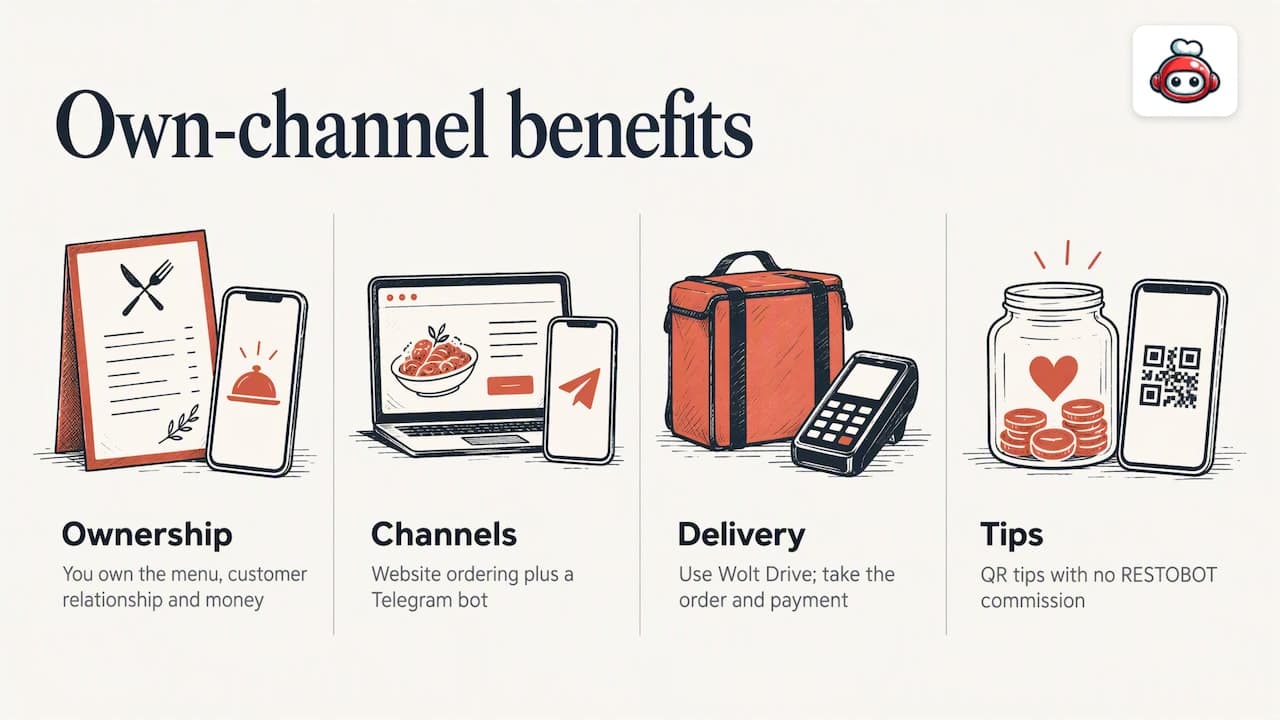
We also think delivery should not lock you in. You can coordinate delivery through third-party couriers such as Wolt Drive while taking the order, and the payment, yourself. If you want to compare approaches, our delivery management software guide explains the options, and our curbside pickup playbook covers the collection side, which suits grab-and-go combos well.
Finally, a combo is only as good as the person who hands it over. Guests can leave voluntary tips for staff by QR code, with no commission taken by us, and a worker can set up a profile even if their venue is not on RESTOBOT. It is a small thing that rewards the person who packed the order right.
*— ADMIN*
Fulfilling combo orders without chaos
A well-built menu still fails if orders reach the kitchen in several places. Tablets for one app, a phone for another and a printer for the website means someone is always missing a ticket.
The fix is to bring orders into one view. A single order dashboard lets staff see each combo, its modifications and its allergy note in the same place, and change its status as it moves from kitchen to courier. If you are moving over from another system, the migration checklist sets out the hours of cutover step by step. For waste and prep problems that combos can expose, such as sides that always run out, see our note on operational efficiency.
A few rules for the pass:
- Print or display the full combo with its choices, not just the headline name.
- Show allergy notes in a separate, highlighted line.
- Label bags and containers when more than one combo goes in the same order, so guests can tell whose is whose.
- Check counts of sides and sauces against the ticket before sealing the bag.
If you also take larger orders, such as office lunches, a catering ordering setup lets you take them on the same system. Multi-site operators can keep combos consistent across venues with multi-location ordering and shared menu management.
Getting found for combos
Combo searches are local and specific. People type the dish, the area and the word "deal". Your own site needs pages and menu text that match, with each combo described in plain words. Getting that visibility is a discipline of its own, and restaurant SEO services can help with keyword research and publishing so that your combos show up when people look for them.
Put your combos on your own site with RESTOBOT
RESTOBOT gives a restaurant a website with an embedded menu and online ordering through the site and a Telegram bot, plus reservations, loyalty cards in Apple and Google Wallet, and a dashboard for real-time orders. Site creation is instant and launch takes one day.
The MENU plan starts at €69 per month, or €59 per year, and the FULL plan starts at €119 per month, or €99 per year. There is no commission on orders. See the pricing page for what each plan includes.
FAQ
Is a combo meal the same as a meal box?
No. A combo meal is a bundle of prepared items from a restaurant, ready to eat on arrival. A meal kit contains raw ingredients you cook yourself, and a prepared meal is fully cooked but usually needs reheating, as Food & Wine explains.
Can I order a combo safely if I have an allergy?
Only after you have asked. Takeaways must give allergen information before purchase and on delivery, and you can ask how the kitchen handles food and whether cross-contamination is possible. Say so in the order notes, and confirm with the restaurant if you are unsure, using the Food Standards Agency advice.
How do I avoid mistakes when ordering combos for a group?
Have one person order and another check it, group items by person, and count sides and sauces. Label special requests clearly so the kitchen sees them. Reading the basket from bottom to top also helps catch errors, as the Menus.top checklist suggests.
Why do restaurants prefer orders on their own website?
Because marketplaces charge 30% of the net order value plus VAT, almost 40% in total, while an own-site setup with RESTOBOT carries 0% commission and a flat monthly subscription. On a low-margin combo, that difference decides whether the order is profitable.
Can staff receive tips on online orders?
Yes, guests can leave voluntary tips for a worker by QR code. The worker has a public profile with a rating and comments, and sets their own payout schedule in the payment provider.