

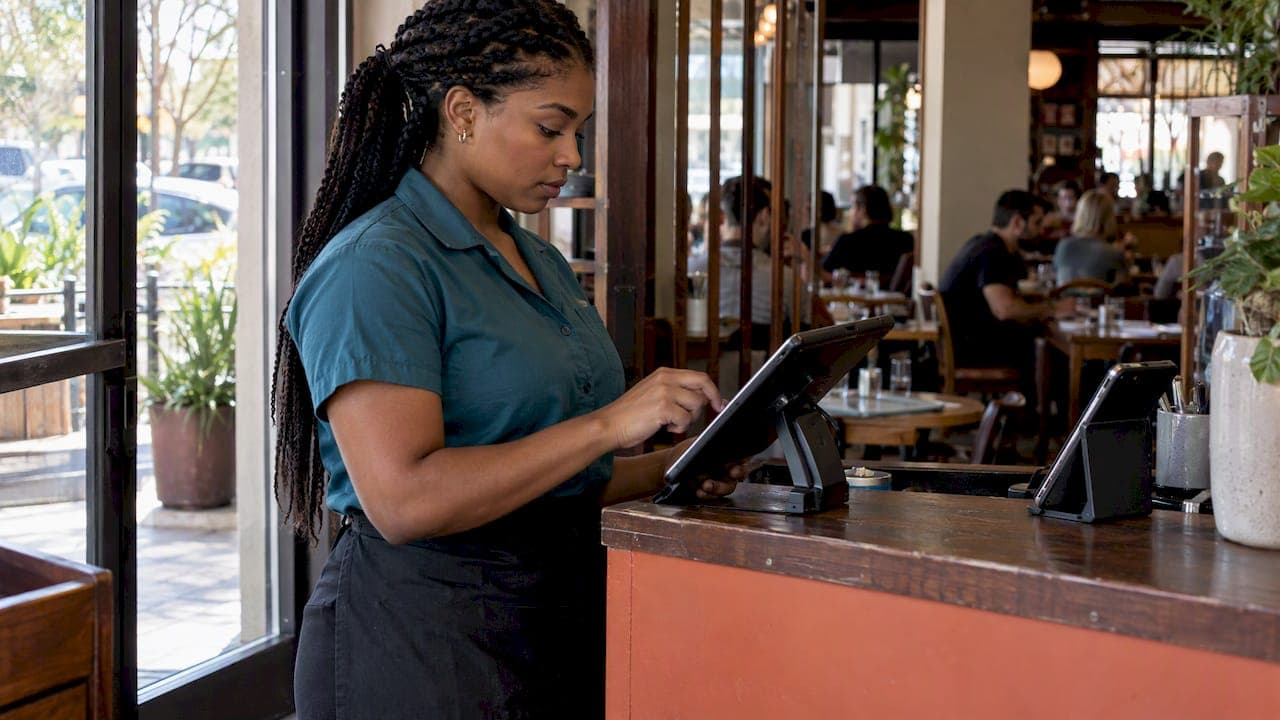
Restaurant operations automation means letting software handle the repetitive, time-consuming jobs that eat a manager's day: taking and routing orders, confirming bookings, tracking stock, sending reminders and collecting feedback. The aim is not to replace your team. The National Restaurant Association describes the practical role as taking over repetitive work, analysing data and flagging upcoming tasks, so that staff can spend their time on customer-facing work. This guide shows where to start, what to check before you buy, and how to introduce it without losing the personal service guests come for.
TL;DR
- Automate the repetitive, high-volume tasks first: order routing, bookings, stock tracking, reminders and review requests.
- Fix the process before you buy the tool. Automating a messy workflow only makes the mess faster.
- Choose tools that connect to each other and to your till. Integration matters more than a long feature list.
- Pilot in one location or one daypart, with a measurable goal, before rolling out everywhere.
- Keep people for hospitality. Automation handles function; your team provides warmth.
Table of Contents
- What restaurant operations automation actually covers
- Front of house: orders, bookings and payments
- Kitchen and back office: where the quiet savings are
- Loyalty, reviews and tips: automating the relationship
- Benefits and drawbacks to expect
- How to choose: a checklist before you buy
- A sensible rollout plan
- Perspective: why we built one platform instead of ten tools
- What RESTOBOT costs
- FAQ
- Sources
What restaurant operations automation actually covers
The phrase sounds grand, but in a restaurant it usually comes down to three questions: which task do your staff repeat many times a day, which task interrupts them in the middle of service, and which task is forgotten when the room is busy?
Those tasks tend to sit in three areas:
- Front of house: chatbots or booking tools that answer enquiries and take reservations, QR ordering, online ordering, payment at the table.
- Kitchen: recipe scaling, temperature monitoring, guided dish assembly and checks. The National Restaurant Association lists these kitchen and back-office uses alongside inventory tracking, demand prediction, purchase orders and schedule optimisation.
- Back office: stock, purchasing, rotas, reporting and real-time insight into how the day is going.
You do not need all of it. A single café with one till and one owner needs very different automation from a group of six sites. The right question is never "what can be automated?" but "what is costing us the most time or money right now?"
Front of house: orders, bookings and payments
Front of house is where most independent restaurants feel the pain first, because it is where guests wait.
Online orders without the tablet pile
Many restaurants run several order channels: a delivery marketplace tablet, a phone, a website form, social media messages. Each one needs somebody to read it and re-key it. Automation can route orders automatically, update their status and send customers notifications, which speeds up fulfilment and removes the copying step where mistakes creep in.
The practical goal is one screen where every order arrives, whichever way the guest placed it. If that sounds like what you need, our guide to a restaurant order dashboard walks through consolidating channels, and the notes on online ordering migration give an hour-by-hour cutover checklist.
The cost of marketplace orders
Automation only pays off if the orders it handles are profitable. Uber Eats, Glovo, Bolt Food, Wolt, Just Eat, Pyszne and similar marketplaces charge 30% of the net order value plus VAT, which comes to almost 40% in total. On a busy delivery night, that is the largest single cost on the order, bigger than ingredients or packaging for many dishes.
Orders placed directly on your own website or through your own Telegram bot carry no such cut. RESTOBOT's commission on orders is 0%; you pay a monthly subscription and nothing more. Moving even part of your regular guests to direct ordering is one of the highest-return automations available, because the order flow stays the same while the fee disappears. For how this fits with your till, see our piece on POS integrations and direct orders.
Delivery coordination
Delivery is the other half. Once an order is accepted, someone has to book a courier, tell the kitchen when to expect them and tell the guest where their food is. Connecting your ordering system to third-party couriers, such as Wolt Drive, handles that hand-off without a phone call. Our overview of delivery management software explains what to look for.
Reservations
A missed phone call during the lunch rush is a lost table. Reservation tools that work from your website, Google Maps and messaging channels let guests book at any hour, and your team sees every booking in one place. If your phone is the bottleneck, an automated voice assistant can also cover overflow and after-hours calls; AI phone answering by industry is one route some venues take for calls and routine enquiries.
Kitchen and back office: where the quiet savings are
Customers never see these automations, but your margins do.
Stock and waste
Inventory automation can track stock, monitor supplies, predict demand, generate purchase orders and issue use-by reminders, according to the National Restaurant Association. For a small kitchen, a realistic first step is far simpler than prediction: a weekly count recorded digitally, with a reorder alert when a key item drops below a level you set.
Before you pay for any of this, read our piece on fixing waste before buying tech. If portions are inconsistent or prep lists are guesswork, software will only record the problem.
Food safety routines
Checklists are a classic case of work that is easy to forget. Automation can handle checklist routing, audit logging and issue alerts, plus reminders for temperature checks and cleaning logs. A reminder that appears on the right person's phone at the right time is more reliable than a clipboard by the walk-in fridge. Your legal food safety obligations remain yours, so check them with your local authority's environmental health team rather than relying on any tool's defaults.
Menus across systems
When prices or dishes change, every place the menu lives needs updating: till, website, delivery listings, printed copy. Drift between them causes wrong orders and wrong charges. A single source of truth that syncs outwards removes the problem; our POS menu sync playbook and the guide to multi-location menu management cover the mechanics.
Scheduling
Rota software that uses sales patterns to suggest staffing levels is among the most popular back-office tools. Trade coverage of restaurant technology suggests operators put retention and productivity ahead of cutting labour costs, favouring training and scheduling tools over technology that replaces people. That is a healthy way to think about it.
Loyalty, reviews and tips: automating the relationship
Some of the most valuable automation concerns guests, not stock.
Loyalty. A digital loyalty card that lives in Apple Wallet or Google Wallet needs no app download and no plastic card. Points are added automatically and the guest can be reminded to come back. Our guide to digital loyalty cards for restaurants looks at what actually brings guests back.
Reviews. Asking every happy guest for a Google or TripAdvisor review is exactly the kind of task a busy team forgets. Automated requests, sent after a visit, make it consistent.
Tips. Guests increasingly pay by card and carry little cash, so staff can lose out. A QR code that lets a guest leave a tip for the person who served them solves this. With RESTOBOT, a waiter, bartender or barista creates a personal profile and receives voluntary tips directly into their own account, with no commission taken by the platform. Guests can add a rating and a comment, so the worker builds a public reputation of their own. The worker chooses the payout schedule in the payment provider. A worker can register alone, even if the venue is not on RESTOBOT, and tips are available on every RESTOBOT plan for venues that want them built in. Taxes on tips are the worker's own responsibility.
A tipping profile also helps retention. Staff who see appreciation reach them directly, and who carry their own rating with them, have a reason to stay and to do well.
Benefits and drawbacks to expect
Be realistic before you start.
| Benefits | Drawbacks | |
|---|---|---|
| Time | Fewer repetitive tasks; fewer interruptions in service | Setup and learning time at the start |
| Accuracy | Less re-keying; fewer wrong orders | Bad data in means bad results out |
| Guests | Faster ordering, booking at any hour | Some guests want a person, especially for complex requests |
| Staff | More time for hospitality | Worry about replacement if you do not explain the plan |
| Cost | Lower fees where direct ordering replaces marketplaces | Subscriptions add up if tools overlap |
Guests are not uniformly enthusiastic either. Reporting on National Restaurant Association research indicates customers generally favour technology for ordering and payment, but are less keen on food prepared or delivered by robots. So automate the transactions and keep the hospitality human.
Academic research on dining served jointly by humans and automation points the same way: machines handle functional tasks efficiently, while human staff remain essential for emotional value and hospitality.
How to choose: a checklist before you buy
The National Restaurant Association's guidance on choosing tools is a sound frame. Turn it into questions you can answer on a call with any vendor, including us:
- What problem are we solving? Write the outcome first: fewer missed calls, lower delivery fees, faster table turns.
- Is it built for restaurants? Generic tools rarely understand modifiers, courses or kitchen printers.
- Does it connect? Check integration with your till, payroll and online ordering. A kiosk that does not send orders straight to the POS and kitchen display creates a re-keying error source.
- Can we measure it? Decide the return on investment and how you will see it.
- How is data handled? Ask about security and where guest data is stored.
- Will staff use it? Involve them before you sign.
One more caution from QSR Pro's 2026 reporting: operators argue that reliability, data integration and system performance should come before adding AI, because AI layered on disconnected systems can add complexity rather than remove it. Get the basics joined up first.
A sensible rollout plan
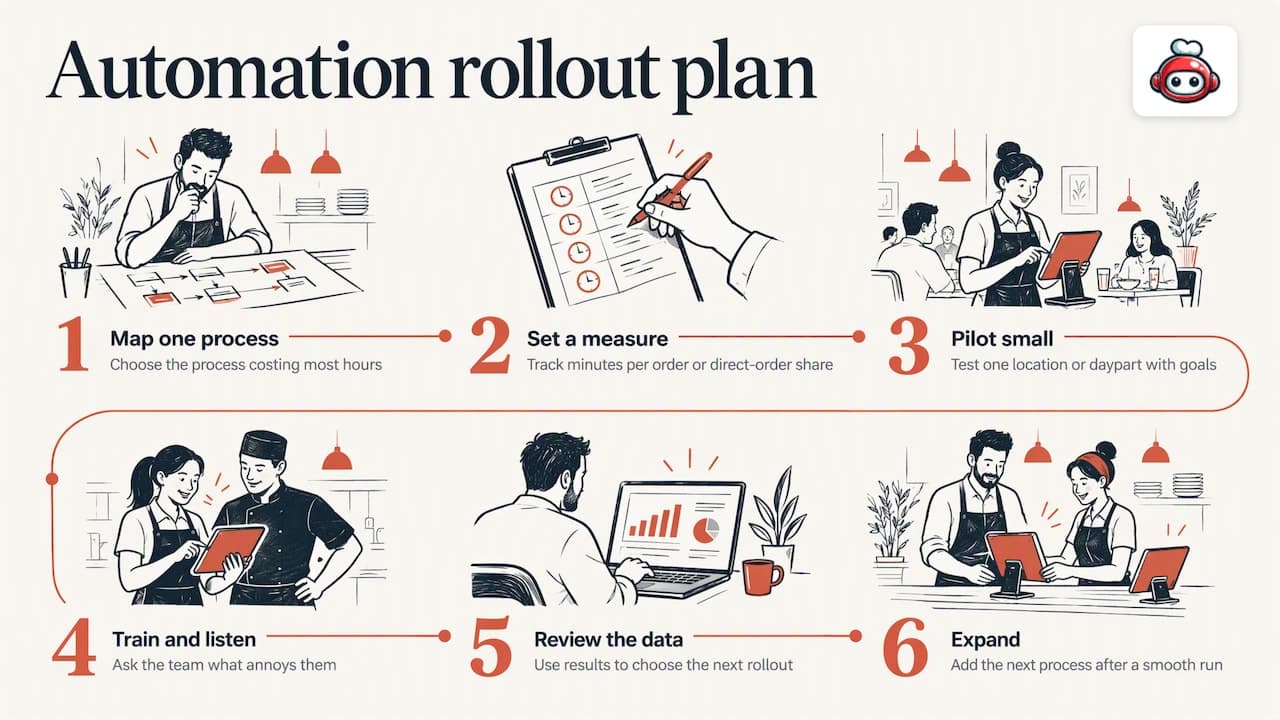
Step 1: Map one painful process. Pick the one that costs the most hours, such as handling orders from three channels.
Step 2: Set a number. For example, minutes per order handled, or share of orders placed direct.
Step 3: Pilot small. Research on implementation advises a pilot in one location or daypart with measurable goals set before full rollout. Start with Tuesday lunch, not Saturday night.
Step 4: Train and listen. Show the team what the tool does for them. Ask what annoys them in the first week and fix it.
Step 5: Review the data. Dashboards are only useful if someone looks. Use the numbers to decide what to roll out next; our guide to six analytics metrics that predict profit is a good starting list, and a wider read on using data for growth insights can help you turn figures into decisions.
Step 6: Expand. Only once the first process runs smoothly add the next.
Perspective: why we built one platform instead of ten tools
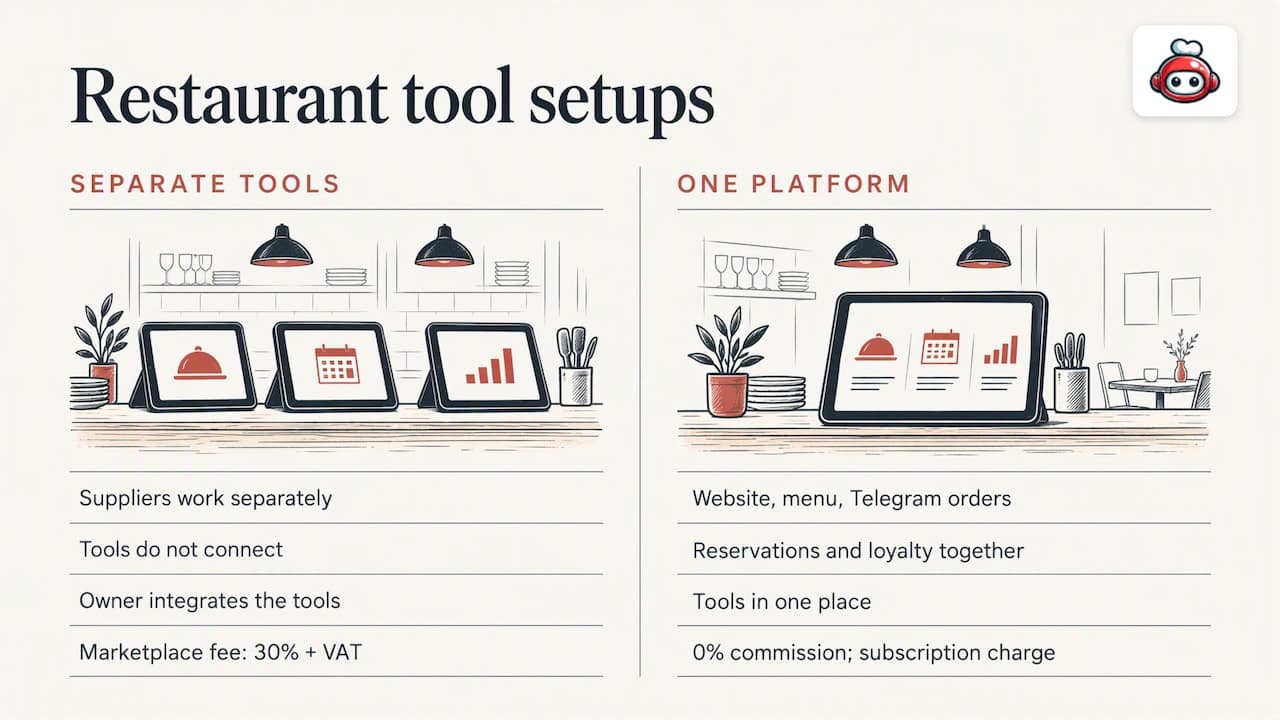
We see the same pattern in venues that come to us. They have a website from one supplier, a booking widget from another, a loyalty app from a third, and delivery tablets from marketplaces that take 30% of the net order value plus VAT. Each tool does one job, none talks to the others, and the owner becomes the integration layer.
That is why RESTOBOT puts the website, embedded menu, ordering through the website and a Telegram bot, reservations, digital loyalty cards, review boosting, delivery coordination, analytics and a manager dashboard in one place. The commission is 0%; the only charge is a subscription. We think this matters more than any individual feature, because a joined-up system is the one your team will actually keep using.
Our view on pace is simple: site creation is instant and launch takes one day, but we would still tell you to pilot one process first. Speed of setup is not a reason to skip the thinking about which problem to fix.
And tips belong in the picture. A restaurant that automates everything else but ignores how its people are rewarded misses half of the hospitality equation, which is why worker tips sit inside the platform, and why a worker can use them alone.
*— ADMIN*
What RESTOBOT costs
RESTOBOT plans are subscription-based. Listed prices start from €39 per month for LOYALTY, from €69 per month for MENU and from €119 per month for FULL. Annual prices are listed at €29 per year for LOYALTY, €59 per year for MENU and €99 per year for FULL. There is no commission on orders. See the MENU and FULL plan details on the pricing page for what each includes, and the tips page if you are a worker who wants a profile of your own.
FAQ
What is the first thing a small restaurant should automate?
Start with whatever is eating most hours or money. For many venues that is order handling across several channels, or marketplace fees on delivery. Consolidating orders in one dashboard and moving regular guests to direct ordering usually shows results fastest.
Will automation replace my staff?
It should not. Research suggests automation covers functional tasks while people supply the hospitality guests value. Operators surveyed by trade media also tend to favour tools for training and scheduling over technology that replaces staff. Explain this to your team early.
How do I know if a tool will work with my till?
Ask for a named integration with your POS and a demonstration with your own menu. The National Restaurant Association advises checking integration with POS, payroll and online ordering before you commit. If orders must be re-typed anywhere, keep looking.
Can waiters get tips if their restaurant does not use RESTOBOT?
Yes. A worker can register alone, create a public profile and share a QR code, and tips go straight to their own account with no commission from the platform. Guests can add a rating and a comment. The worker sets the payout schedule in the payment provider.
Sources
- National Restaurant Association: AI on the menu for restaurant operations
- National Restaurant Association: choosing the right AI tools for your restaurant
- Zapier: restaurant operations automations
- MDPI Sustainability: co-served dining by humans and automation
- Restaurantware: QSR technology implementation
- QSR Pro: restaurant tech benchmark 2026
- Restaurant News Resource: automated ordering and payment
- Nation's Restaurant News: 2023 restaurant technology outlook