


Map your live order journey and inventory every connected system before you touch a migration tool. That single step surfaces the payment gateways, delivery integrations, and loyalty connections that cause outages when ignored. Reference established platform guides like Shopify's migration documentation, and weigh whether a rapid-deploy platform such as RESTOBOT removes some of that integration risk entirely.
***
TL;DR:
>
- Inventory mapping must include orders, customer profiles, products, coupons, loyalty data, and all connected third-party systems to prevent costly discovery errors during cutover. - The choice of migration method depends on dataset complexity, POS integration, downtime tolerance, and budget, with manual, automated, and managed options each carrying different risks and costs. - Sign-off criteria should encompass record count matches, full menu review, and full journey tests, involving all relevant owners before proceeding with cutover. - A detailed hour-by-hour runbook helps control the migration, including pre-cutover preparations, step sequences, verification tests, and fallback procedures managed by explicit ownership. - An all-in-one platform like RESTOBOT reduces migration complexity by bundling key functions, but custom integrations still require thorough testing to avoid edge case failures.
***
Table of Contents
- Inventory and mapping: what to extract and why it matters
- Decisions to make before you choose a migration method
- Migration workstreams and owners
- Cutover runbook: testing, rollback triggers, and the hour-by-hour plan
- Post-migration validation and monitoring checklist
- Why an integrated platform changes the migration math
- How RESTOBOT can simplify your online ordering migration
- FAQ
- Sources
- Authoritative migration resources
Inventory and mapping: what to extract and why it matters
Before picking a migration method, build a full inventory of what lives in your current system. Missing a data type here means discovering it mid-cutover, which is when it costs the most to fix.
- Orders and order history: capture statuses, timestamps, line items, and fulfillment notes, not just totals.
- Customers: export contact details, addresses, and order counts tied to each profile.
- Products, SKUs, and modifiers: list every variant, size, and add-on exactly as customers see them.
- Coupons and gift cards: record remaining balances and expiration rules so nothing voids on launch day.
- Loyalty data: export point balances and tier status; a lost loyalty record is one of the fastest ways to lose trust.
- Connected systems: payment gateways, tax engines, POS, delivery providers, CRM, and analytics all need their own mapping sheet.
Shopify's own migration guide lays out which data types typically support bulk transfer, including products, customers, historical orders, and gift cards, and which require manual handling. For WooCommerce stores, plugins documented by WebToffee explain how to export orders in formats that preserve line-item detail rather than flattened summaries.
The deliverable from this phase is a single spreadsheet: one row per data type or integration, its source format, its destination format, and a note on any field that does not map cleanly. That sheet becomes the reference every later workstream checks against.
Decisions to make before you choose a migration method
Once the inventory is done, you have three realistic paths: manual CSV import, an automated migration app, or a managed migration service. The right choice depends on a few concrete factors.
- Dataset size and custom fields: a few hundred SKUs with simple pricing is a different job than thousands of items with modifiers and custom fields.
- POS complexity: a tightly integrated POS raises the stakes of getting mapping wrong.
- Downtime tolerance: some restaurants can absorb a quiet overnight window; others cannot afford any gap in order flow.
- Budget and timeline: manual work costs staff hours, automated tools cost license fees, and managed migrations cost a service fee, each with a different risk profile.
Manual CSV import gives full control but invites human error on large catalogs. Automated apps, like Migratly on the Shopify App Store, handle bulk transfers faster but still require per-integration testing since the tool itself does not validate your payment or tax setup. A managed migration shifts the labor off your team but costs more up front.
Acceptance criteria should be defined before cutover: a sample of records validated field by field, a real payment capture tested end to end, and at least one live test order placed through the new system before customers see it.
Migration workstreams and owners
Assign clear ownership to each workstream so nothing falls through the cracks between teams.
- Catalog and pricing: owned by operations; sign-off gate is a full menu review against the live POS before go-live.
- Customer and order records: owned by operations with IT support; sign-off gate is a record count match between old and new systems.
- Domain and customer journeys: owned by marketing; sign-off gate is a complete click-through test of the ordering flow on both desktop and mobile.
- Connected systems and integrations: owned by IT or an integrations lead; sign-off gate is individual testing of every third-party dependency, payment, tax, delivery, and loyalty, before the catalog workstream is marked complete.
Finance should review the payment and tax workstream even when IT owns the technical setup, since a misconfigured tax engine shows up on the next filing, not on launch day. A 90-day onboarding checklist can be adapted into these sign-off gates so each owner has a written hand-off item rather than a verbal agreement.
Cutover runbook: testing, rollback triggers, and the hour-by-hour plan
A documented, hour-by-hour runbook is what separates a controlled cutover from a scramble. Build it out in these stages.
- Pre-cutover checklist: confirm backups, freeze catalog changes, and notify staff of the exact start time.
- Cutover steps: switch DNS or domain routing, activate the new ordering system, and disable the old one in a fixed sequence.
- Verification: run test orders immediately, a successful charge, a deliberately failed charge, and a partial fulfillment with refund, checking each against the expected outcome.
- Communications: alert kitchen and front-of-house staff the moment the new system is live, and update customers if there is any visible downtime.
- Fallback: keep the old system reachable for a defined window in case a rollback trigger fires.
Rollback triggers need explicit ownership. One person should hold the authority to abort and revert, with clear criteria such as a failed payment capture or a broken kitchen print route. A launch plan built around maintenance windows offers a useful template for structuring these checkpoints.
Pro Tip: *Run your test orders during off-peak hours first, then repeat them once during a real lunch or dinner rush to confirm the system holds under load.*
Post-migration validation and monitoring checklist
The first 72 hours after launch decide whether the migration holds. Validate these items immediately, then keep watching for the following month.
- Live orders and payment reconciliation: confirm every charge posted correctly and notifications reached kitchen and customer inboxes.
- Fulfillment routing: check that kitchen prints and delivery assignments match the old system's behavior.
- Redirects and SEO: build a one-to-one redirect map for every page with meaningful traffic and verify it with a full site crawl rather than spot checks.
- Operational KPIs: track order failure rate, payment decline rate, fulfillment SLA breaches, and support ticket volume daily for the first week.
At the 30-day mark, reconcile loyalty balances, close out any lingering support tickets tied to the migration, and archive the old system's export files once every figure has been double-checked against the new platform.
Why an integrated platform changes the migration math
Most migration pain comes from integration testing, not data transfer. Every payment gateway, tax engine, and delivery connection you inventory is another point of failure to test individually, and that work does not shrink just because you chose a good migration app.
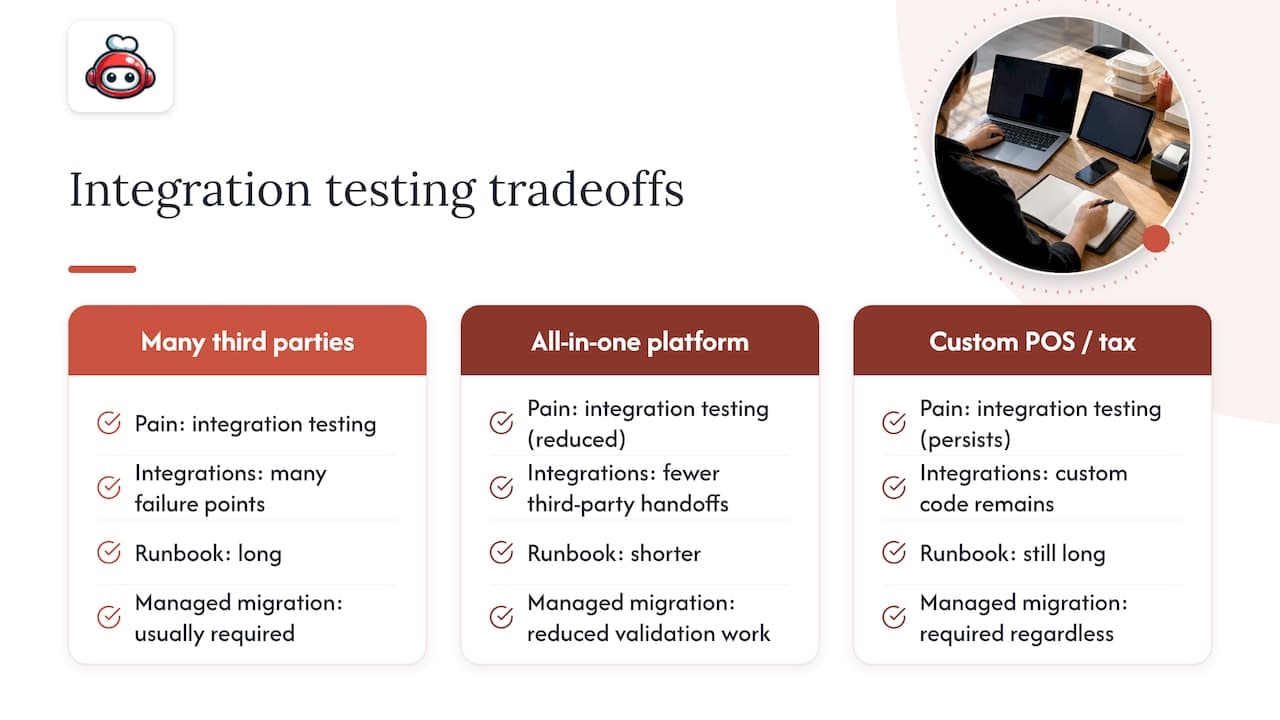
An all-in-one platform changes that math by reducing the number of moving parts to test in the first place. RESTOBOT bundles website creation, ordering, delivery coordination, and loyalty into one system, which means fewer third-party handoffs to validate during cutover. That said, a restaurant with a deeply custom POS integration or a bespoke tax setup still needs a managed migration approach regardless of which platform it lands on, because custom code does not disappear just because the destination platform is simpler.
The tradeoff is straightforward: fewer integrations to test means a shorter runbook, not a guarantee against every edge case.
*— ADMIN*
How RESTOBOT can simplify your online ordering migration
Migrating onto RESTOBOT skips most of the integration testing described above, because the website, ordering system, delivery coordination, and loyalty cards are already built into one platform. The platform creates your site and domain automatically shortly after your application is confirmed, so the technical setup is not the bottleneck your team has to plan around.
RESTOBOT charges zero commission on orders, which matters if you are leaving a marketplace model behind and want to keep full control of your margins. The same zero-commission structure applies to the built-in tipping feature, which staff can use even independently of whether their restaurant runs on RESTOBOT at all.
If you are evaluating a migration right now, compare your current setup against the LOYALTY, MENU, and FULL plans, or look at the tipping page if staff tip collection is part of your current pain points.
FAQ
How much does it cost to migrate a website?
Cost depends on dataset size, integration complexity, and whether you choose manual work, an automated app, or a managed service, so there is no single published figure. Get a quote based on your specific catalog size and integration count before committing to a method.
How do you process online orders during a migration?
Keep the old system live and processing orders until the new system has passed test orders and payment verification. Only switch customer-facing traffic once a successful charge, a failed charge, and a partial refund have all been verified on the new platform.
How long does a migration take?
Timeline depends on catalog size, the number of connected systems, and the migration method chosen, with manual imports typically taking longer than automated tools or managed services. Shopify's own migration guide outlines the sequence of tasks, from data import to test orders, that shapes most timelines regardless of platform.
What does it mean to migrate a website?
Migrating a website means moving your data, including orders, customers, products, and integrations, from one platform to another while keeping the customer experience intact. It covers everything from catalog transfer to reconnecting payment and delivery systems on the new platform.
What should I check before choosing a migration method?
Check your dataset size, how many custom fields or modifiers your catalog uses, your POS complexity, and how much downtime your business can tolerate. These factors determine whether a manual CSV import, an automated app, or a managed migration service fits your situation best.
Sources
Authoritative migration resources
For platform-specific steps, Shopify's migration guide walks through importing content, setting up payments, and running test orders. WooCommerce store owners can reference export plugin documentation from Wordpress for the technical formats behind order transfers. For automated bulk transfers, app pages like Migratly describe the file compatibility and sequencing needed to avoid lost sales. For integration mapping specifically, this restaurant software integrations guide covers testing third-party data flows before a switch.