

For most restaurants, cafes and takeaways, a website with built-in ordering is the better first channel. Guests tap a link and order with nothing to download, and you keep the customer relationship and the money. A branded app can add value later, once you have regulars. An Instagram menu helps people discover you, but it is a poor place to take orders.
This guide compares the three on the things an owner actually feels: set-up effort, cost, how easily guests order, repeat business and what you pay per order.
Table of Contents
- What each option actually is
- Website vs app: how they compare
- Instagram menu vs a real ordering page
- What each channel costs you per order
- Features to compare, channel by channel
- How to choose: a quick decision guide
- Setting up and checking your ordering channel
- Our perspective
- Start taking direct orders with RESTOBOT
- FAQ
- Sources
What each option actually is
The words are used loosely, so it helps to pin them down.
A restaurant website with ordering is your menu, basket and checkout on a web page. Guests open it in a browser from Google, a QR code or a link. It is the same thing as a "web app" for most practical purposes: it runs in the browser, whatever the phone.
A native app is something your diners download from the Apple App Store or Google Play. It is built separately for each system. According to one restaurant technology write-up, native apps need separate development for iOS and Android, which makes them more expensive and slower to build. The same piece notes that web apps run in any browser with no download and no app store approval delay, although offline functionality is limited.
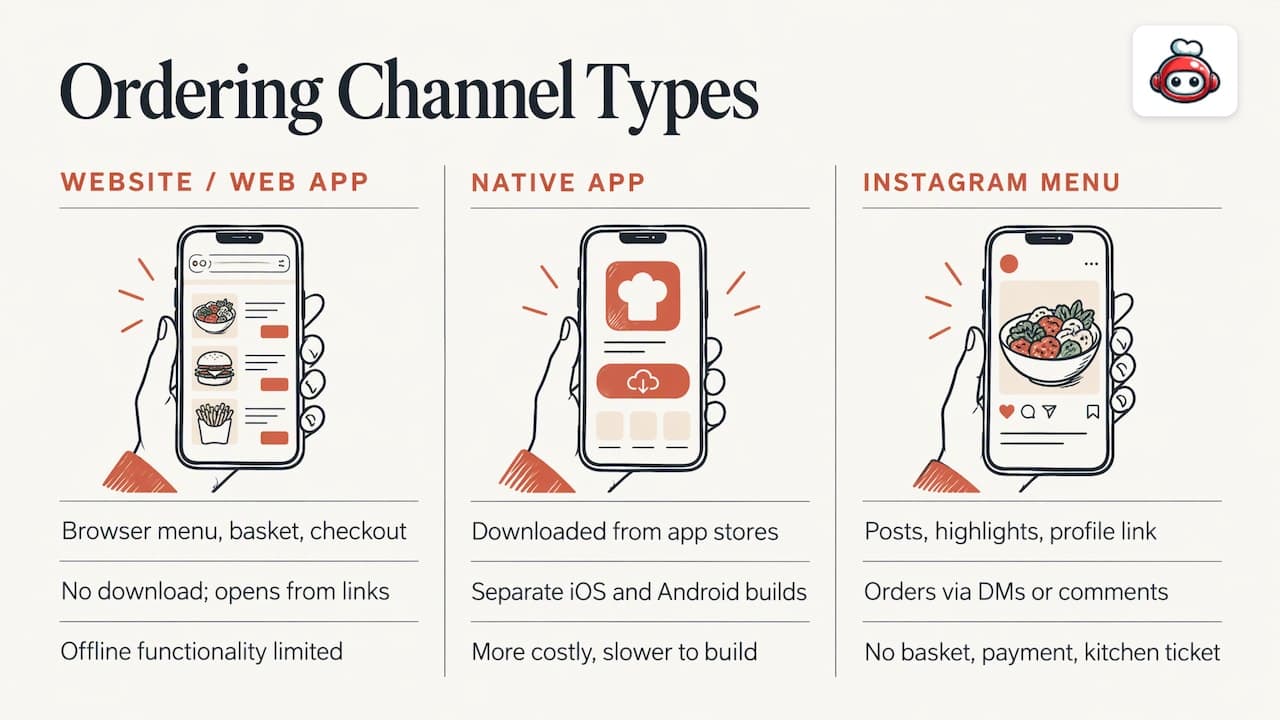
An Instagram menu is a post, highlight or link in your profile showing what you serve. Orders, if any, arrive as direct messages or comments. There is no basket, no payment and no kitchen ticket.
Website vs app: how they compare
| Criterion | Website ordering | Native app | Instagram menu |
|---|---|---|---|
| Guest effort | Tap a link, order | Find, download, install, sign up | Read, then message you |
| Works for first-time guests | Yes | Rarely | Yes, for browsing |
| Build time and cost | Low | Highest, two platforms | Free, but no ordering |
| Found through Google | Yes | Only through app stores | Only through Instagram |
| Payments and kitchen tickets | Yes | Yes | No |
| Repeat-business tools | Wallet cards, Telegram, email | Push notifications | Posts and stories |
| Updates | Instant, on your side | App store review cycles | Manual |
Why the website wins on reach
A hungry guest at 7pm will not install an app for a restaurant they have never visited. They will tap a link. That is why the website is the channel for new customers, and it is also the page Google can show when someone searches for your name or your dish. An app lives behind a store listing that almost nobody searches for.
A site also gives you one place to run everything: menu, ordering, table reservations and your opening hours. Our guide to restaurant website best practices covers the layout choices that get a guest from landing page to paid order in a few taps.
Where an app can earn its place
An app makes sense when you already have a loyal crowd, several sites, or a menu complex enough that guests order from you weekly. Push notifications are a real advantage, and an icon on the home screen keeps you in view. But the cost is two builds, store reviews, update cycles and the constant job of persuading guests to download it.
Many owners find they can get most of that benefit more cheaply. A digital loyalty card in Apple Wallet or Google Wallet sits on the guest's phone without any download, and a Telegram bot gives guests a one-tap reorder path in a messaging app they already use.
Instagram menu vs a real ordering page
Instagram is excellent at one job: making people hungry. Photos and short videos of your food and your room bring in guests who would never have found you otherwise. It is a weak place to take orders, though.
Orders by direct message mean someone has to read, confirm prices, ask for an address, chase payment and re-type everything for the kitchen. Mistakes creep in during a busy service. There is no record of modifiers, allergies or collection times, and the guest has no basket to return to.
The better pattern is simple:
- Keep posting on Instagram for discovery.
- Put one link in your bio that opens your menu with ordering.
- Add the same link to your stories, your Google Business Profile and your table QR codes.
- Let the website send the order straight to the kitchen with payment already taken.
That way you keep the visual appeal of social media and the accuracy of a system.
What each channel costs you per order
This is where the choice stops being about design and becomes about margin.
Marketplaces such as Uber Eats, Glovo, Bolt Food, Wolt, Just Eat and Pyszne charge 30% of the net order value plus VAT, which comes to almost 40% in total. On a basket where your food margin is already thin, that can erase the profit.
Diners notice prices too. PYMNTS research from 2022 found that 34% of U.S. diners chose not to use an aggregator because it seemed expensive, against 11% who avoided a restaurant's own channel for the same reason. The same survey found 16% of diners ordered at least half their restaurant meals directly through restaurants' digital channels in the previous 30 days, compared with 8% for aggregators. It is American data from 2022, so treat it as a direction of travel rather than a UK figure.
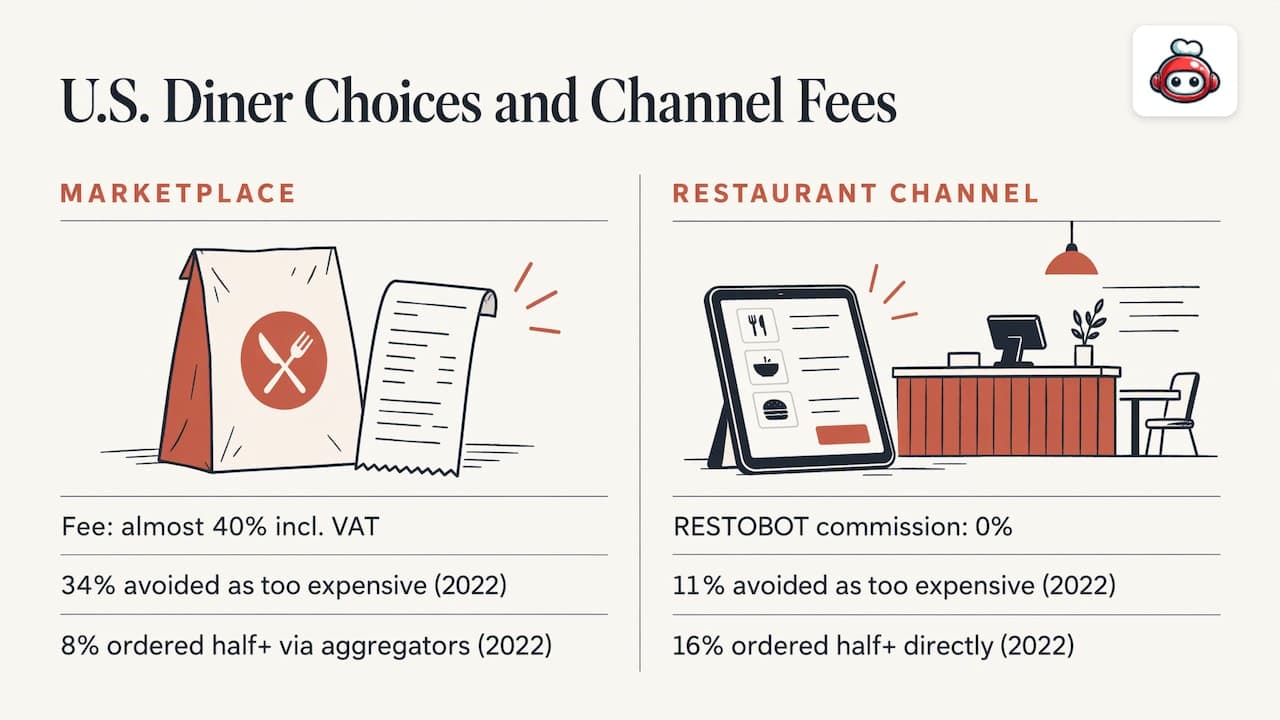
With your own website, the cost model is different. You pay a subscription and the commission on orders is nothing. With RESTOBOT it is 0%, and the plans are fixed monthly or annual fees. If you want the detail on moving away from marketplace fees, see our piece on POS integrations and the 30% plus VAT comparison.
Features to compare, channel by channel
Payments
A website or app can take card payments up front, which removes no-shows on delivery and collection. On RESTOBOT, online payments support several methods, cryptocurrency included. An Instagram menu cannot take payment at all. More on this in our guide to online payments for restaurants.
Delivery
You do not need your own riders. Your ordering page can hand deliveries to third-party couriers such as Wolt Drive, so you pay for the delivery itself rather than a share of the food order. Read how this works in third-party delivery integration and delivery management software.
Reservations
Website and app can both take bookings. On RESTOBOT, reservations come in via your website, Google Maps and Telegram, and land in one dashboard. Instagram offers nothing comparable beyond a message.
Loyalty and repeat orders
This is where apps used to have the edge. Digital loyalty cards in Apple Wallet and Google Wallet close much of that gap, because the card sits on the phone and needs no installation. Combined with an ordering link, they give guests a reason to come back to you rather than to a marketplace.
Menu quality
Whatever the channel, the menu does the selling. Clear photos, short descriptions and sensible grouping lift orders. The Menu Design for Conversions guide looks at what moves guests to order, and our own piece on online menu optimisation goes into structure and pricing display.
How to choose: a quick decision guide
Pick the website first if:
- You are a single venue, a cafe, a takeaway or a small group.
- You want orders live quickly without a development project.
- Most of your guests are new or occasional.
- You want your menu to appear in Google search.
Consider an app later if:
- You already have thousands of repeat customers.
- You have budget for building and maintaining two platforms.
- You have a clear plan for getting guests to download it.
Keep Instagram as a front door in either case, never as the till.
If you run more than one site, the same logic holds. Our guide to multi-location restaurant ordering shows how to keep one menu and one reporting view across venues.
Setting up and checking your ordering channel
Whichever route you take, a few checks save headaches. ExpertMarket advises comparing options on fees, data ownership, POS and kitchen display compatibility and delivery options. Map menu items and modifiers to your POS, connect payments, set up fulfilment and routing, then test orders and refunds before launch.
The same source suggests walking through the mobile journey from homepage to paid order, aiming for around 90 seconds, and tracking the first 30 days for on-time percentage, prep accuracy, refunds, average order value and cart abandonment. It also recommends keeping stock accurate so sold-out dishes disappear automatically.
If you want a method for measuring where guests drop out of the basket, this cart abandonment measurement playbook walks through it step by step. If you are switching from another system, our migration checklist takes you through the cutover hour by hour.
Our perspective
We built RESTOBOT around one conviction: the restaurant should own the guest and the revenue. That is why we start with the website rather than an app. A website is where a new guest lands, and a link is something they will actually tap.
From the website we add the pieces an app would otherwise provide. Orders come in through the site and a Telegram bot. Loyalty cards go into Apple Wallet and Google Wallet. Reservations arrive from your site, Google Maps and Telegram. Everything runs into one dashboard, so you see orders and bookings in real time.
We charge a monthly subscription and nothing on orders. Marketplaces take 30% of the net order value plus VAT, almost 40% in total. Our commission is 0%. Your own channel should be the cheapest way to sell to your own customers.
You can create a site instantly and launch within one day. For most restaurants, that beats a long app project.
the author
Start taking direct orders with RESTOBOT
RESTOBOT combines a website builder with an embedded menu, ordering through your site and a Telegram bot, reservations, loyalty cards and a management dashboard. Plans are published on the pricing page: MENU from €69 per month (€59 per year) and FULL from €119 per month (€99 per year). A LOYALTY plan is also available from €39 per month (€29 per year).
Your waiters can benefit too. Every plan includes online tips, and a worker can register alone even if your venue is not on the platform. Guests scan a QR code, rate the worker, leave a comment and choose an amount.
FAQ
Is a website or an app better for restaurant ordering?
For most independent restaurants, a website. Guests can order without downloading anything, Google can find it, and it costs less to build than a native app on two platforms. Apps are worth considering once you have a large base of regular customers.
Can I take orders through an Instagram menu?
You can receive messages, but you cannot run a reliable ordering process there. There is no basket, payment or kitchen ticket. Use Instagram to attract guests and link them to a proper ordering page from your bio.
Do I need an app to run a loyalty programme?
No. Digital loyalty cards for Apple Wallet and Google Wallet live on the guest's phone with no app download. They work alongside your website ordering and are included in the RESTOBOT LOYALTY plan.
What is the difference between a website and a web app?
A website mainly presents information, while a web app lets users do something, such as build a basket and pay. Both run in the browser with no install. A restaurant ordering page is effectively a web app.
Will direct ordering replace marketplaces completely?
Not necessarily. Many owners keep a marketplace for discovery while steering regulars to their own site, where there is no commission on RESTOBOT. Our guide on promoting online ordering explains how to shift guests over time.