

An order tracking page is the single screen a guest opens after paying, to see whether the kitchen has their food, whether a courier has it, and when it will arrive. A good one answers "where is my order?" before anyone picks up the phone. It shows a short list of clear stages, updates itself without a refresh, and tells the guest what to do if something goes wrong. This guide covers what to put on the page, how to feed it live data, how text and chat updates fit in, and how a restaurant can get one running without building software from scratch.
TL;DR
- Show four to six plain stages (received, in the kitchen, ready, with the courier, delivered) rather than a countdown that may turn out wrong.
- Updates should be triggered by real events in the kitchen or courier app, and appear without the guest refreshing the page.
- Lead with a summary and let guests tap for the full order. Too much detail makes people more anxious, not less.
- Send the tracking link by message as well as showing it on screen, so guests can close the tab and still follow along.
- RESTOBOT gives restaurants a real-time order dashboard, website and Telegram ordering, and courier integrations on a flat monthly subscription, with 0% commission.
Table of Contents
- Why guests look for a tracking page at all
- What an order tracking page should show
- Real-time updates: how the page stays current
- Text, chat and email updates
- Building the page: three realistic routes
- Perspective: what we see in restaurant kitchens
- A rollout plan you can finish in a week
- Mistakes that make guests more anxious
- Promo: tracking, ordering and delivery on one subscription
- Measuring whether the page works
- FAQ
- Sources
Why guests look for a tracking page at all
Most people who search for an order tracking page are not curious. They are waiting, and waiting is uncomfortable when food is involved. Lateness is the problem guests meet most often. A 2025 study of 335 food delivery users in Poland found that 79% had experienced delivery problems, and 69% of those reported late delivery. Missing items (35%) and poor condition on arrival (24%) followed. It is a small, non-UK sample, so treat the figures as a signal rather than a UK benchmark. The pattern is still familiar to anyone who runs a kitchen: the complaint is rarely the wait itself, but not knowing how long it will last.
For the restaurant, each "where is my order?" call ties up a member of staff in the middle of service. A tracking page moves that conversation off the phone and onto a screen that is always right.
What an order tracking page should show
Start from the guest's questions, in order of urgency:
- Has my order gone through?
- Is the restaurant working on it?
- Who has it now, and roughly when will it arrive?
- What do I do if something is wrong?
Every element of the page should answer one of those. Anything that does not is clutter.
Stages beat countdown timers
It is tempting to put a big minute counter at the top. The trouble is that a counter promises precision you do not have. Traffic, a rush of tickets or a courier waiting at another venue can all stretch it. Design notes from a case study of Just Eat Takeaway's tracking experience point the same way: event-triggered updates such as "in the kitchen" or "with the courier" work better than a raw timer, because a stalled bar makes guests nervous.
A workable set of stages for a restaurant that delivers:
| Stage | What the guest sees | What triggers it |
|---|---|---|
| Received | "We have your order" with order number | Payment confirmed |
| Accepted | "The kitchen has started" | Staff accept the ticket on the dashboard |
| Ready | "Packed and waiting for the courier" | Kitchen marks the order ready |
| On the way | "With your courier" and a link to their live position, if the courier service provides one | Courier collects |
| Delivered | "Enjoy your meal" and a prompt to rate | Courier confirms drop-off |
For collection orders, replace the last two stages with "Ready to collect" and "Collected". For table orders, "Served" is enough.
Summary first, detail on request
Guests want transparency, but the same case study notes that over-informing can raise anxiety. The suggested balance is a clean summary on top, with a tap to expand the receipt and full item list. Put the stage and the estimated window in large type, the order contents below, and the support contact below that.
Plain words for a delay
If an order is running late, the page should say so. A status that sits unchanged for twenty minutes looks like a fault. A short line such as "Busy kitchen, your order is next" is worth more than a spinning icon. Keep a human route visible: the restaurant's phone number or a message button, shown only after a sensible wait so it does not invite calls on every order.
Real-time updates: how the page stays current
Guests should never have to hit refresh. Academic work on food ordering interfaces, including a comparison of food ordering applications, concludes that there is no single perfect interface, but that successful ones put convenience first and make the route from order to status quick and effortless. For a tracking page that means the status arrives on its own.
Behind the screen, three things have to be connected:
- The order source. Website, app or chat order, all landing in one place.
- The kitchen action. A tap on a tablet or phone that changes the status. If staff have to update a second system, the page will lag and the staff will stop bothering.
- The courier signal. Pickup and drop-off events from whoever carries the food, whether your own riders or a third-party service.
The weak point is almost always the middle one. A tracking page is only as honest as the habit of the person pressing the button, which is why the kitchen interface should need one tap per stage and nothing more.
Several sites, one set of statuses
If you run more than one location, each with its own menu, prices and opening hours, the tracking page should still look identical to the guest. A pizza franchise project described by gotoAndPlay frames it well: the real task is making separate systems talk to each other so the customer and the restaurant see the same thing. A central dashboard covering in-store, takeaway and delivery orders removes the manual messaging between sites. Our guide to multi-location restaurant ordering covers that setup in more detail.
Text, chat and email updates
A tracking page only helps while it is open. Most guests will lock their phone and go back to what they were doing, so the page needs a companion: a message with the link and a nudge at the moments that matter.
Keep message updates few. Three is plenty:
- Order confirmed, with the tracking link.
- Order on its way (or ready to collect).
- Delivered, with a one-tap rating prompt.
Every extra buzz is another chance for the guest to mute you. Write each message so it makes sense on its own, with the venue name, order number and the one thing that changed. If you send texts, check the sender name is recognisable and that guests have agreed to receive messages about their order; for the rules that apply to your business, speak to your own adviser.
Chat is often better than a text. In Telegram, the order and its updates live in the same thread, so there is no link to hunt for. If your guests already use it, see how Telegram food ordering works for a restaurant, and the wider chatbot ordering approach.
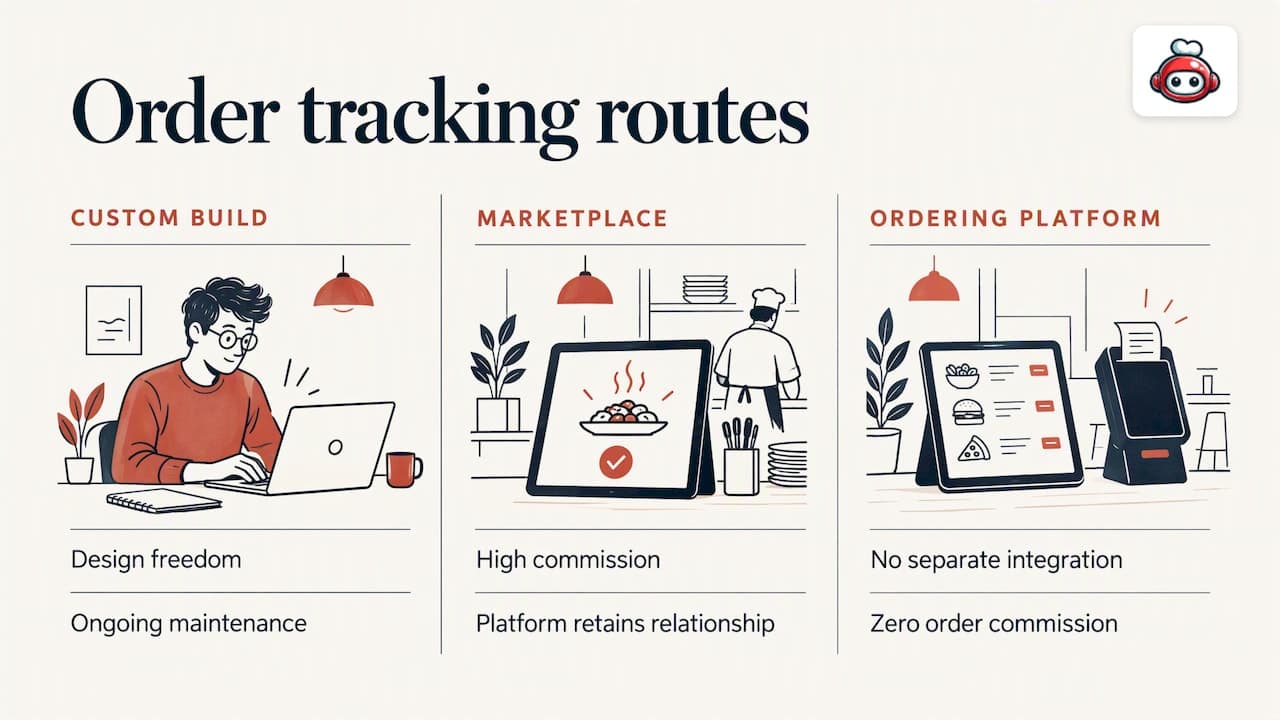
Building the page: three realistic routes
1. Custom build
You commission a developer or agency to build the tracking page, the status API and the kitchen interface. You get full design freedom, and you also get a project: scoping, testing across phones, maintaining integrations when a courier service changes its API. This suits large chains with their own technology team. If the design side is what you need most, a specialist in stylish, seamless website design can help you shape how the page looks and flows on a phone.
2. Marketplace tracking
The big marketplaces have good tracking, and guests know it. The price is steep. Uber Eats, Glovo, Bolt Food, Wolt, Just Eat, Pyszne and similar platforms charge 30% of the net order value plus VAT, which comes to almost 40% in total. You also hand over the customer relationship: the guest is theirs, not yours.
3. Tracking built into your ordering platform
The third route is to take ordering and tracking from the same system, so the status comes from the tool the kitchen already uses. That is where RESTOBOT sits. There is nothing to integrate yourself, and the commission on orders is 0%, because we charge only a monthly subscription.
Perspective: what we see in restaurant kitchens
We build RESTOBOT for restaurants, and the pattern we come back to is simple: a tracking page is an operations tool first and a design feature second. If the kitchen does not control the statuses easily, the page will be wrong, and a wrong page is worse than none.
That is why our order and reservation dashboard sits at the centre. Orders from your website and from the Telegram bot arrive in one place, and staff manage them in real time. Delivery can be coordinated through third-party couriers such as Wolt Drive, so you do not need your own fleet to offer delivery. For the operating detail, read our pieces on the restaurant order dashboard and delivery management software.
Our advice is to fix the workflow before you polish the page. Decide who presses which button, at what moment, and what happens when the kitchen is slammed. Our note on operational efficiency makes the same point about waste: tools magnify the process you already have, good or bad.
*— ADMIN*
A rollout plan you can finish in a week
You do not need a long project. A sensible sequence:
- Map your real journey. Write down what actually happens to an order from payment to doorstep, including the awkward cases: a missing item, a courier running late, a cancellation.
- Choose the stages. Four to six, in your guests' words, not kitchen jargon.
- Assign the triggers. One person or one action per stage. Cut anything that needs double entry.
- Set the message moments. Confirmation, on the way, delivered.
- Test with real orders. Place three orders yourself on a phone, one collection and two delivery, and time how long each status takes to appear.
- Watch for a fortnight. Count "where is my order?" calls before and after. If they do not fall, the page is unclear or the statuses are late.
If you also take orders for events or offices, the same page works for larger jobs; see our guide to online catering ordering. For orders placed from the table, the QR table ordering playbook shows how the status can be as simple as "served".
Mistakes that make guests more anxious
- Fake precision. "Arriving in 7 minutes" that becomes 19 loses trust faster than a wider window would.
- A status that never changes. If nothing has moved for a long stretch, say why.
- Too many messages. Each should carry news.
- Hidden support. Guests should find a contact in one tap once an order is late.
- A cluttered first view. Order contents, upsells and promotions compete with the one thing the guest came for.
- No post-delivery step. The moment of delivery is the best time to ask for a rating, while the meal is fresh.
Promo: tracking, ordering and delivery on one subscription
With RESTOBOT you can launch a website with an embedded menu and online ordering within a day, take orders from the site and the Telegram bot, and run them from one dashboard. The MENU plan starts from 69 EUR per month and the FULL plan from 119 EUR per month; annual prices are 59 EUR and 99 EUR respectively. See the plans and pricing to compare them. There is no commission on orders.
If you are also thinking about your team, hospitality workers can receive online tips from guests via a QR code, with no commission taken by the platform, and a worker can sign up alone even if the venue is not on RESTOBOT.
Measuring whether the page works
Track a handful of numbers, and compare them week by week:
- Calls and messages asking about order status, per 100 orders.
- Share of orders where the status was updated before the guest asked.
- Late-delivery complaints and refunds.
- Rating scores left right after delivery.
The Polish study above shows late delivery as the most common complaint, so if your late-order complaints fall while your actual delivery times stay the same, the page is doing its job: it is managing expectations. If both stay flat, look at the kitchen and the courier, not the screen.
FAQ
What should an order tracking page show?
It should show the current stage, the order number, a realistic arrival window, the order contents and a way to contact the restaurant. Keep the stage and window at the top and let guests tap to see the rest. Avoid a precise countdown unless you can keep it accurate.
How do I give customers real-time order updates?
Connect the page to the actions your staff already take. When the kitchen accepts, marks ready or hands over to a courier, the status changes and the page updates without a refresh. A dashboard that manages every order in one place makes this much easier than separate systems.
Should I send text messages as well as a tracking page?
Yes, but sparingly. One message with the link on confirmation, one when the order is on its way or ready, and one on delivery is enough. Chat apps such as Telegram can carry the same updates in a single thread, which many guests find easier than following a link.
Do I need my own couriers to offer tracking?
No. Delivery can be coordinated through third-party courier services, and the page shows the stages as those events happen. What you need is a clear handover moment so the status changes when the courier actually collects the food.
Does RESTOBOT charge commission on orders?
No. RESTOBOT charges only a monthly subscription, and commission on orders is 0%. Marketplaces charge 30% of the net order value plus VAT, almost 40% in total.
Sources
- Determinants of customer satisfaction in on-demand food delivery: the role of last-mile logistics
- Enhancing user experience in Just Eat Takeaway's order tracking system
- Comparative analysis of the functionality and quality of the interface of chosen applications for ordering food
- Three interwoven websites for a single pizza franchise